- 47 -
Printing Troubles
Troubleshooting
1
2
IndexMaintenance
For Windows
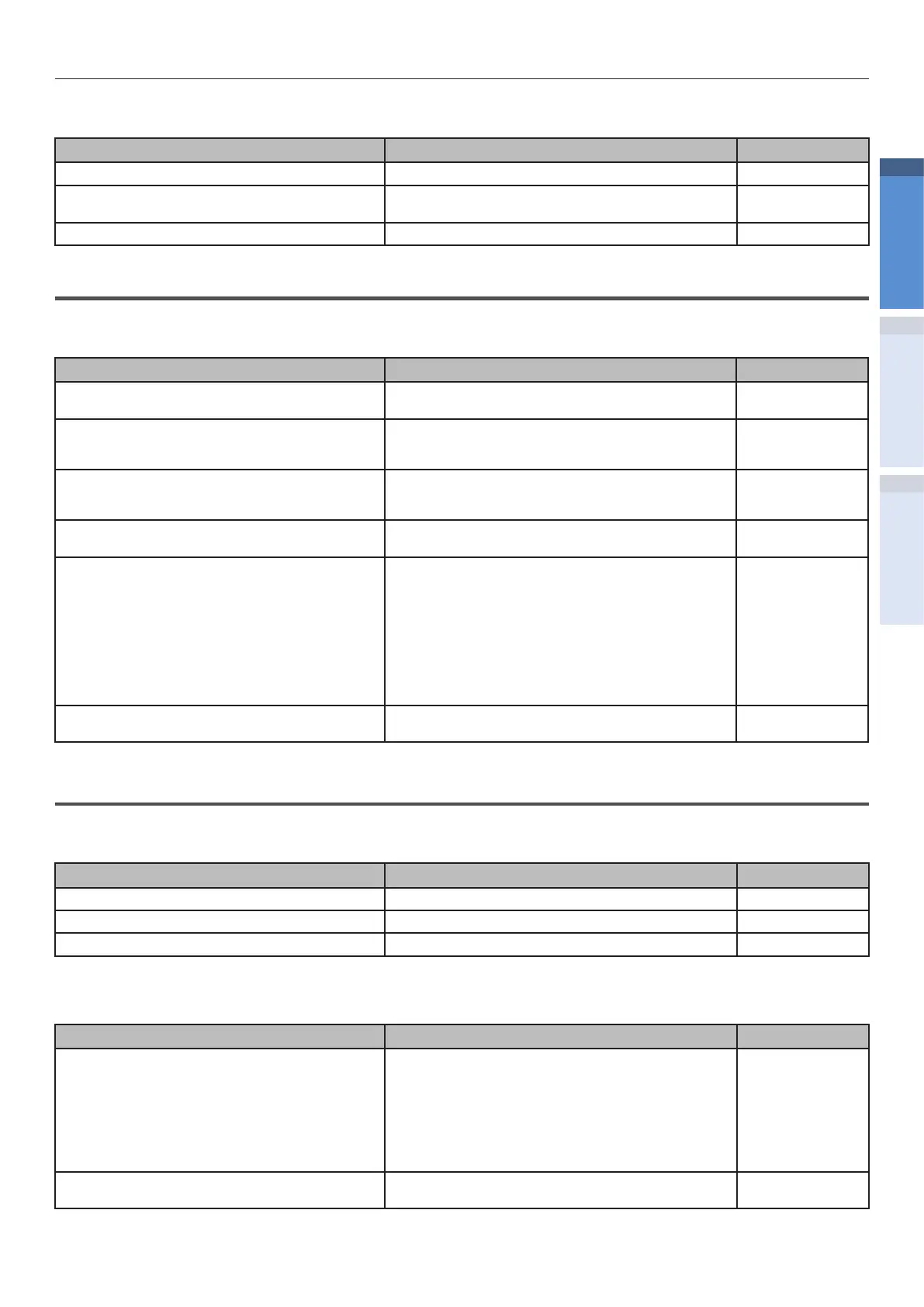
Cause Solution procedure
Reference pages
This printer is not set as default printer. Set it to default printer. -
Output port of printer driver is incorrect. Select the output port where LAN cable/USB
cable is connected.
-
Printing from other interface is in progress. Wait until the printing is complete. -
Network Connection Problems
Common for Windows/Mac OS X
Cause Solution procedure
Reference pages
Cross cable is used. Arrange straight cable and hub, and connect
correctly.
Basic
Compatibility problem with hub. Select [Admin Setup]>[Network Setup]>[Hub
Link Setting] from the operation panel, and
change the settings.
Advanced
There is a problem with hub. Insert network cable in the empty hub, or
another port. If the problem is still not solved,
use another hub.
-
Network cable is defective. Reconnect with a new or a dierent network
cable, and check again.
-
Incorrect IP address.
z
Check that IP address settings of the printer,
and IP address of the printer set in the
computer are matching.
z
If you are using IntoPrintLPR Utility on
Windows, check IP address settings in
IntoPrint LPR Utility.
z
Check that IP address is not overlapping with
other device.
z
Check that correct address is set in IP
address, Subnet mask, and Gateway address.
Advanced
Duplicate IP address. Check that IP address of the printer does not
overlap with other IP address.
-
USB Connection Problems
Common for Windows/Mac OS X
Cause Solution procedure
Reference pages
Cable does not meet the standards. Use USB cable of USB 2.0 specications. Basic
USB hub is used. Directly connect the printer to the computer. -
Printer driver is not installed correctly. Please re-install the printer driver. Basic
For Windows
Cause Solution procedure
Reference pages
Printer is oine. Right click the IntoPrint SP1360 icon in the
[Devices and Printers] folder, and select [See
what’s printing] (When multiple drivers are
installed>[IntoPrint SP1360 (*)]). Select the
[Printer] menu in the dialog displayed, and
uncheck [Use Printer Oine].
*: Select the type of required driver.
Basic
Switch, buer, extension cable, and USB hub
are used.
Directly connect the printer to the computer. -


 To Next Page