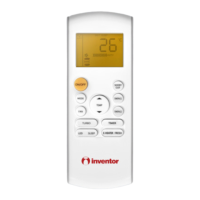
Operation of Remote Controller
6
This area will show the set tempe-
rature. In SAVE mode,"SE" will be
displayed. During defrosting opera-
tion, “H1” will be displayed.
DIGITAL display:
23
Press FAN button to select the
desired fan speed setting(AUTO-
Low-Med-High).Your selection will
be displayed in the LCD windows,
except the AUTO fan speed.
FAN SPEED display:
25
LOCK icon:
is displayed by pressing "+"
and “-” buttons simultaneously.Press
them again to clear the display.
20
LIGHT icon:
is displayed by pressing the
LIGHT button.Press LIGHT button
again to clear the display.
19
MODE icon:
If MODE button is pressed,
current operation mode icon
(AUTO), ( COOL),
(DRY), (FAN) or (HEAT
is only for heat pump models)
will show.
15
is displayed when pressing
the
up & down swing
button.
Press this button again to clear the
display.
18
Up & down swing icon:
After pressing TIMER button, ON
or OFF will blink.This area will
show the set time.
SET TIME display:
21
Pressing TEMP button,
(set temperature),
ambient temperature)
(outdoor ambient temperature)
and blank is displayed circularly.
(indoor
TEMP icon:
17
SLEEP icon :
is displayed by pressing
the SLEEP button. Press this
button again to clear the display.
16
is displayed when pressing the
nottub siht sserP.nottub OBRUT
again to clear the display.
TURBO icon:
22
is displayed when pressing the
X-FAN button. Press this button
again to clear the display.
X-FAN icon:
24
15
16
20
23
24
22
25
17 18 19
21

 To Next Page
 Loading...