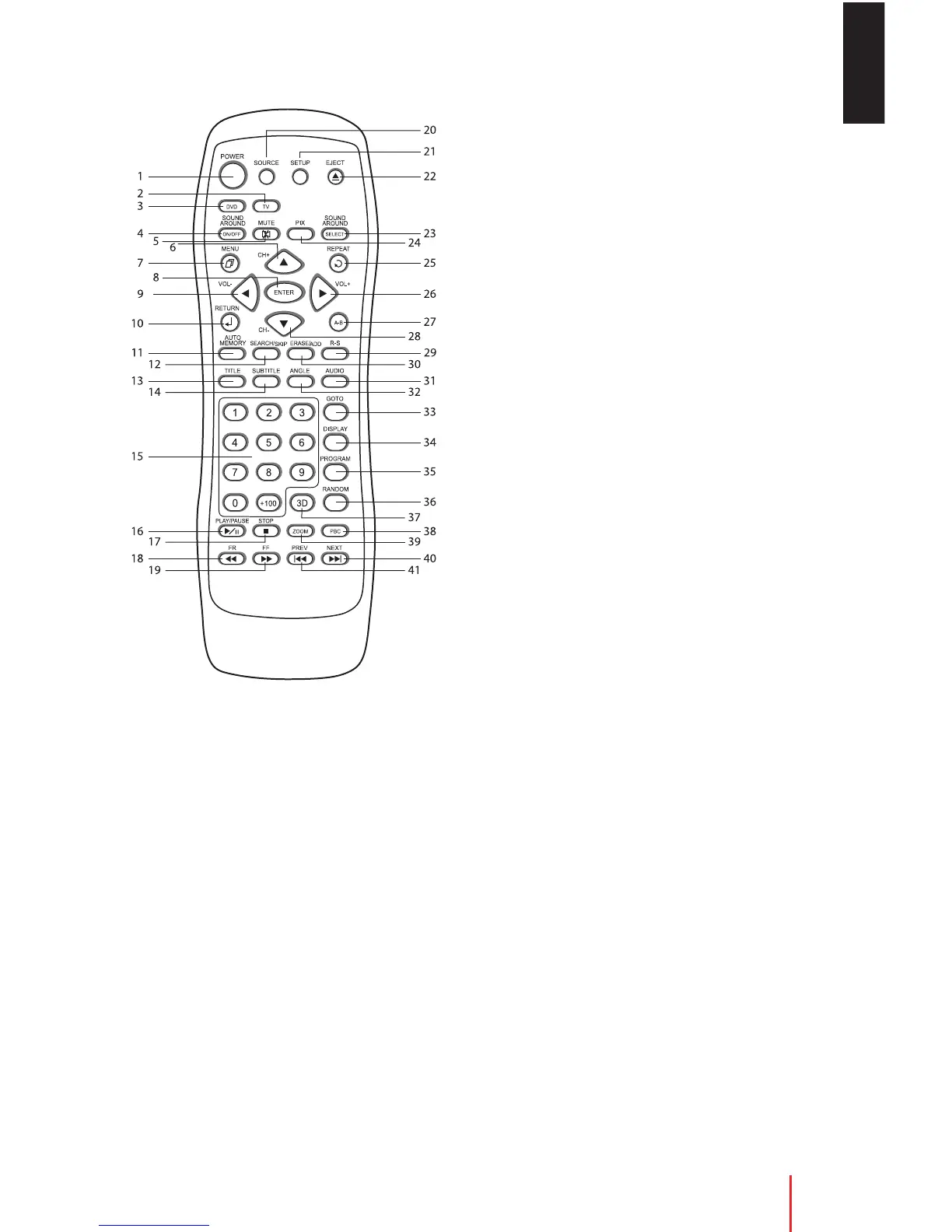
1. POWER
Press the button to turn the device on. The TV
or current video source will be displayed on the
screen, and the picture will appear in a few
seconds. Press the button again to turn the
device off.
2. TV - Not applicable
3. DVD
Enable DVD key function
4. SOUND AROUND ON/OFF
Turn the FM modulator ON/OFF.
5. MUTE
Press the button to shut off the sound
transmitted to the headphone stations. The
screen will display that the sound has been
turned off. Pressing the button again restores
sound to the previously set level.
6.
/CH+
In the DVD Mode, use this button to scroll the
OSD menu upwards.
7. MENU
Disc Menu.
8. ENTER
Confirm a selection
9.
/Vol-
In the DVD mode, use this button scroll menu
left.
10. RETURN
Select return Menu.
11. AUTO MEMORY - Not applicable
12. SEARCH/SKIP - Not applicable
13. TITLE
Navigate the Title menu included in the Disc
14. SUBTITLE
Change the subtitle language to another
available language or set to off (only if the disc
contains multiple subtitle languages).
15. NUMBERS
Decimal number: 0 to 9
+100: Add 100
16. PLAY/PAUSE
Press this button to play or pause a movie
while disc is loaded into the disc
compartment.
17. FR
Press button to search disc forward continuously.
17. STOP
Stop playing the movie or songs
Stop–Play: resumeplayingfrom stopping point
Stop–stop–play: start playing from beginning
of disc.
18. FR
Press button to search disc forward continuously.
EN
Button Function Descriptions
Button Function Descriptions 13



 To Next Page