EasyManua.ls Logo

Iomega HipZip - HipZip Player Overview; Controls and Connections

Iomega HipZip
16 pages
Print Icon
To Next Page IconTo Next Page
To Previous Page IconTo Previous Page
Loading...
8
HipZip
Player Overview
Controls and Connections
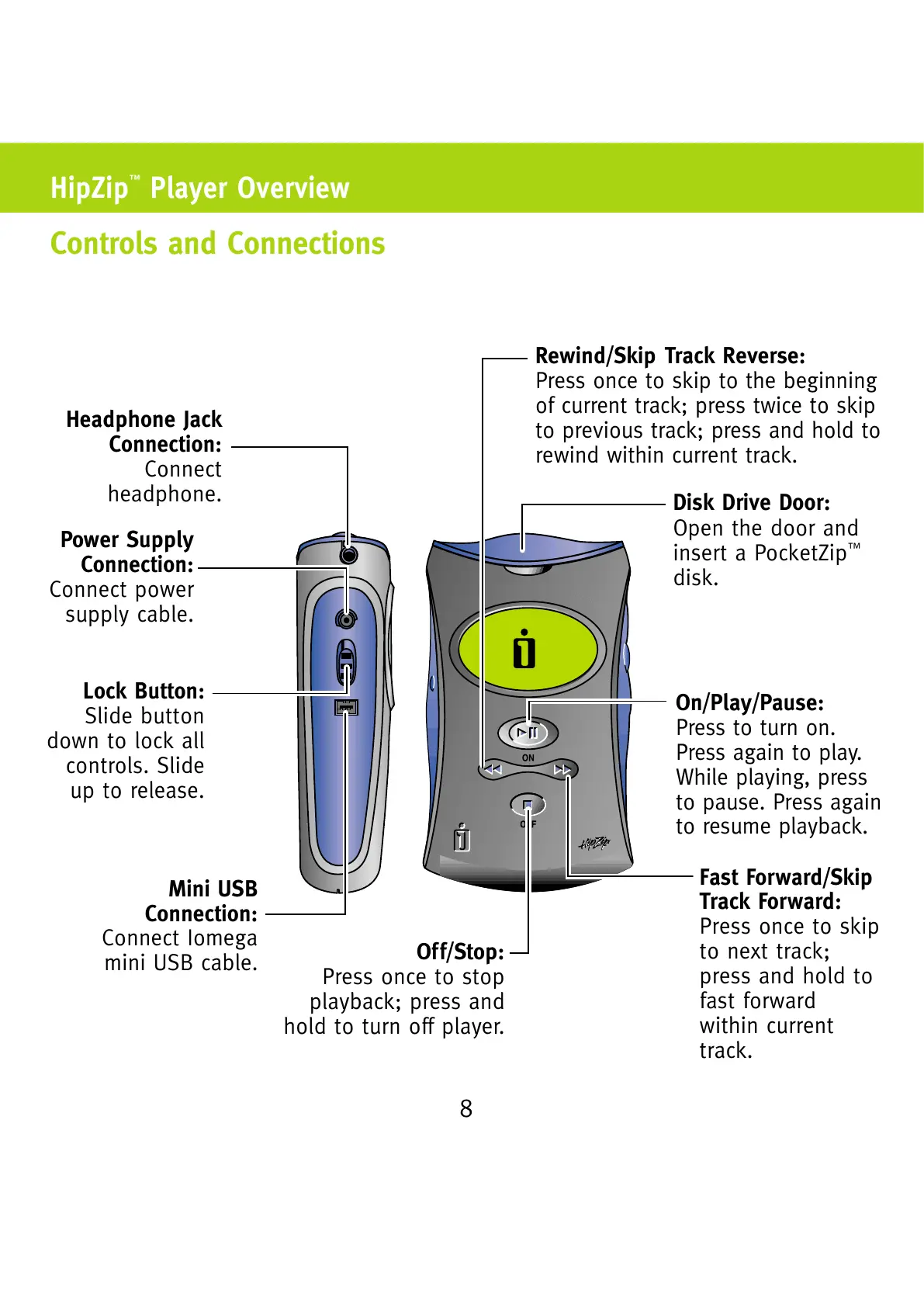
Fast Forward/Skip
Track Forward:
Press once to skip
to next track;
press and hold to
fast forward
within current
track.
Headphone Jack
Connection:
Connect
headphone.
Lock Button:
Slide button
down to lock all
controls. Slide
up to release.
Mini USB
Connection:
Connect Iomega
mini USB cable.
Off/Stop:
Press once to stop
playback; press and
hold to turn off player.
Rewind/Skip Track Reverse:
Press once to skip to the beginning
of current track; press twice to skip
to previous track; press and hold to
rewind within current track.
Disk Drive Door:
Open the door and
insert a PocketZip
disk.
On/Play/Pause:
Press to turn on.
Press again to play.
While playing, press
to pause. Press again
to resume playback.
Power Supply
Connection:
Connect power
supply cable.
All manuals and user guides at all-guides.com