The Iomega HipZip Digital Audio Player is a portable device designed for playing digital audio files stored on PocketZip™ disks. It offers a range of features for managing and enjoying music on the go.
Function Description:
The HipZip player allows users to listen to digital audio files, primarily MP3s, stored on Iomega PocketZip™ disks (also compatible with Iomega 40MB Clik!™ disks). It connects to a computer via a mini USB cable for transferring audio files and charging. The device supports various playback modes, including normal, random, scan, repeat all, repeat random, and repeat track. It also features an equalizer with standard, rock, classical, jazz, and custom modes to tailor the audio output. Users can create and manage playlists, view disk information (megabytes free, total play time, number of tracks), and access song information (file name, size, location).
Important Technical Specifications:
- Storage Medium: Iomega PocketZip™ disks (40MB capacity).
- Connectivity: Mini USB for computer connection and data transfer.
- Power: Rechargeable battery, charged via a power supply connected to an electrical outlet. Full charge takes approximately 2 hours.
- Audio Output: Headphone jack.
- Controls:
- On/Play/Pause: Press to turn on, play, or pause playback.
- Off/Stop: Press once to stop playback; press and hold to turn off.
- Rewind/Skip Track Reverse: Press once to skip to the beginning of the current track, twice to skip to the previous track, or press and hold to rewind.
- Fast Forward/Skip Track Forward: Press once to skip to the next track, or press and hold to fast forward.
- Lock Button: Slides down to lock all controls, up to release.
- Menu Up/Down: Navigates menu options.
- Menu/Select: Displays menu options and selects highlighted items.
- Volume Up/Down: Adjusts volume when not in menu mode.
- Display Icons: Battery level, volume level, artist, song title, play mode, time elapsed, equalizer mode, lock button on, track number, and various play sequence indicators (normal, repeat all, repeat track, scan, repeat random, random).
- Messages: Provides status updates such as "Connected," "Charging," "Battery Full," "Insert Disk," "Bad Connection," "Bad Disk," and "Check Disk."
Usage Features:
- Software Installation: Requires IomegaWare™ software and audio management software (MusicMatch Jukebox™ Plus is provided) to be installed on the computer before transferring files. The application and user's manual CD contains the necessary software.
- Connecting to Computer: Connect the HipZip™ mini USB cable to the computer's USB port and then to the HipZip player. USB extension cables are not recommended as they may cause data loss.
- Powering On/Charging: The device must be connected to a power supply and charged until the "Battery Full" icon appears. The power supply is also required to use the player without an initial battery charge.
- Inserting/Ejecting Disks:
- Open a PocketZip™ disk case by squeezing the top and bottom.
- Open the door on top of the HipZip player and insert the PocketZip™ disk (label side up) until it clicks.
- To eject, open the door and gently press in on the disk until it clicks and pops out.
- Menu Navigation: Use the Menu Up/Down buttons to scroll through options like Play Mode, Equalizer, Disk Info, Play List Manager, Settings, Song Info, and Player Info. Press Menu/Select to choose an option. Any button on the front of the player can be pressed to exit a menu.
- Audio File Transfer: Use MusicMatch Jukebox™ Plus software to create digital audio files from CDs, download from the internet, organize into playlists, and transfer to the HipZip player. For Windows PC users, select a playlist and use "Send to Device" -> "Download Playlist to the HipZip™ Player." For Mac OS users, drag and drop audio files (not folders) to the HipZip player icon on the desktop.
- File Structure: Audio files must be located in the root directory of the HipZip™ player; files in folders or subdirectories will not play.
Maintenance Features:
- Reset Function: If the player malfunctions, insert one end of a paper clip into the reset hole and then remove it to reset the player.
- Troubleshooting: The User's Manual CD provides detailed information on troubleshooting common issues, including "Getting Started," "Installing IomegaWare™," "Connecting the HipZip™ Player," "USB Guidelines," "Using Your HipZip™ Player," "HipZip™ Tips," "Using PocketZip™ Disks," "Troubleshooting," and "How to Get Help."
- Software Requirements for Manual: To view the User's Manual on the CD, Microsoft® Internet Explorer® 4.0 or higher or Netscape™ Navigator® 4.5 or higher must be installed on the system.
- Online Registration: Users can register their Iomega product online at http://www.iomegareg.com.
- Support: Iomega provides worldwide support options, including a web site (http://www.iomega.com and http://www.iomega.com/support) and customer support phone numbers (e.g., 1-888-4-IOMEGA for U.S. and Canada).
- Power Unit: In North America, the product is intended to be supplied only with an Iomega-approved, UL-Listed and Canadian-certified Class 2 direct plug-in power unit with a rated output of 5.2 Vdc, 1.0 A.

 Need help?
 General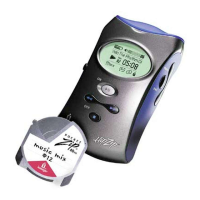

 To Next Page