www.naturalchoicewater.com ION 900 Series Owners Manual
maintenance and cLeaning (continued)
1. Flush carbon dust and air from the filter by pressing the cold dispensing
button until water runs clear (2-3 gallons may be necessary).
CAuTION: Do not press the hot water button when flushing new
filters. Doing so may result in damage to the ION.
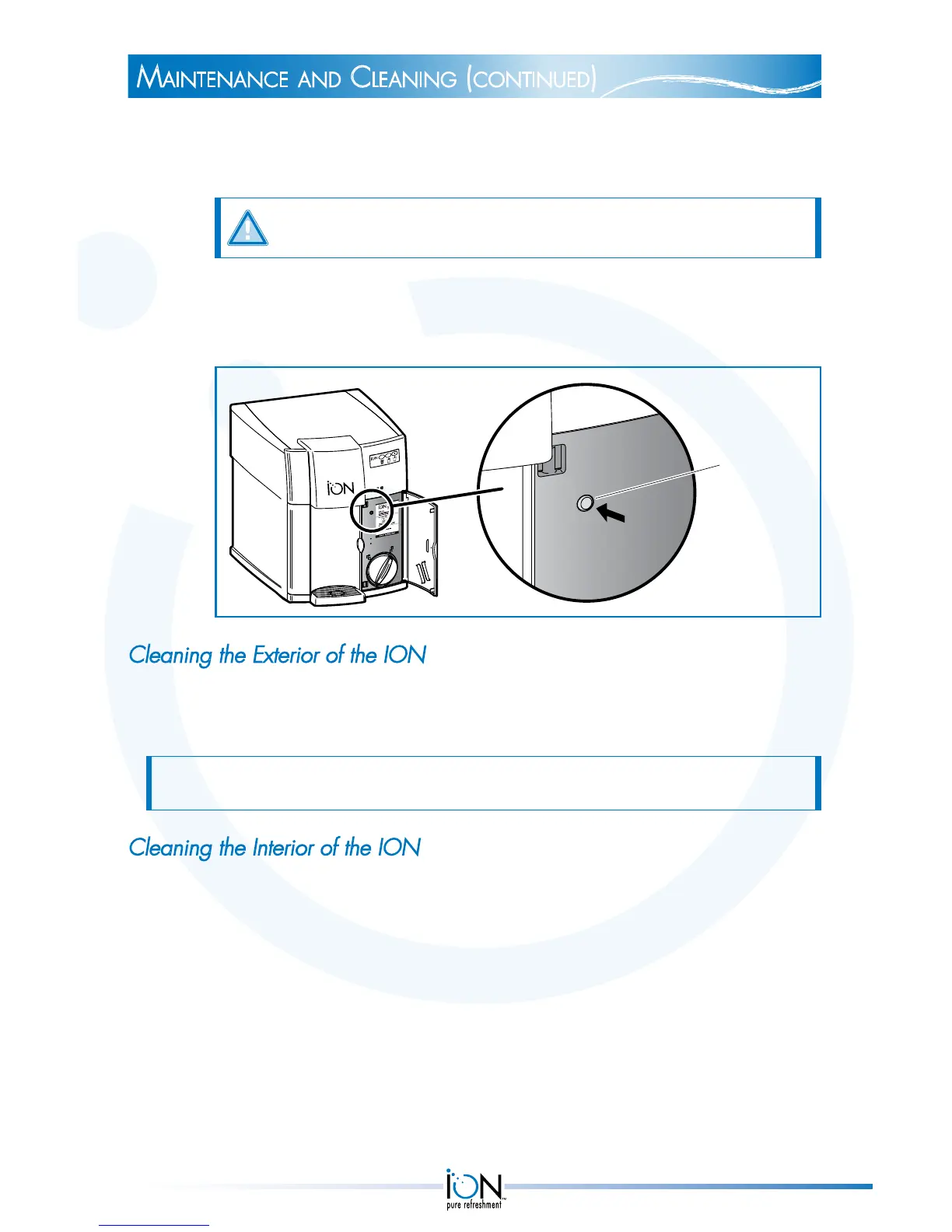
2. Press the filter reset button until you hear an audible beep. This resets the
timer. In 1 year or after 1500 gallons have been used, the ION LED will
display two solid red lights.
Filter reset
button
Cleaning the Exterior of the ION
The ION is designed to be cleaned with mild soap and water only. The faucet
and drip trays are designed to be easily removed and dishwasher safe.
NOTE: DO NOT use chemical or abrasive cleaners because they may cause paint to
wear away from the ION.
Cleaning the Interior of the ION
The ION is designed with an innovative Sealed Water Pathway that is purged
with every glass of water dispensed. Depending on your water, periodic
scaling in the hot water tank may occur and may require maintenance.
19



 To Next Page