3
Outdoor Use and Care
Though Pickup
TM
is water-resistant and able to tolerate splashing water, please review the tips
below to get the best performance from Pickup
TM
:
• Pickup
TM
must only be used outdoors with power outlets or extension cords that are rated
for outdoor use.
• Bring Pickup
TM
indoors during extreme weather.
• Please do not place Pickup
TM
in standing water.
• Please do not connect the power cable to Pickup
TM
in a wet environment. Make sure the
power input, power cable, and power outlet are all completely dry before making any
connections.
• WARNING: Keep any non-water-resistant devices (phones, music players, etc.) in a dry
place where they will not be affected by water and cause a risk of electric shock.
Setup
1. Make sure all items listed in the Box Contents are included in the box.
2. Read the Safety & Warranty Manual before using the product.
3. Make sure the battery is completely charged prior to first use for maximum battery life.
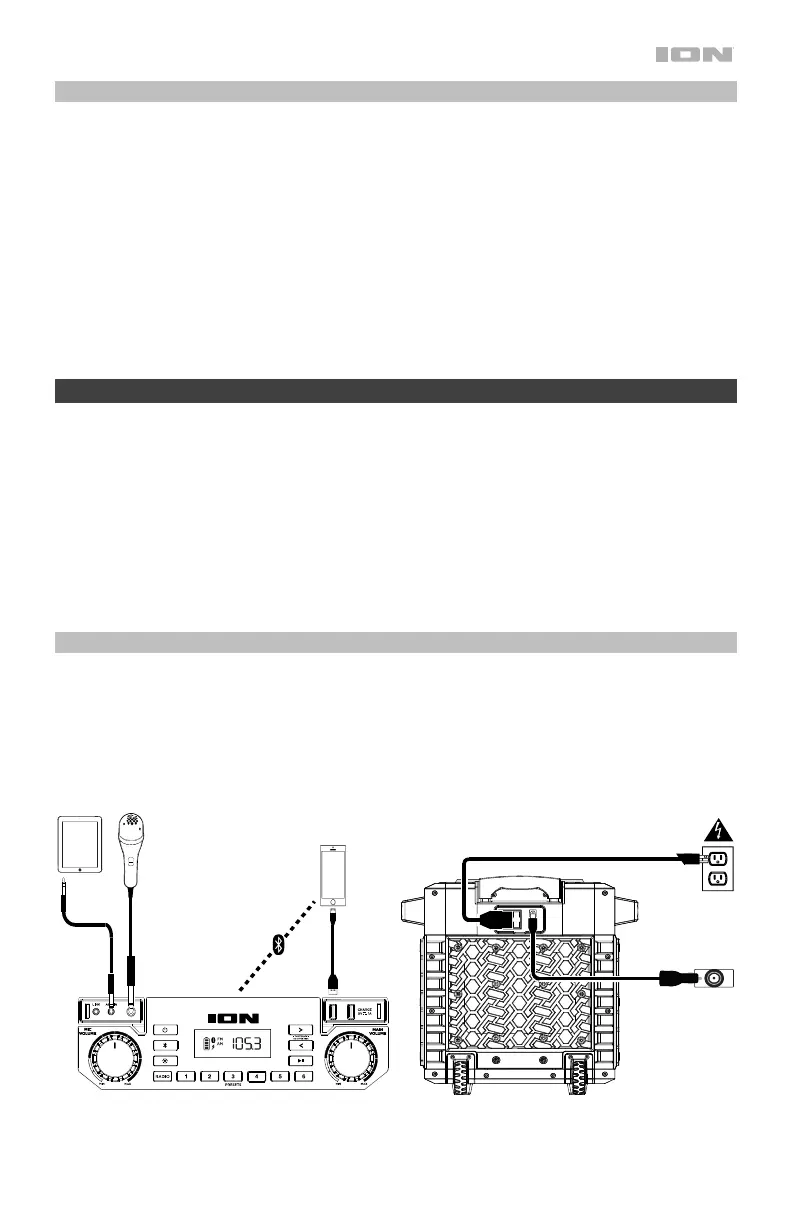
4. Study the Connection Diagram.
5. Ensure the Main Volume on Pickup
TM
is at zero.
6. Connect your devices.
7. Raise the volume to a comfortable level.
8. Return the Main Volume to zero when you are finished using Pickup
TM
.
Connection Diagram
Items not listed under Introduction > Box Contents are sold separately.
Tablet,
MP3
Player,
etc.
Microphone
Bluetooth Device
Power
Rear Panel
Front Panel
IEC or DC


 To Next Page