5
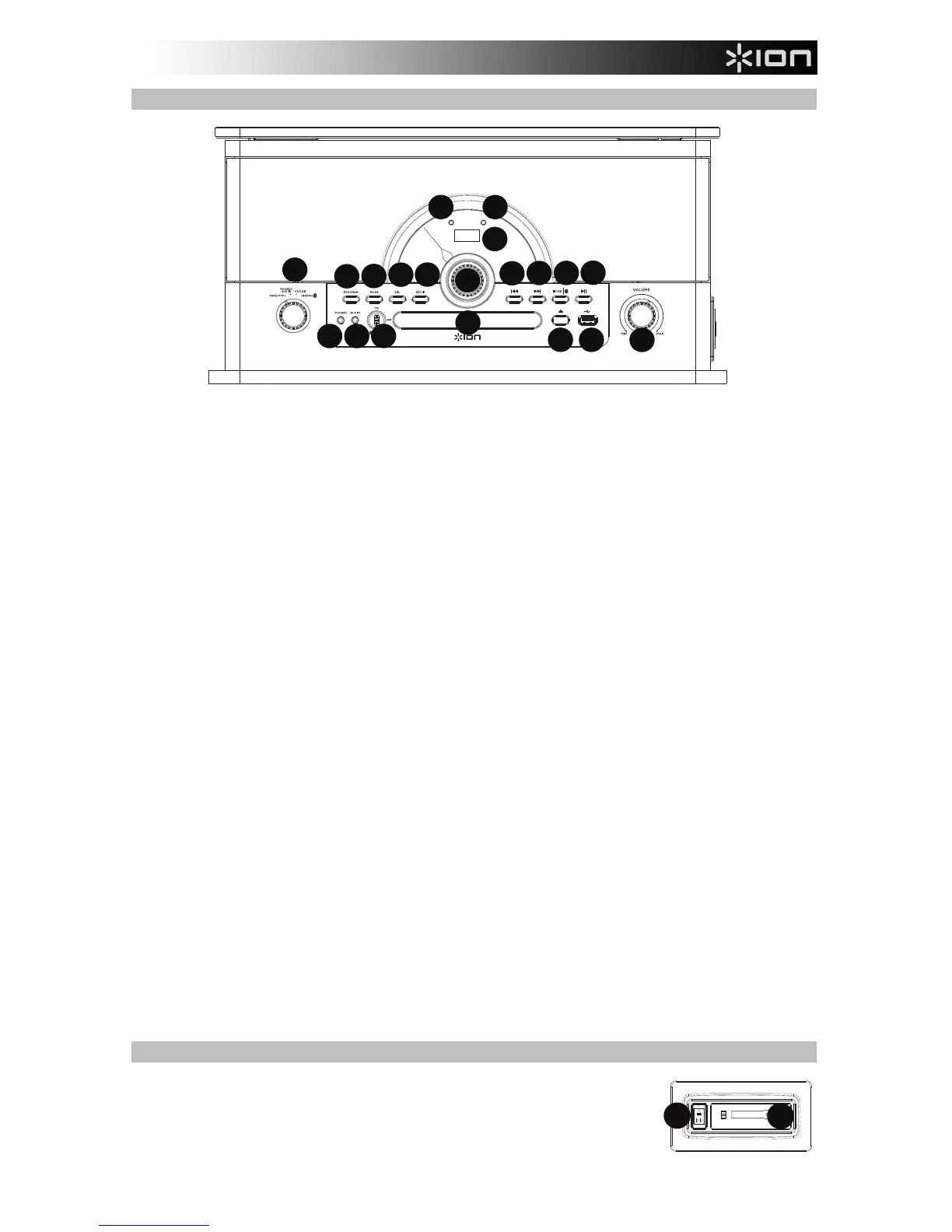
Front Panel
1. Function Selector: Turn this dial to select which source to use: Tape/Off, Phono/Aux In, CD/USB, or
Radio/Bluetooth.
2. Program Button: Press this button to program CD tracks to play in a certain order.
3. Mode: Selects how the tracks on the USB flash drive or CD will be played back: “ONE” (plays the
same track repeatedly), “FOL” (plays through the same folder repeatedly) “ALL” (plays through all
tracks repeatedly), or “NOR” (normal playback order without repeating).
4. Delete Button: Press this button to delete tracks or folders from a USB flash drive.
5. Rec: Press this button to go to USB recording mode if a USB flash drive is connected.
6. Radio Frequency Selector: Turn this dial to select the AM or FM radio station frequency.
Note: EU units can only select FM stations.
7. Display: Shows the current mode and track number.
8. Power LED: This LED illuminates when the power is turned on.
9. Bluetooth LED: This LED flashes when in pairing mode and is solid when connected to a Bluetooth
speaker.
10. Skip Backward: Press this button to go to the previous USB file, Bluetooth track, or CD track.
Note: When listening to Bluetooth sources, pressing this button may go to another playlist or music
genre in some apps.
11. Skip Forward: Press this button to go to the next USB file, Bluetooth track, or CD track.
Note: When listening to Bluetooth sources, pressing this button may go to another playlist or music
genre in some apps.
12. Stop/USB/Bluetooth: Press this button to end recording to the USB flash drive. Press this button to
stop playback of a USB track, CD track, or Bluetooth track. With the Function Selector set to
USB/CD, press and hold this button for 2 seconds to switch between CD mode and USB mode. With
the Function Selector set to Radio/Bluetooth, press and hold this button for 2 seconds to disconnect
from a paired Bluetooth device.
13. Play/Pause: Press and release this button to play/pause tracks from CD, USB, and Bluetooth
sources.
14. Headphone Output: When headphones are connected, the internal speaker is muted.
15. Aux In: Connect the output of a line-level device to this input, such as from a smartphone, media
player, tablet, etc.
16. FM/AM/Bluetooth (FM/Bluetooth for EU units): Toggle this to switch from FM, AM, and Bluetooth
sources.
Note: EU units can only select between FM and Bluetooth.
17. CD Tray: Place a CD here. This unit is designed to play commercially available CDs, properly burned
and finalized CD-Rs, CD-RW’s, and MP3 CDs.
18. Open/Close: Press this button to open or close the CD tray.
19. USB Port: Playback tracks from your USB flash drive or record songs to the USB flash drive.
20. Volume: Adjusts the sound level for the internal speakers and the headphone output.
Side Panel
1. Cassette Eject / Fast Forward (FF) Button: Press this button to eject the
tape. Press and hold the button to fast forward through the tape.
2. Cassette Door: Insert a cassette tape here.


 To Next Page