ION Audio Trailblazer™ Roar User Guide 9
8
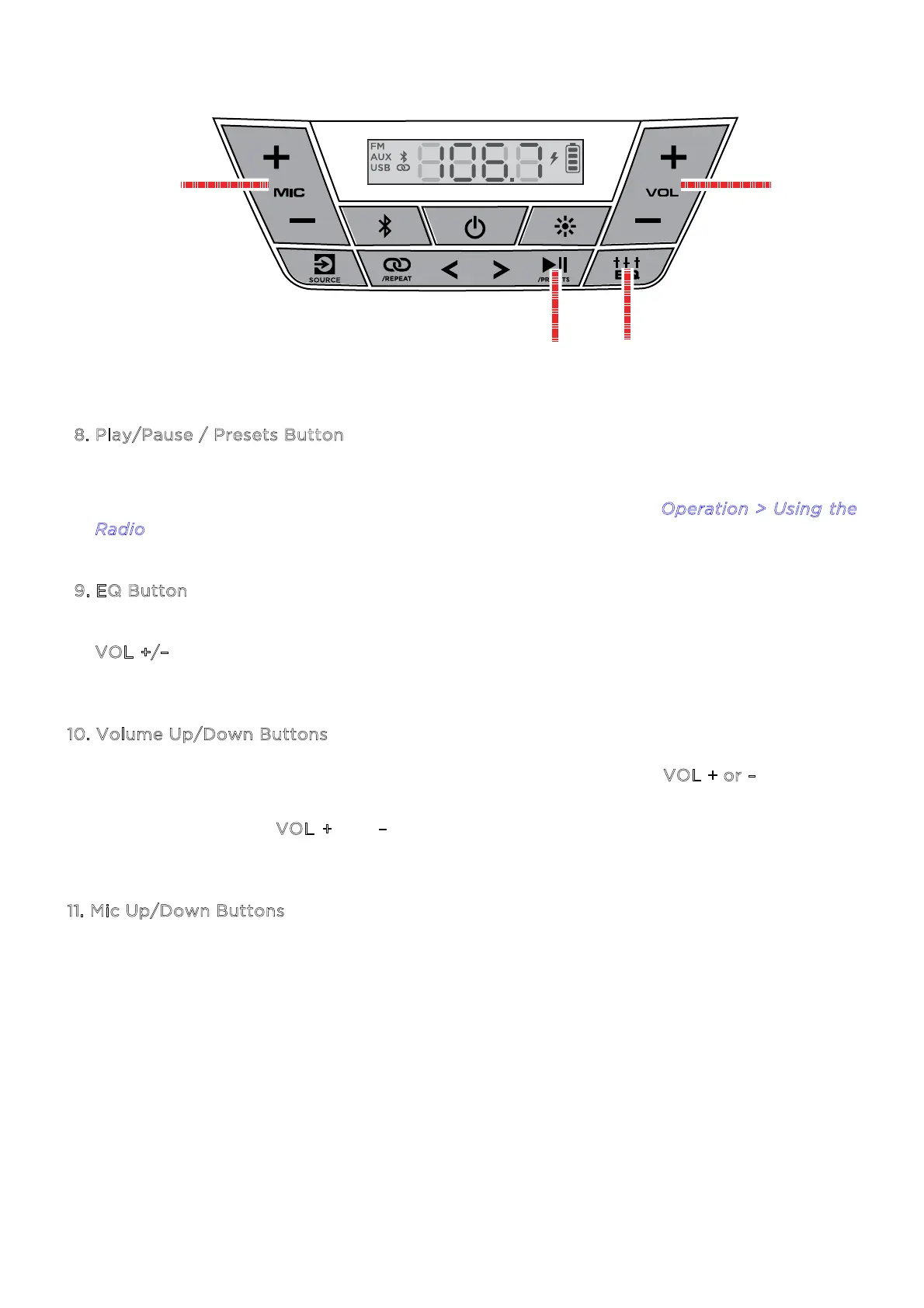
. Play/Pause / Presets Button
Press this button to start and stop Bluetooth or USB audio.
In FM mode, use this button to save and recall radio presets. See O
peration > Using the
R
adio to learn more.
9
. EQ Button
Press this button to cycle through the Low, Mid, and Hi EQ frequencies. Then press the
V
OL +/– buttons to adjust the EQ frequency settings. If no changes are made within five
seconds, Trailblazer™ Roar will exit EQ adjustment.
1
0. Volume Up/Down Buttons
Press these buttons to adjust the speaker’s volume. Press and hold V
OL + or – to navigate
Bluetooth tracks.
Press and hold both V
OL + and – buttons for 5 seconds to reset the speaker to factory
settings.
1
1. Mic Up/Down Buttons
Press these buttons to adjust the microphone volume.
8 9
10
11


 To Next Page