2. “Setting” Menu
2.1 Bluetooth Pairing
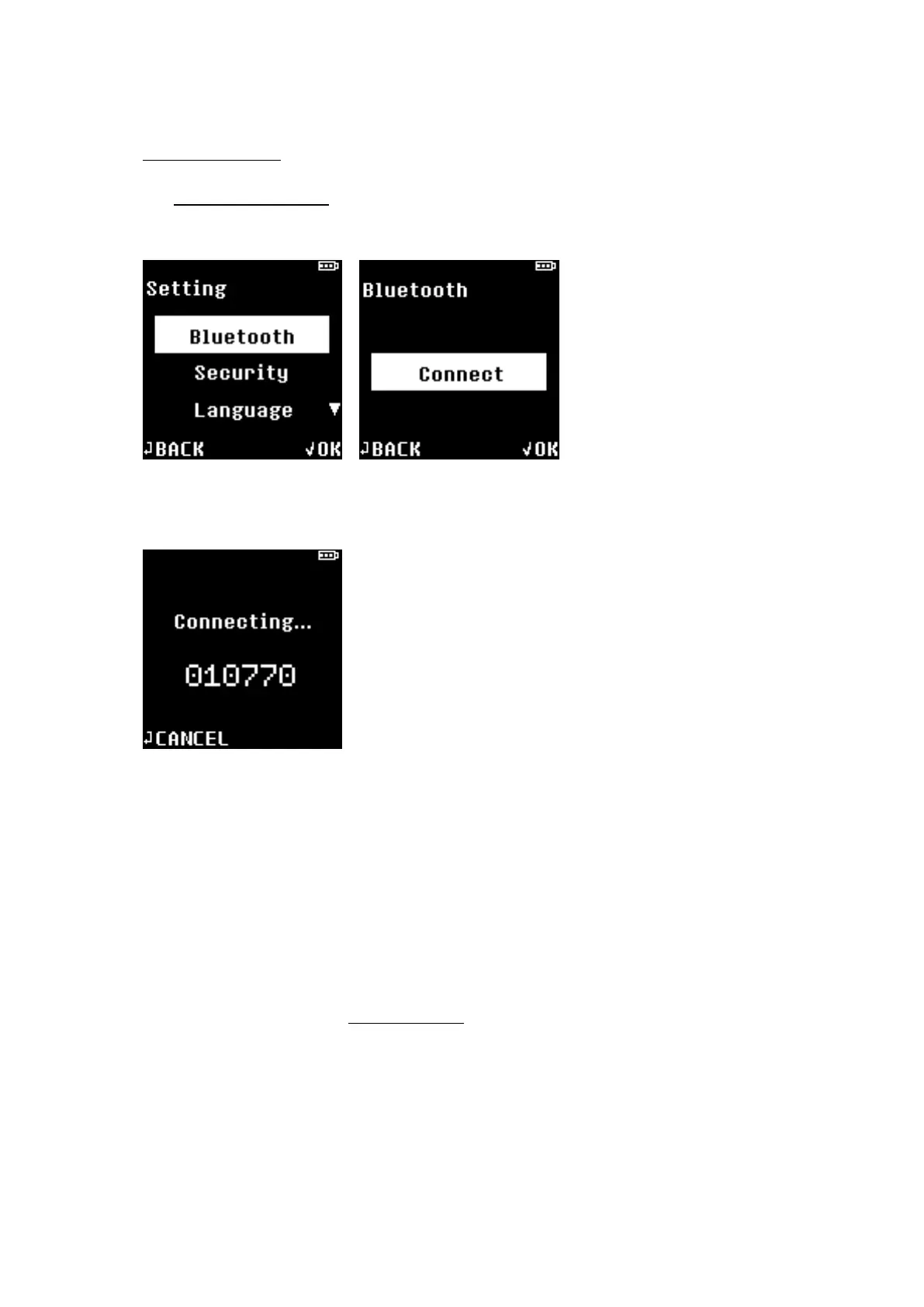
★ From Setting Select Bluetooth Select Connect.
D’CENT will display 6-digit pairing code for Bluetooth pairing.
★ From the Bluetooth menu on your mobile device or PC, select your D’CENT hardware wallet
from the list and you will be prompted to enter the 6-digit pairing code to complete the
Bluetooth pairing with D’CENT hardware wallet.
During pairing process, BLE Indicator blue light will blink (indicates unpaired status or attempting
to pair), and BLE indicator blue light will remain on when pairing is successful.
NOTE: If D’CENT is registered as PAIRED DEVICES on your mobile device or PC, it is not necessary
to repeat the steps above to pair again. While Bluetooth is enabled on your host device (mobile or
PC), D’CENT will pair automatically when it is powered on.
NOTE: BLE indicator has the following states:


 To Next Page