Get Started
Thank you for purchasing D’CENT hardware wallet. This guide will help you on setting up your
D’CENT and securing your digital assets.
What You Need:
Unlike other cryptocurrency hardware wallets, D’CENT does not require any other software for
initialization. To be able to fully initialize from a stand-alone device without connecting PC or mobile
device is a big security advantage against risks such as virus or malware infection.
All you need is your D’CENT hardware wallet along with your recovery card and a pen to write
down your Recovery Seeds.
Initialize your D’CENT
When D’CENT hardware wallet is first boot after purchase, the device must be initialized to set
device security (PIN and Fingerprint) before your private key is generated.
NOTE: For any reason, if your D’CENT hardware wallet is powered off before completing the
initialization process, you must repeat the initialization process from the very beginning (Step 1).
Step 1: Press and hold On/Off button for 2 seconds to power-on D’CENT.
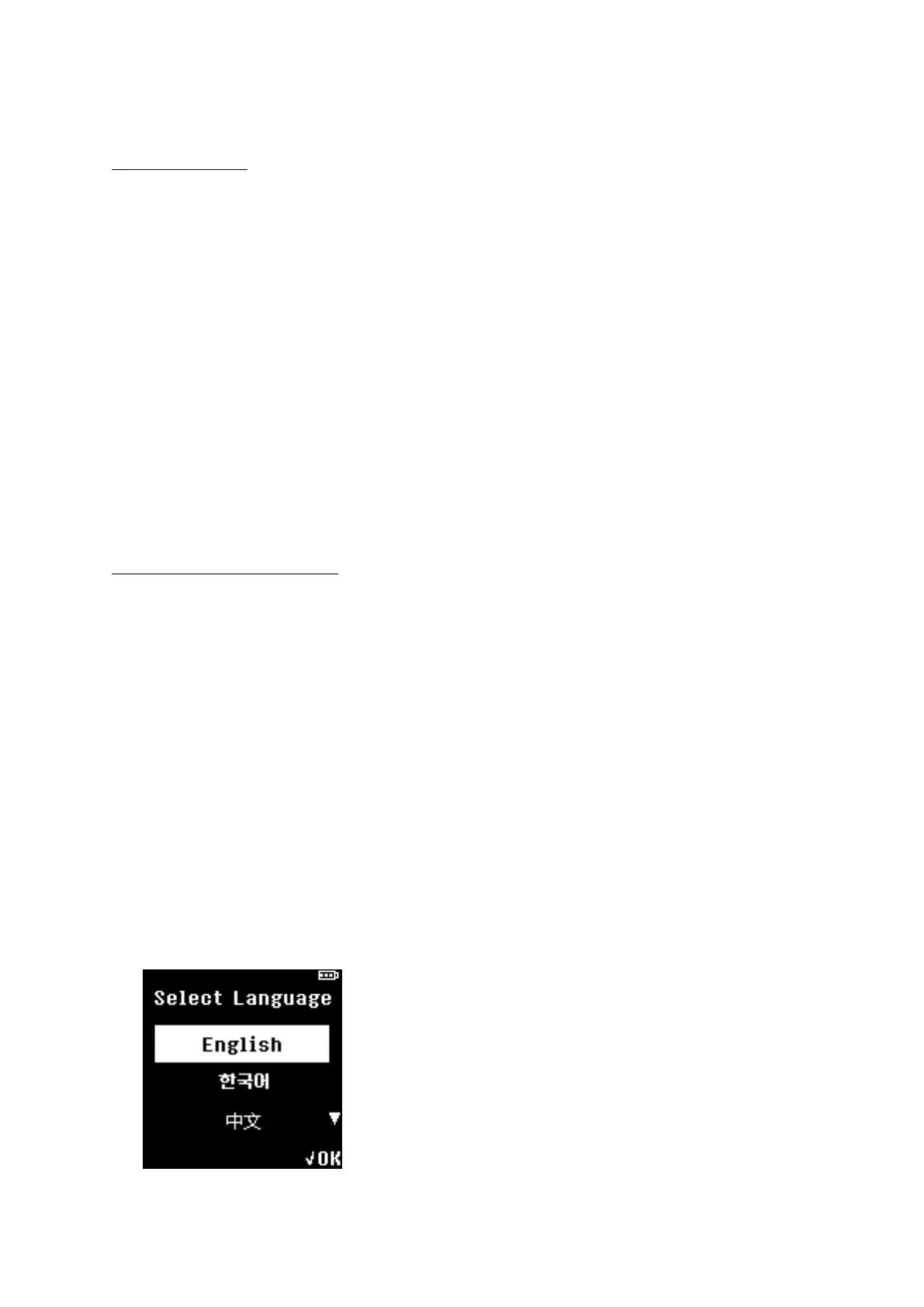
Step 2: Choose your language. (English / Korean / Chinese / Japanese)
★ Select your language by pressing UP or DOWN and press OK to choose.
NOTE: Language can be changed from the Setting menu after completing the initialization process.


 To Next Page