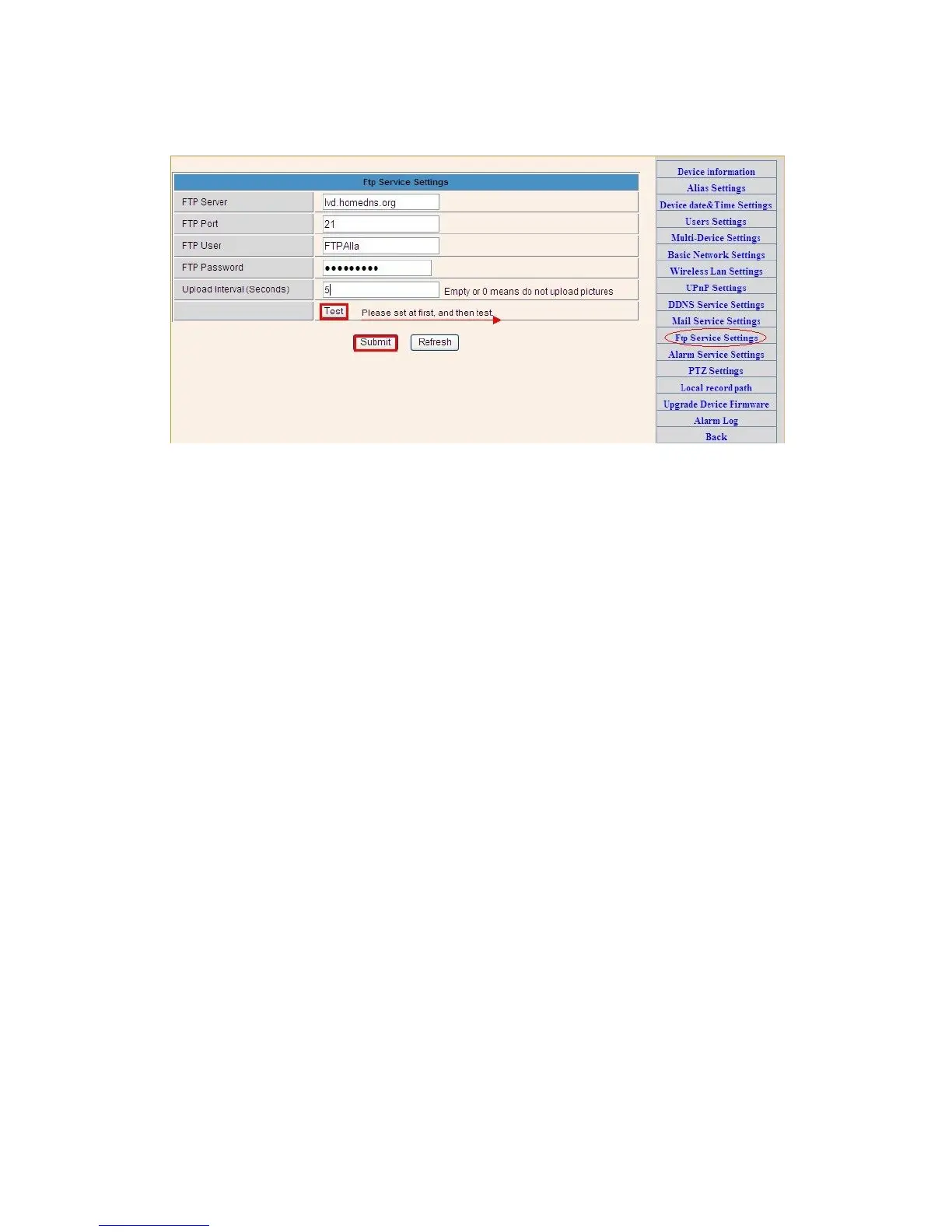
Figure 3.32
The above setting is equally similar to Mail Server Settings,when alarming is
triggered it also sends image,please enter FTP server,FTP port,FTP user,FTP
password, FTP upload directory,FTP mode,FTP mode has two options: PORT and
POSV. If needs a quick upload image, then select it, edit upload image interval(second)
3.5.7. Alarm Service Settings
As shown below, there are two modes of alarm trigger, first one is motion detection,
please refer to below interface,the sensitivity of motion detection can be adjusted
according to the users′ requirement, the higher the number is, the lower sensitivity
is; Another mode is input alarm, when connected, it triggers alarm through alarm
input signal which connects to linkage alarm GPIO;
When triggered, there are 3 alarm modes:one is IO alarm linkage, camera connects
with linkage alarm box through GPIO, sound the siren ;the second is email notification,
send email with images captured;the last is upload pictures alarm,as the way mentioned
before FTP upload pictures alarm, Upload pictures interval(second)keeps consistent
with the mentioned upload pictures interval of Ftp service settings.
The schedule refers to arming time,as the selected time interval: 0:00 minute per
week to 0:45 minutes and Monday 1:00 hour and 2:00 hour


 To Next Page