RSGM Installer Guide
30
6.3 RSGM Configuration via Serial Terminal
Serial Terminal configuration is a simple way to configure the RSGM network parameters using
Terminal Emulator software (e.g. Hyper Terminal) via TIA/EIA-323 serial connection. It provides
access to the RSGM Terminal Admin pages that are similar in function to the Web Admin pages.
Serial Terminal Admin is suitable for first-time installation.
The serial communication settings for terminal emulators are as follows;
Bits per Second (bps) : 38400
Data Bit : 8
Parity : None
Stop Bit : 1
Flow Control : None
As the Serial Terminal configuration is conceptually the same as Web configuration, this section will
concentrate on how use Serial Configuration to change network parameters. Please refer to the
previous section, RSGM Configuration via Web browser.
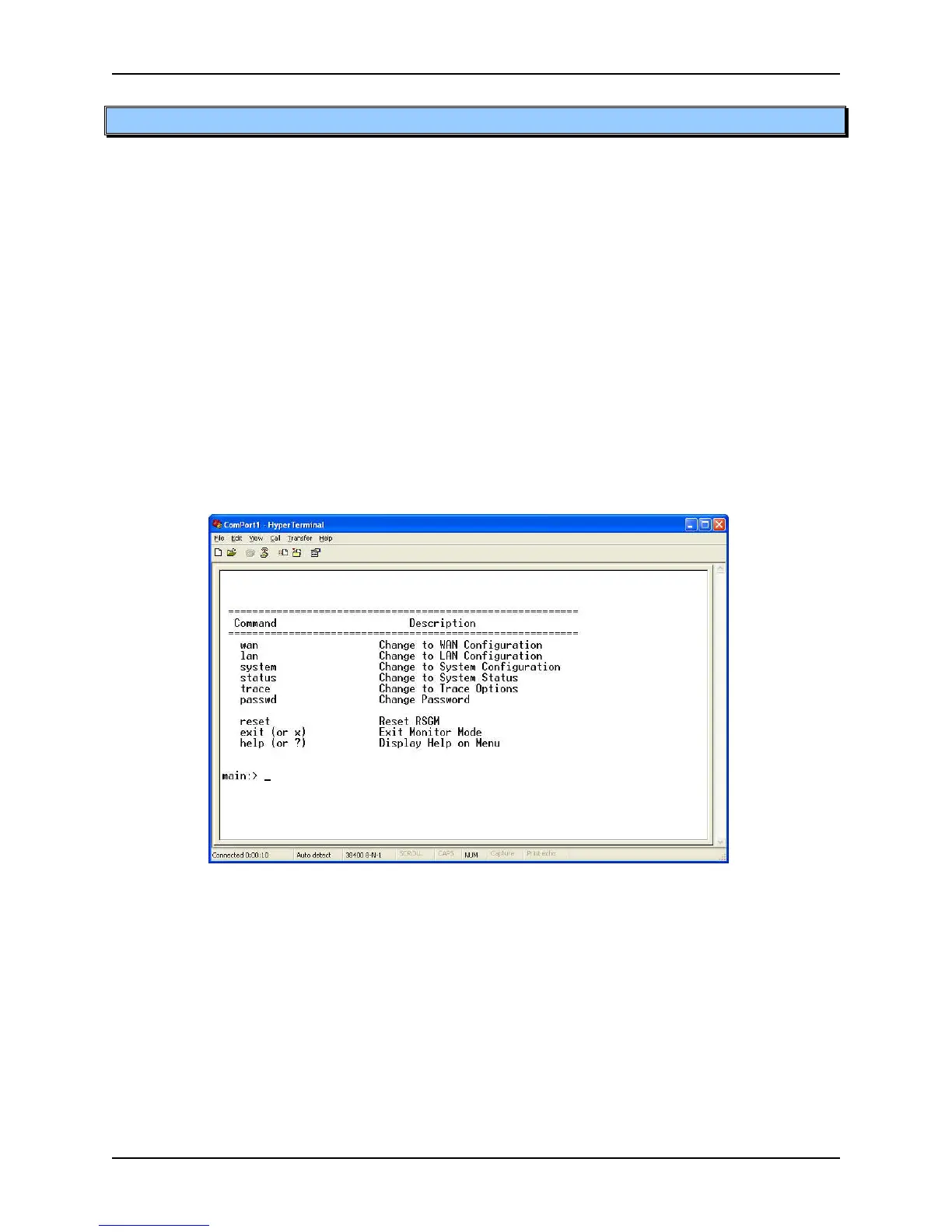
Figure 6.3-1 Initial Serial Terminal Screen
After connecting the PC and RSGM with TIA/EIA-323 serial cable, launch the terminal emulator
(e.g. Hyper Terminal), and then press “Enter” key, you will see the menu above.
The Serial Terminal configuration employs a directory structure. To enter the WAN Configuration
sub-directory, type “wan” and then press “Enter” ke y, the WAN Configuration menu as in Figure 6.3-
2 will be displayed. Here there are sub-directories and/or operation commands. To return to
higher level directory, type “..” and then press “Enter” key.



 To Next Page