EasyManua.ls Logo

iPega Batman - Usage of Android Device; Bluetooth Pairing and Connection; Game Software and Compatibility

iPega Batman
7 pages
Print Icon
To Next Page IconTo Next Page
To Previous Page IconTo Previous Page
Loading...
Usage
of
Android
device
Bluefooth
On
Pic 1
Psired desit
04
O
sONY
NE
ZX100
sONY
SRSXT7
Pic
2
sONY
SmartWatch
2
sONY
XPERIA
22
Tablet
vallable
devices
PG-9076
Pic 3
Your
"SONY
XPERIA
Z25
Premium
Duais
vislbn
tn
rearby
devices
wrie
the
Biuerootn
sertirgs
streen
is
open
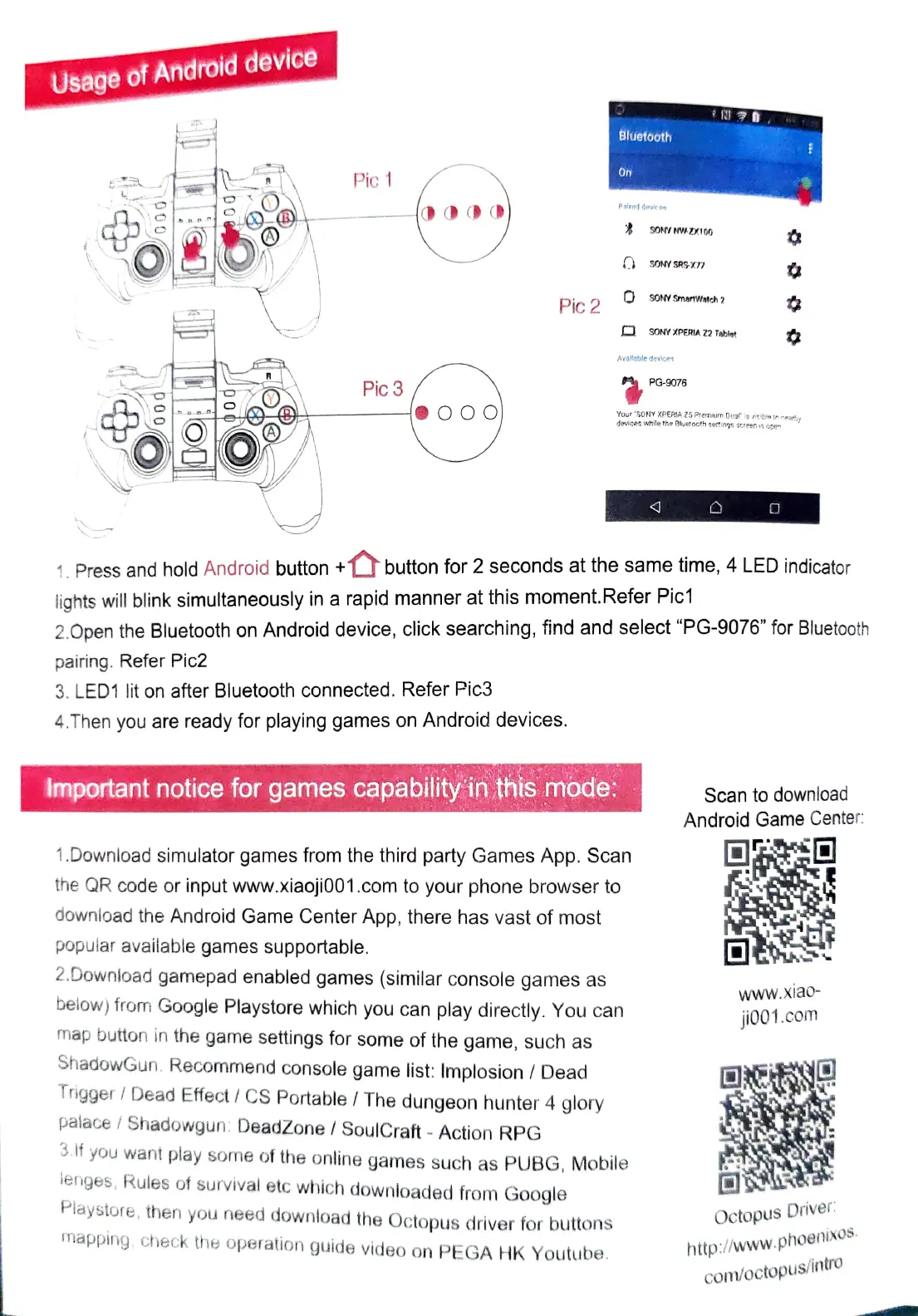
Press
and
hold
Android
button
buton
for 2 seconds at the same
time,
4
LED
indicator
lights
will
blink
simultaneously
in
a
rapid
manner
at
this
moment.Refer
Pic1
2.Open the Bluetooth on Android device, click searching,
find
and select "PG-9076" for Bluetoth
pairing.
Refer
Pic2
3.
LED1
lit
on after Bluetooth
connected.
Refer
Pic3
4.Then you
are
ready
for playing
games
on
Android
devices.
Important notice
for
games
capability
in
this
mode:
Scan
to
download
Android
Game
Center
1.Download simulator
games
from
the
third party
Games
App.
Scan
the
QR
code
or
input
www.xiaoji001.com
to
your
phone
browser
to
downioad
the
Android
Game
Center
App,
there
has
vast
of
most
popular available
games
supportable.
2.Downioad
gamepad
enabled
games
(similar
console
games
as
www.xia0
below)
from
Google Playstore which you can play directly. You
can
jio01.comn
map
button
in
the
game
setings
for
some
of
the
game,
such
as
ShadowGun.
Recommend
console
game
list:
Implosion
/
Dead
Trigger/Dead
Effect/
CS
Portable/
The
dungeon
hunter
4
glory
palace
Shadowgun:
DeadZone/
SoulCraft
Action
RPG
3.If
you
want
play
some
of
the
online
games
such
as
PUBG,
Mobile
lenges,
Rules
of
survival
etc
which
downloaded
from
Google
aystore,
then
you
need
download
the
Octopus
driver
for
buttons
mapping.
check
the
operation
guide
video
on
PEGA
HK
Youtube.
Octopus
Driver
http://www.phoenixOS.
com/octopus/intro

Related product manuals