B.
iPhone
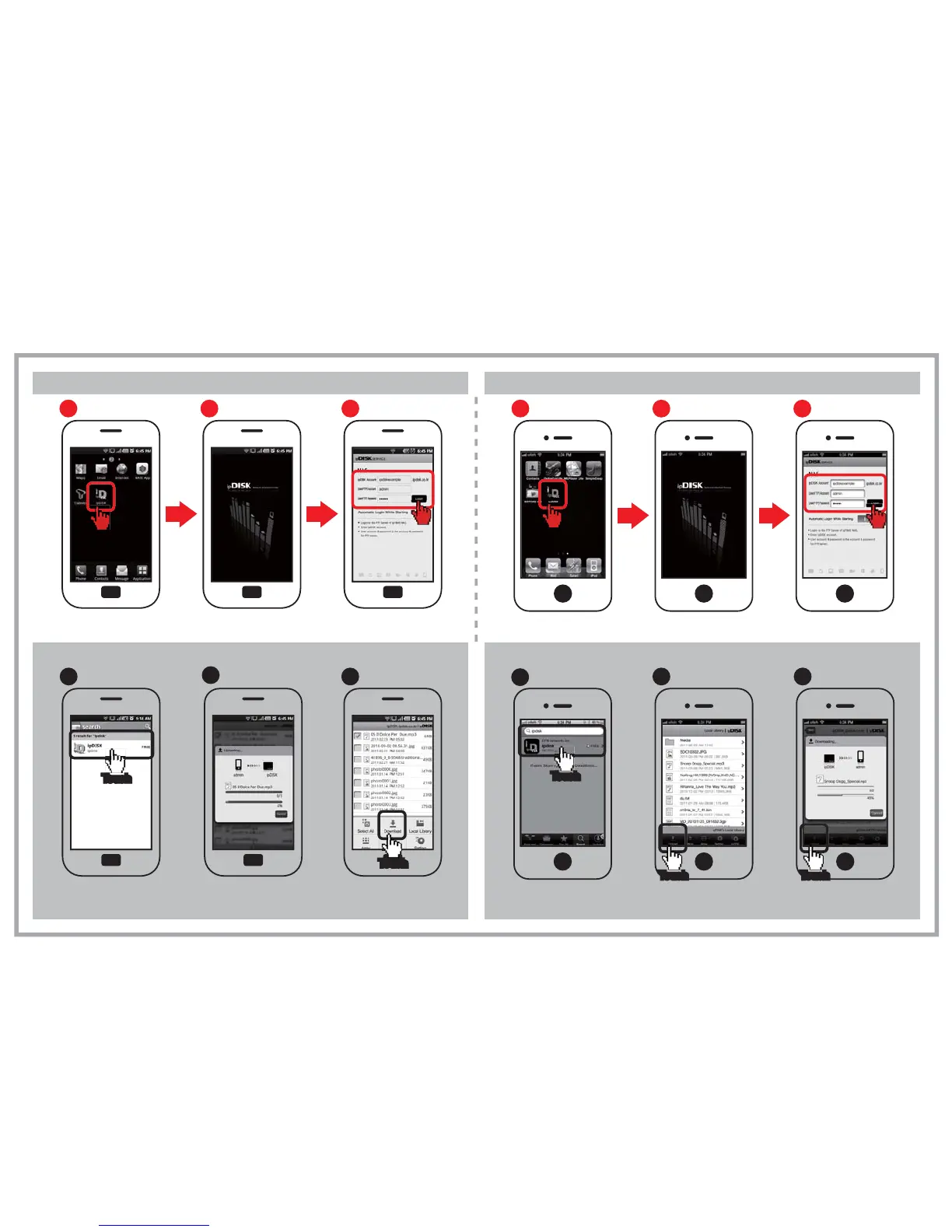
Smart-phone ipDISK service
Eight.
Select ipDISK icon.
Enter ipDISK
User account and password.
Run ipDISK
Run ipDISK
A.
Android Phone
[Using Examples] [Using Examples]
Selecting ipDISK
1
Running ipDISK
2
Login
3
Touch
Touch
Select ipDISK icon.
Enter ipDISK
User account and password.
Selecting ipDISK
1
Running ipDISK
2
Login
3
Touch
Touch
Upload
b
The files in the phone can
be uploaded to the NAS.
Download
b
The files in the NAS can be
downloaded to the phone.
TouchTouch
Upload
a
The files in the phone can
be uploaded to the NAS.
TouchTouch
Download
c
The files in the NAS can be
downloaded to the phone.
TouchTouch
※ The figures on smart-phone can be different.
※ ipDISK APP can be downloaded from the Android market
and Apple App-store using the searching keyword
“ipDISK”.
a
Installing App
TouchTouch
To install the App,
search with keyword,
ipdisk in the Android market.
“ ”
c
Installing App
TouchTouch
To install the App,
search with keyword,
ipdisk in the Apps store.
“ ”


 To Next Page