18 IRIDEX IQ 577
®
/IQ 532
®
Laser Systems Operator Manual 15510-EN Rev G
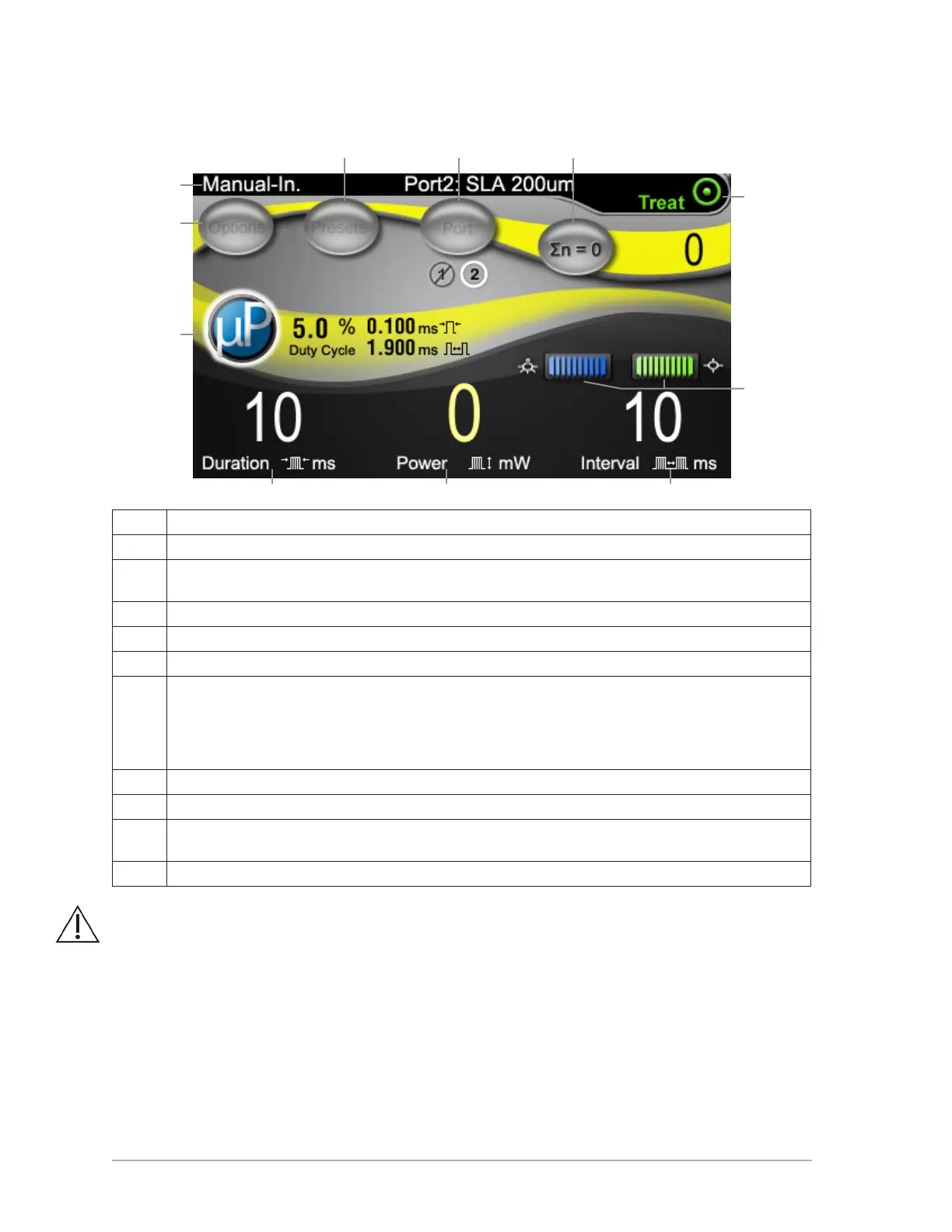
Treat Screen
A Displays eye safety lter status and delivery device.
B Go to Options screen.
C (Optional) Adjust MicroPulse settings. When MicroPulse is activated, parameters are displayed to the
right of the button (as shown).
D Go to Presets screen.
E Switch port.
F Reset pulse counter.
G Indicates laser mode:
• Ready: Laser is ready; will re when footswitch is pressed.
• Standby: Laser is disengaged.
• Treat: Laser is ring (footswitch pressed).
H Aiming Beam and LIO adjustments.
I Displays pulse duration. Adjust with control knob.
J Displays pulse power. Adjust with control knob. Two power parameters, one for CW-Pulse and one for
MicroPulse (if applicable), are maintained.
K Displays pulse interval. Adjust with control knob.
WARNING: Except during actual treatment, the laser must always be in Standby mode.
Maintaining the laser in Standby mode prevents accidental laser exposure if the
footswitch is inadvertently pressed.
A
G
H
D
I J K
E F
C
B



 To Next Page