30
MUSIC
Basic operation
MUSIC
29
Basic operation
Note
You can not delete a folder at all.
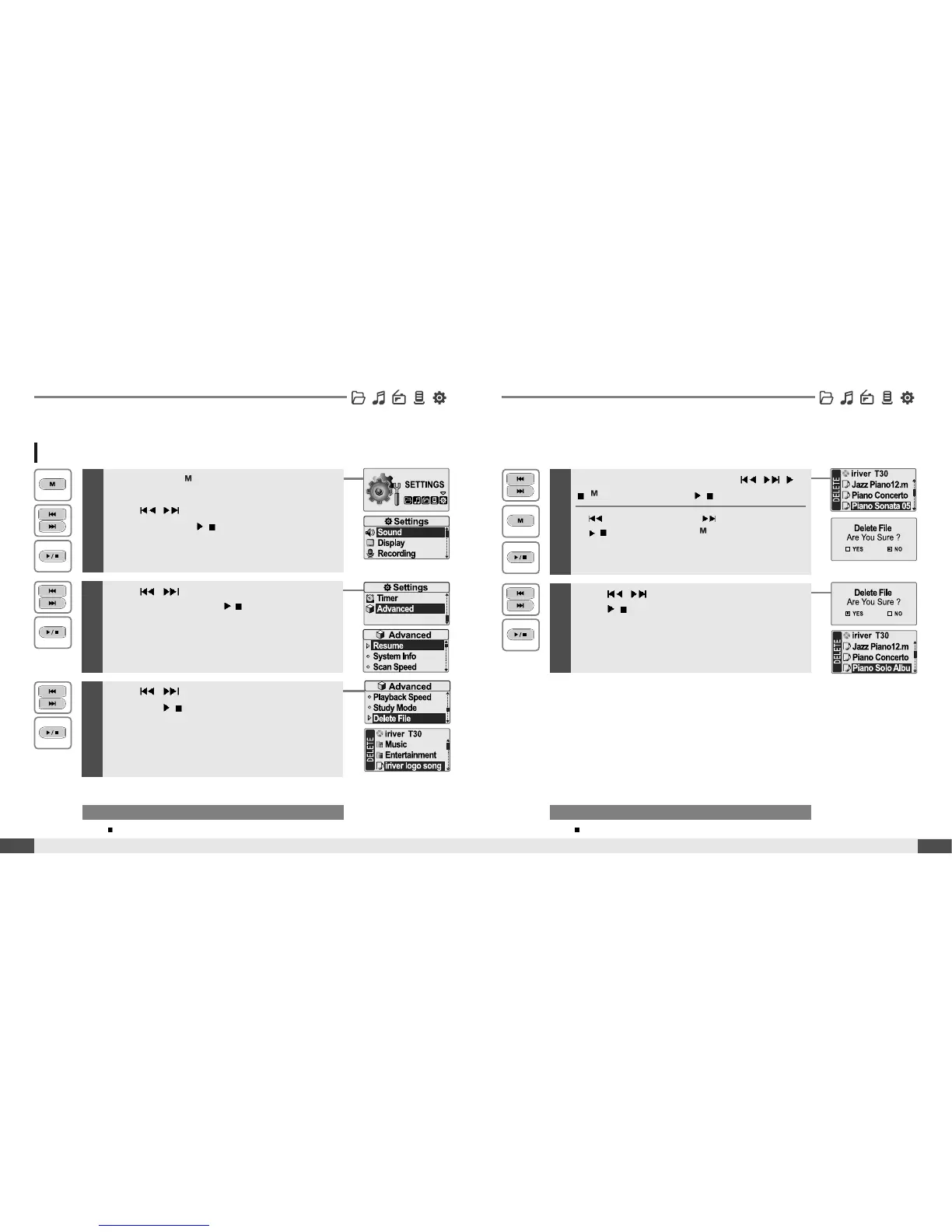
Deleting a file on the player
1
Press and hold button to display the function
mode screen.
Press
, button to select [SETTINGS]
mode, then press
/
button to enter.
The [SETTINGS] screen will be displayed.
2
Press , button to choose the
[Advanced], then press
/
button.
The [Advanced] sub-menu screen will be displayed.
3
Press , button to choose the [Delete File],
then press
/
button.
The [DELETE file] list screen will be displayed.
4
Select a f ile to delete by using the , ,
/
, button, then press
/
button.
:tomoveup :tomovedown
/
: to enter the folder : to exit the folder
5
Press , button to choose the [Yes], then
press
/
button.
File is deleted on the player.
Note
While in a music file playback, delete functions are not available.
Th File can be deleted in the [SETTINGS - Advanced - Delete File].
(Refer to page 61)



 To Next Page
 Loading...