
 Need help?
Do you have a question about the iRobot i Series and is the answer not in the manual?
Step-by-step guide on how to remove and replace the disposable bag in the Clean Base for proper dirt disposal.
Instructions for inspecting and cleaning the IR window and charging contacts to ensure optimal robot performance.
Guidance on how to inspect and clean the blower cover for any lint or debris buildup.
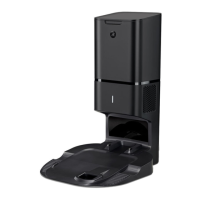
This document serves as an Owner's Guide for the Robot Roomba Clean Base™ Automatic Dirt Disposal, designed for use with Roomba i Series Robot Vacuums. It provides essential information for maintaining the device to ensure optimal performance and longevity.
The Robot Roomba Clean Base™ Automatic Dirt Disposal is an accessory for Roomba i Series Robot Vacuums, providing an automated solution for emptying the robot's dirt bin. Its primary function is to automatically transfer collected dirt and debris from the robot vacuum into a sealed bag within the Clean Base, eliminating the need for frequent manual emptying of the robot's bin. This system significantly enhances the convenience of robot vacuum ownership by allowing the robot to clean for longer periods without user intervention for dirt disposal. The Clean Base also serves as the robot's charging station, ensuring the robot is always ready for its next cleaning cycle. The automatic dirt disposal process is initiated when the robot docks with the Clean Base after completing a cleaning job or when its dirt bin is full. The Clean Base uses powerful suction to pull debris from the robot's bin into a disposable bag, which is designed to seal itself upon removal to prevent dust and allergens from escaping back into the air. This feature is particularly beneficial for individuals with allergies or sensitivities to dust, as it minimizes exposure to collected debris.
The Clean Base is designed for seamless integration with Roomba i Series Robot Vacuums, offering a hands-free experience for dirt disposal. When the robot returns to the Clean Base, it automatically empties its bin, allowing for continuous cleaning without interruption. The system is intuitive, with the robot communicating its need to empty to the Clean Base. The disposable bags within the Clean Base are designed for easy installation and removal. When a bag is full, the system will typically alert the user through the robot's companion app or an LED indicator on the Clean Base itself, prompting a replacement. The design of the bag ensures that it seals automatically upon removal, preventing the release of dust and debris back into the environment. This makes the disposal process clean and hygienic. The Clean Base also functions as the robot's home base, where it returns to recharge its battery between cleaning tasks. This dual functionality ensures that the robot is always charged and ready to clean, while also managing the collected dirt efficiently. The overall design aims to provide a low-maintenance and highly convenient cleaning solution, allowing users to enjoy cleaner floors with minimal effort.
To ensure the Clean Base operates at peak performance, regular maintenance is crucial. The Owner's Guide outlines specific care procedures and frequencies for various components.
The most frequent maintenance task is replacing the disposable bag. The guide recommends replacing bags when prompted by the LED indicator on the Clean Base or through the companion app. The process is straightforward:
These components are vital for the robot's ability to dock correctly and for the Clean Base to communicate with the robot.
The blower cover, located inside the canister, can accumulate lint and debris over time, which might affect the Clean Base's suction performance.
By following these maintenance guidelines, users can ensure their Robot Roomba Clean Base™ Automatic Dirt Disposal continues to operate efficiently, providing a clean and convenient solution for managing household dirt and debris.
 General
| Model | i Series |
|---|---|
| Filter Type | High-Efficiency Filter |
| Connectivity | Wi-Fi |
| Brush Type | Dual Multi-Surface Rubber Brushes |
| Cliff Detect | Yes |
| Auto Recharge | Yes |
| Multi-Surface Cleaning | Yes |
| Compatible with Virtual Assistants | Amazon Alexa, Google Assistant |
| Battery Type | Lithium Ion |
| Recharge and Resume | Yes |
| Run Time | 75 minutes |
| Charging Time | 3 hours |
| App Control | iRobot HOME App |
| Weight | 7.44 lbs |
| Dimensions | 3.6 inches in height |






 To Next Page