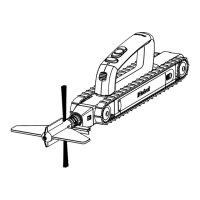
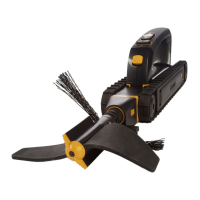
The iRobot Looj Gutter Cleaning Robot is a specialized device designed to simplify and automate the task of cleaning gutters. It aims to eliminate the need for multiple ladder climbs and overreaching at dangerous heights, making gutter maintenance safer and easier for homeowners.
Function Description:
The iRobot Looj is a powerful robot that cleans gutters by removing clogs, lifting debris, and brushing the gutters clean. It features a flexible three-stage auger that spins at 500 RPM, disrupting, lifting, and tossing debris out of the gutters, away from the roof. The robot is controlled wirelessly via a detachable remote control handle, allowing the user to operate it from a safe distance (up to 40 feet, depending on environmental conditions). The remote control provides complete forward and backward movement control, as well as the ability to change the auger's spin direction to ensure debris is ejected away from the roof. The robot is compatible with most standard K-style gutters that have straps or ties mounted at least 2¼ inches above the bottom trough. It is designed for residential use only.
Important Technical Specifications:
- Battery: 7.2V rechargeable battery.
- Battery Life: Designed to power Looj through 150 linear feet of gutter on a single charge.
- Charging Time: 15 hours for initial and subsequent charges.
- Auger Speed: 500 RPM.
- Remote Control Range: Up to 40 feet (wireless).
- Remote Control Batteries: Two AAA alkaline batteries (not included).
- Waterproof Rating: Robot is waterproof in up to one foot of water. The remote control handle is not waterproof.
- Storage Temperature: 50° to 80° F (10° to 26° C).
- Charger Input: Standard US (120V AC) outlet only.
Usage Features:
- Remote Control Convenience: The detachable remote control handle allows for wireless operation, keeping hands clean and facilitating easy placement and removal of the robot from the gutter with one hand.
- Belt Clip/Holster: An included belt clip (and optional holster accessory) allows the user to secure the robot to their side or behind them while climbing or descending a ladder, ensuring both hands are free for safety.
- Three-Stage Auger: The flexible auger system efficiently disrupts, lifts, and tosses debris.
- Directional Debris Ejection: The remote control allows the user to select the auger spin direction, ensuring debris is thrown away from the house and onto the roof, or vice versa, depending on preference and safety.
- Clog Handling: For dense clogs, the robot can be driven slowly forward, allowing the auger to eject small amounts of debris. If the clutch slips (indicated by a loud clicking sound and the auger stopping), the user should reverse the robot to clear loosened debris before proceeding.
- Pre-Use Testing: Users are advised to test Looj on the ground before using it in gutters to familiarize themselves with its movement and auger operation.
- Safety Glasses: Recommended to wear safety glasses to protect eyes from flying debris during operation.
- Ladder Safety: Emphasizes choosing safe ladder positions, inspecting the ladder, avoiding overreaching, and maintaining balance. The robot should be attached to the belt clip or holster when climbing or descending.
Maintenance Features:
- Easy Cleaning: The robot is designed to be easily cleaned with a hose or under a faucet. The remote control handle and treads should be removed before cleaning. No chemicals should be used.
- Battery Care:
- Charge the battery for 15 hours prior to first use and after each use.
- Do not store the battery on the charger for more than several days to optimize battery life.
- For long-term storage, remove the battery from the robot and handle, fully charge it, and store it in a cool, dry place.
- The battery naturally loses charge during storage and requires a 15-hour recharge after a season of non-use.
- Remote Control Handle Cleaning: Clean with a damp cloth only; it is not waterproof.
- Post-Use Cleaning: Clean Looj after each use to prevent sludge accumulation.
- Seasonal Cleaning: Clean gutters at least once per season, or more regularly in areas with heavy debris, to avoid overspill and sludge buildup.
- Battery Compartment Seal: Ensure the battery compartment door is clean and properly sealed when the battery is removed and before cleaning to prevent damage.
- Storage: Store Looj and its battery in a cool, dry place (50°-80°F / 10°-26°C). Remove both the robot's battery and the remote control's batteries for best results during long-term storage.
- Troubleshooting Guide: A comprehensive chart is provided to help resolve common issues such as remote control signal loss, auger problems, and robot movement issues.
- Customer Support: Users can visit the iRobot website for support tips, FAQs, and accessories, or contact customer care representatives for assistance.


 To Next Page
 General