6 For more information, visit www.irobot.com/Roomba800
EN
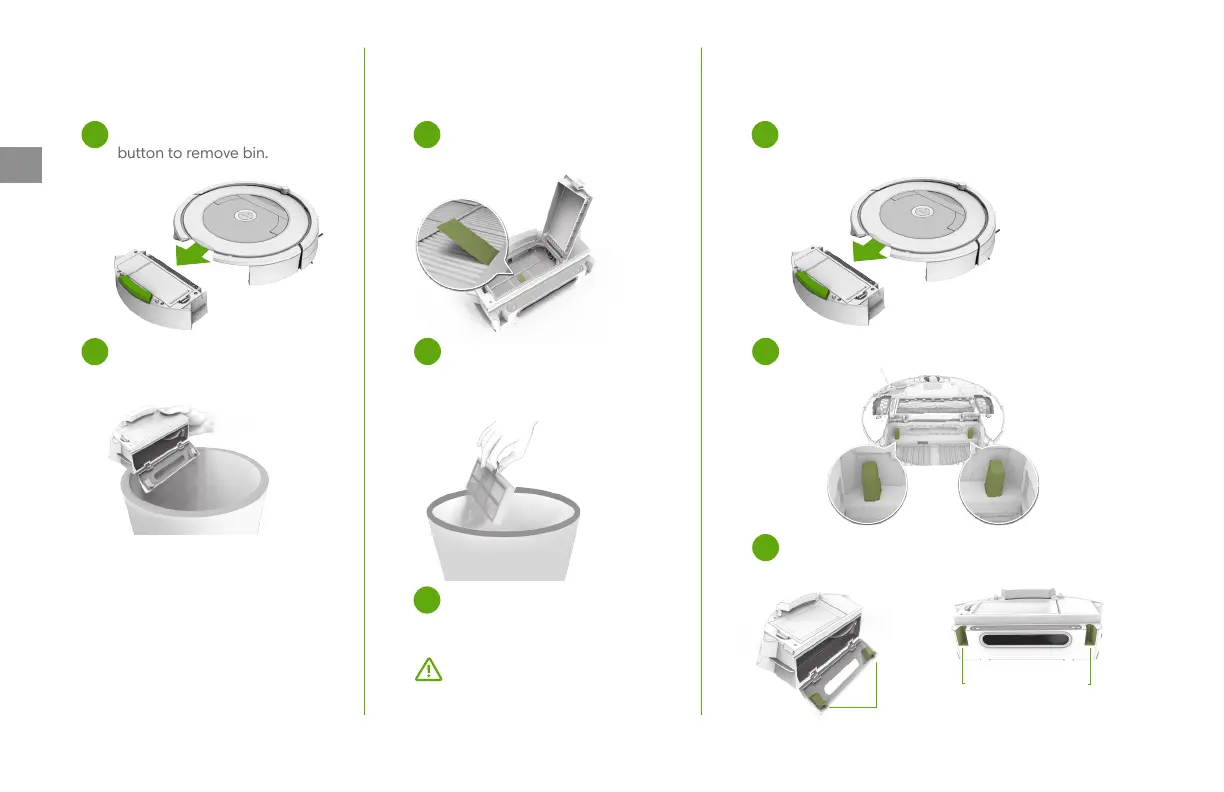
Outer Sensor Ports
Inner Sensor Ports
Emptying the Bin
Cleaning the Filter
Cleaning the Full Bin Sensors
Important: The filter door won’t
close unless a filter is reinserted
correctly. Replace the filter every
two months.
Open the filter door and remove
filter by grasping the tab.
1 1
Shake o debris by tapping
thefilter against the side of
yourhousehold waste bin.
Reinsert filter with the tab
facing up.
Wipe the sensors with a clean, dry cloth.
Wipe the inner and outer sensor ports
on the bin with a clean, dry cloth.
2 2
3
3
Open bin door to
empty bin.
2
Press bin release
button to remove bin.
1
Remove and empty the bin.



 To Next Page