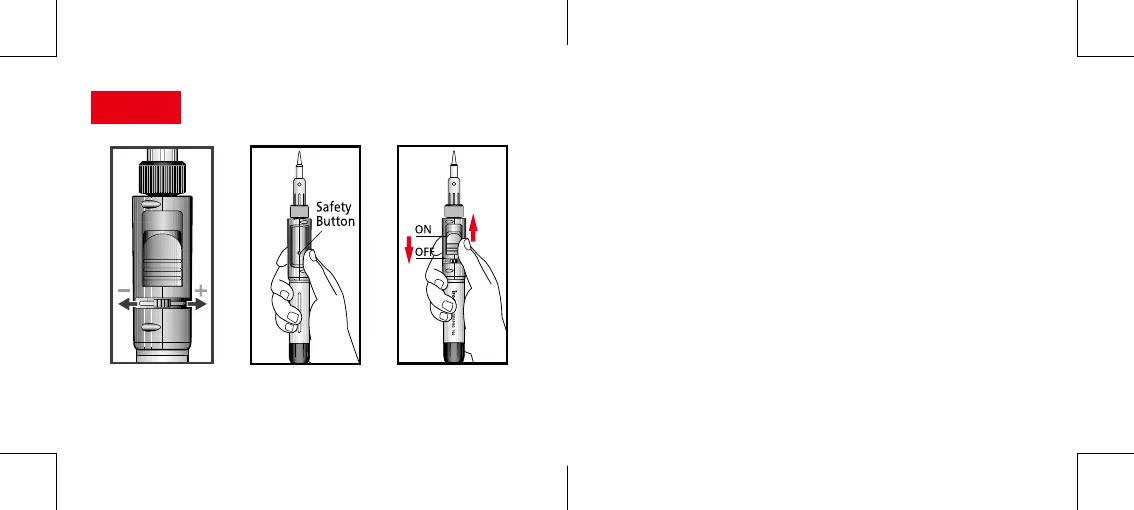
IGNITION
1. SetGas Control Leveratmid position.(Fig.3)
2. WhilepushinginandholdingtheSAFETY BUTTON(Fig.4)
SlowlyslideuptheON/OFF Ignition Switch(Fig.5)tothe"ON"
positiontostarttheowofgas.
3.Asgasisowing,continueslidingtheIgnition Switchtowardthe
tiptillyouhearaclick.Theautomaticignitionwilllightthegas.
4.Releasetheswitchanditwillautomaticallymovebacktothe
"ON"position.
5.Thetiphousingwillstarttoglowred.Ifnot,slidetheON/OFF
Ignition Switchbacktothe“OFF”positionandrepeatsteps2
and3.
6.Toturno,slidetheON/OFF Ignition Switchdownwardtothe
OFFposition.
Fig.3 Fig.4 Fig.5
8
9


 To Next Page