EasyManua.ls Logo

iRV Technologies iRV 70 - Remote Control Guide

iRV Technologies iRV 70
19 pages
Print Icon
To Next Page IconTo Next Page
To Previous Page IconTo Previous Page
Loading...
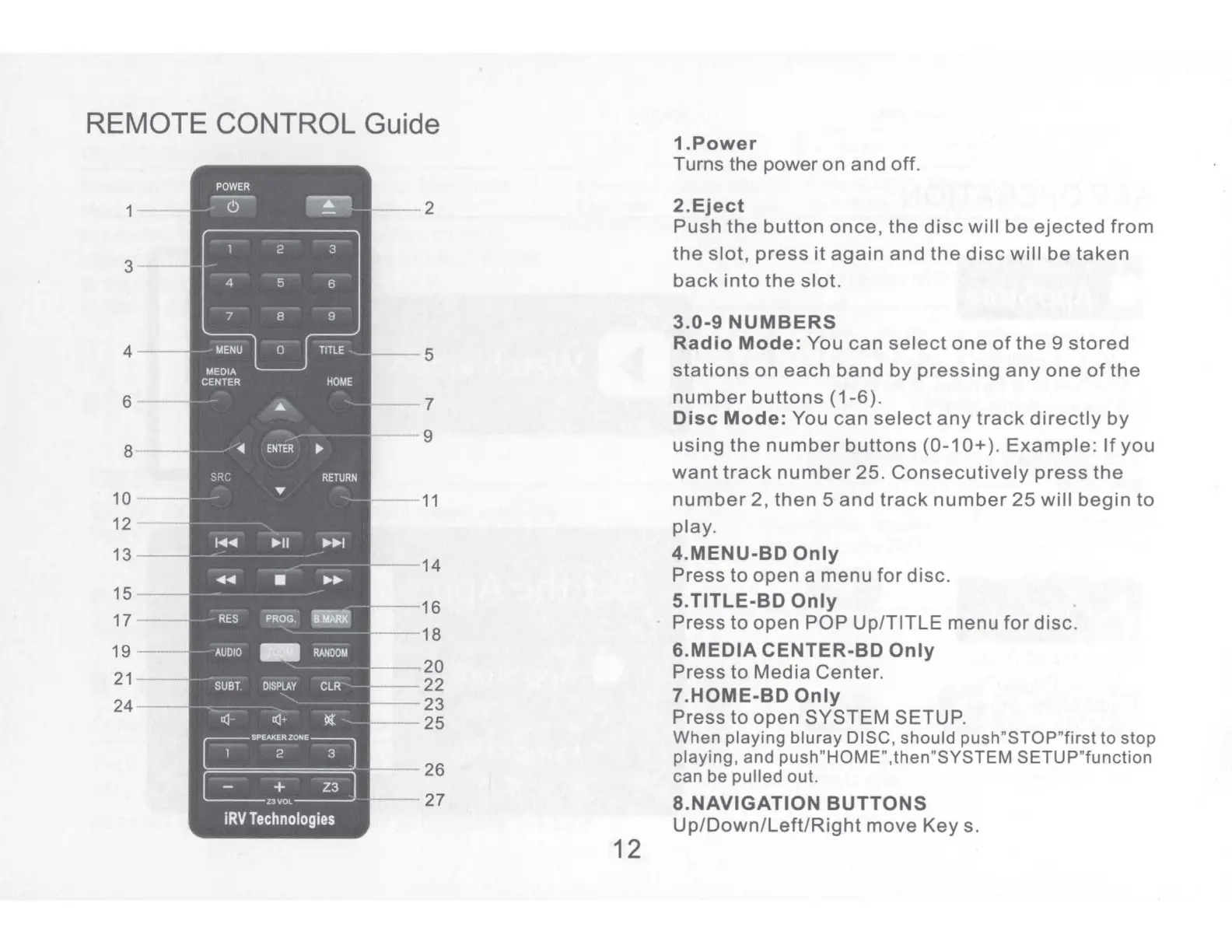
REMOTE CONTROL Guide
3
6
8
I
15
--
17
--
19
--
21
--
24
--
POWER
~
~
2 3
4 5
6
7
8 9
MENU
0
TITLE
MEDIA
CENTER
HOME
.....
ENTER
SRC
RETURN
...
I
◄◄
II
►►
I
◄◄
►►
RES
PROG.
'-MARK'
AUDIO
-
RANDOM
SUBT.
DISPLAY
CLR
a:J-
a:J+
l(
SPEAKER
ZONE~
2 3
+
23
Z3VOL
iRV
Technologies
2
5
--
16
--
18
----,
20
--
22
--
23
25
12
1.Power
Turns the power
on
and
off.
2.Eject
Push
the
button
once,
the
disc
will
be
ejected
from
the
slot,
press
it
again
and
the
disc
will
be
taken
back
into
the
slot.
3.0-9
NUMBERS
Radio
Mode:
You
can
select
one
of
the
9
stored
stations
on
each
band
by
pressing
any
one
of
the
number
buttons
(1-6).
Disc
Mode:
You
can
select
any
track
directly
by
using
the
number
buttons
(0-1 O+ ).
Example:
If
you
want
track
number
25.
Consecutively
press
the
number
2,
then
5
and
track
number
25
will
begin
to
play.
4.MENU-BD
Only
Press
to
open
a
menu
for
disc.
5.TITLE-BD Only
Press
to
open
POP
Up/TITLE
menu
for
disc.
6.MEDIA
CENTER-BO Only
Press
to
Media
Center.
7.HOME-BD
Only
Press
to
open
SYSTEM
SETUP.
When
playing
bluray
DISC, should
push"STOP"first
to stop
playing, and push"HOME",then"SYSTEM
SETUP"function
can be pulled out.
8.NAVIGATION
BUTTONS
Up/Down/Left/Right
move
Keys.

Related product manuals