EasyManua.ls Logo

iRV Technologies iRV 70 - Page 13

iRV Technologies iRV 70
19 pages
Print Icon
To Next Page IconTo Next Page
To Previous Page IconTo Previous Page
Loading...
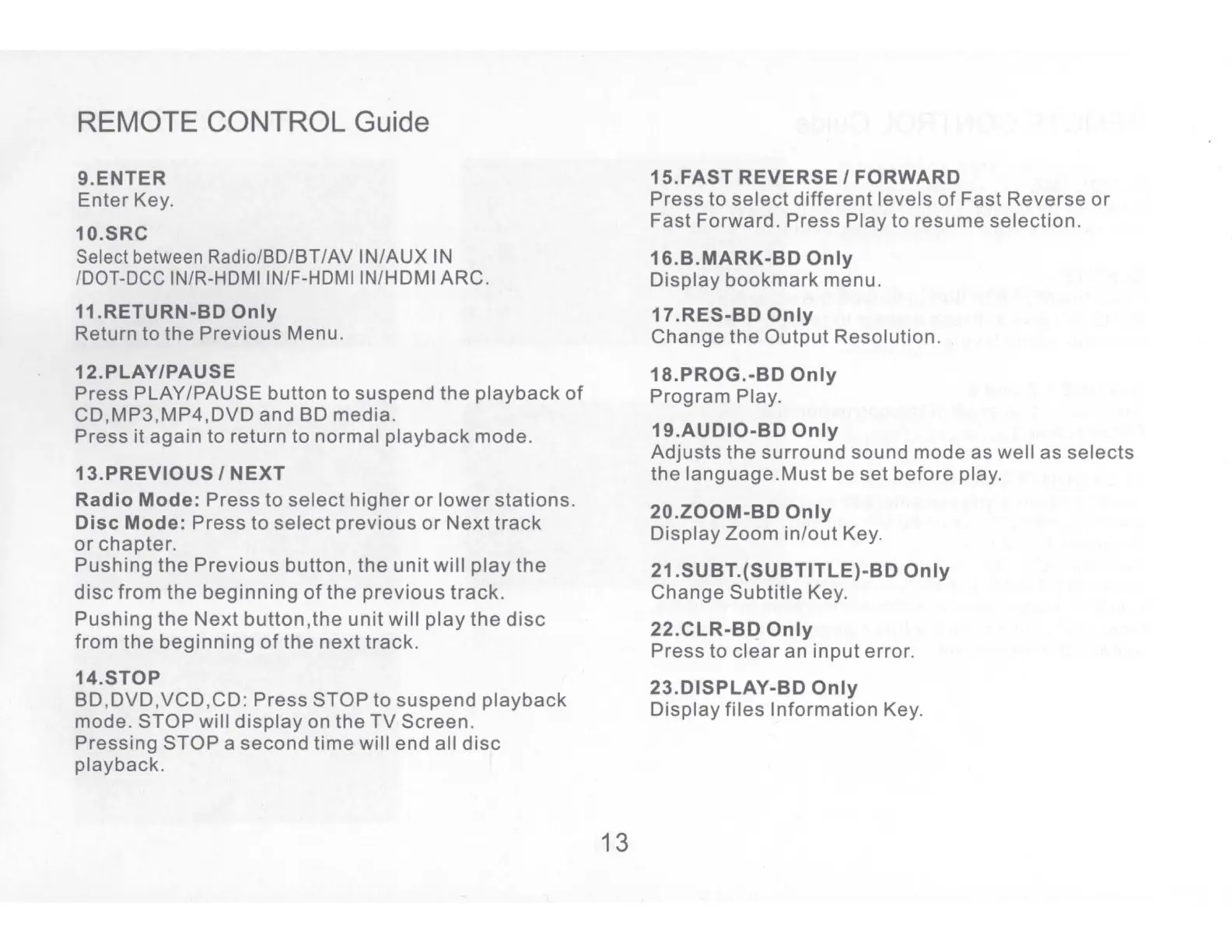
REMOTE CONTROL Guide
9.ENTER
Enter
Key.
10.SRC
Select between Radio/BO/BT/AV IN/AUX
IN
/DOT-DCC
IN/R-HDMI IN/F-HDMI IN/HDMI ARC.
11.RETURN-BD
Only
Return
to
the
Previous
Menu.
12.PLAY/PAUSE
Press
PLAY/PAUSE button
to
suspend
the
playback
of
CD,MP3,MP4,DVD
and
BO
media.
Press
it
again
to
return
to
normal
playback
mode.
13.PREVIOUS
/
NEXT
Radio
Mode:
Press
to
select
higher
or
lower
stations.
Disc
Mode:
Press
to
select
previous
or
Next
track
or
chapter.
Pushing
the
Previous
button,
the
unit
will
play
the
disc
from
the
beginning
of
the
previous
track.
Pushing
the
Next
button.the
unit
will
play
the
disc
from
the
beginning
of
the
next
track.
14.STOP
BD,DVD,VCD,CD:
Press
STOP
to
suspend
playback
mode.
STOP
will
display
on
the
TV
Screen.
Pressing
STOP
a
second
time
will end all
disc
playback.
13
15.FAST
REVERSE/
FORWARD
Press
to
select
different
levels
of
Fast
Reverse
or
Fast
Forward.
Press
Play
to
resume
selection.
16.B.MARK-BD
Only
Display
bookmark
menu.
17.RES-BD
Only
Change
the
Output
Resolution.
18.PROG.-BD
Only
Program
Play.
19.AUDIO-BD
Only
Adjusts
the
surround
sound
mode
as
well
as
selects
the
language.Must
be
set
before
play.
20.ZOOM-BD
Only
Display
Zoom
in/out
Key.
21.SUBT.(SUBTITLE)-BD
Only
Change
Subtitle
Key.
22.CLR-BD
Only
Press
to
clear
an
input
error.
23.DISPLAY-BD
Only
Display
files
Information
Key.

Related product manuals