
 Need help?
Do you have a question about the iRV Technologies iRV66 and is the answer not in the manual?
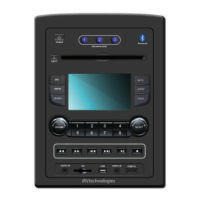
Describes the physical layout and buttons on the unit's front panel.
Details operation of Power, Source, Radio, Clock, Volume, and media playback buttons.
Describes CD/DVD loading, USB, and SD card media support.
Details HDMI, Audio/Video inputs, IR, and ARC connections.
Explains the Bluetooth link and its capabilities.
Covers frequency selection, auto-search, and band activation.
Instructions for setting and recalling radio station presets.
Explains auto best station memory and scanning functions.
Step-by-step guide for setting the unit's clock.
Describes fast forward/reverse and track selection for DVDs, CDs, and MP3s.
Instructions for loading and playing media from USB and SD cards.
Guide for using the companion mobile application for control.
Step-by-step instructions for connecting Bluetooth devices.
Covers Power, Eject, Number buttons, and Fast Forward/Reverse.
Details Play/Pause, Mode, Navigation buttons, and Previous/Next.
Covers Repeat, Stop, Mute, Audio, Volume, and Setup controls.
Explains settings for TV system, resolution, and screen saver.
Guide for configuring OSD, audio, subtitle, and menu languages.
Covers SPDIF and HDMI audio output settings.
Details settings for speaker zones and delays.
Visual guide to all input and output connections.
Addresses problems like no power, poor reception, and disc errors.
Lists physical dimensions, power, frequency ranges, and other technical details.
The iRV 66 is a versatile entertainment system designed for a range of audio and video playback, offering features for both stationary and portable use. It functions as an AM/FM/CD/DVD/MP3/MP4 player with digital 5.1 surround sound and an optical SPDIF audio input, making it suitable for various media sources. A key feature is its Bluetooth connectivity, enabling secure, wireless connections with portable devices and allowing handheld control of streaming music from a user's wireless device playlist.
For media playback, the unit includes a CD/MP3/MP4/DVD disc player compatible with standard size CD, MP3, MP4, and DVD discs (4.75" or 12cm). It is designed to read standard DVD, MP3, MP4, CD, CD-R, CD-RW, and JPEG-CD discs. It's important to note that due to variations in recording methods, some discs may not play, and the unit is designed to play Region 1 DVDs (USA and Canada). The iRV 66 also supports USB and SD cards, allowing users to play files such as MP3 music, MP4 short video clips, and JPEG photo files. The USB port can also charge devices like iPods and MP3 players. SD cards up to 32GB and USB flash drives up to 1TB are supported, provided they are formatted to FAT or FAT32.
The built-in AM/FM tuner offers 27 preset FM stations and 18 AM stations. Users can select between FM1, FM2, FM3, AM1, or AM2 bands, with each band capable of auto-programming 8 station presets. Manual tuning is also available, allowing users to move through channels up or down. An auto-search tuning function helps find available stations at higher or lower frequencies, staying on the selected station until another function is chosen. For manual frequency presets, users can select a band and desired frequency, then hold a numeral for 3 seconds to set it. An automatic store/preset scan feature allows the receiver to scan and save stations while listening to the radio, or to scan through saved stations.
The iRV 66 provides high-power audio and video outputs to three different zones. Zone 1 receives 5.1 digital surround sound, while Zones 2 and 3 receive standard stereo audio. It includes 1 video input, 2 video outputs, 3 audio inputs, and 1 digital/optical input, enabling entertainment from external sources such as satellite radio, VCRs, digital cameras, video games, iPods, and MP3 players. These sources can be connected directly to the unit or via additional accessory wall plates. The digital optical input specifically enables digital audio from A/V components with digital optical output.
For video connectivity, the unit features HDMI with 3 HDMI inputs and 3 HDMI outputs, including 1 HDMI ARC (Audio Return Channel). This allows for comprehensive integration with modern display devices.
A built-in clock displays the time when any button is pressed and includes a sleep timer to turn off the radio. The clock setting can be accessed by pressing and holding the CLOCK button for 3 seconds, then using the SELECT knob to set the hour and minutes.
The iRV 66 can also be controlled via a dedicated app, supporting iPhone 4S+ and Android 4.3+. Users can download the app from the App Store or Google Play by searching for "iRV33" or "iRV66".
Operation of the unit is straightforward, with clearly labeled buttons for power, eject, source selection (SRC), AM/FM, clock, speaker zone control, mute, audio, setup, volume, and selection. Number buttons (1-8) are used for entering numbers, track numbers, DVD chapter numbers, or time data. FWD and RWD buttons are used for auto-scanning and memorizing preset stations in radio mode, and for selecting different levels of fast reverse in disc mode. PLAY/PAUSE and STOP buttons control disc playback. The SELECT knob is used for choosing and confirming selections when navigating menus or playing media from USB/MP3/CD discs.
Maintenance and safety are important considerations. The manual warns against opening the cabinet due to the risk of electrical shock and advises contacting a professional technician for service. Only factory-recommended components should be used for replacement. The unit should be turned off when not in use, and the face cleaned with a dry, soft cloth. To address moisture issues, the unit can be turned on, a disc ejected, and run for 1-2 hours to vaporize moisture. Users should avoid repeatedly turning the unit off and on, waiting 10 seconds before restarting. Broken, scratched, or twisted discs should not be used to prevent damage to the unit, and only 5" (12cm) discs are recommended.
Troubleshooting guidance is provided for common issues. If there's no power, check the fuse. For LCD errors or unresponsive buttons, turn off and restart the unit, or perform a factory default restart by holding the POWER button for 5 seconds. Poor radio reception or static may indicate an antenna issue (length, extension, breakage, or grounding) or a weak broadcast signal. If a disc cannot be loaded, ensure it's not already in the machine and try ejecting it. For no picture, check the video line connections to the TV and ensure the TV SYSTEM is set to "NTSC" if applicable. Disc errors may mean the disc is damaged or dirty, requiring cleaning or replacement. If there's no color on video, restart the unit or perform a factory default restart. If problems persist after these checks, consulting a service dealer is recommended, and users should never attempt to disassemble the unit themselves.
 General
| Bluetooth | Yes |
|---|---|
| USB Port | Yes |
| AM/FM Radio | Yes |
| HDMI Output | Yes |
| Pre-set Equalizer | Yes |
| Remote Control | Yes |
| Playable Media | CD, MP3, USB |

 To Next Page