06
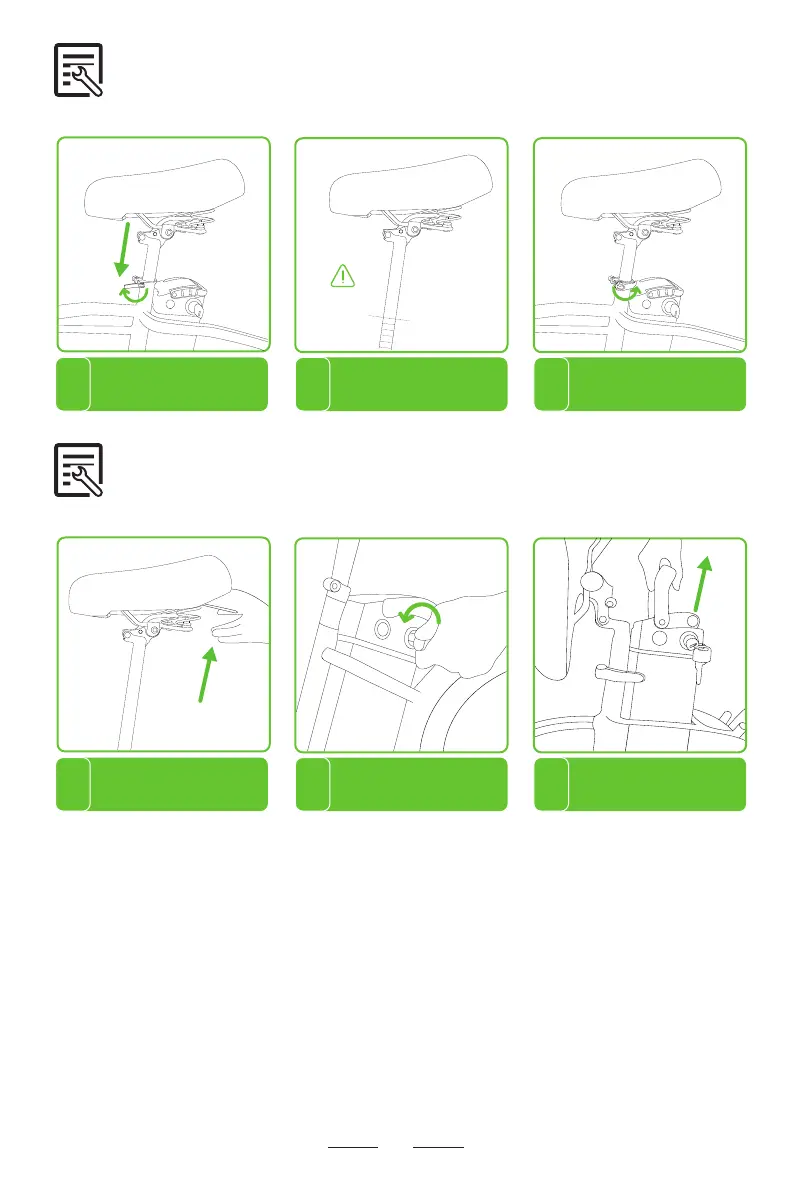
Step 6 Seat Installation
Open the QR seatpost clamp and
adjust the seat height by pulling up
or pressing down the seat.
1
Close the seatpost clamp and make sure
the seatpost is held in place. Don’t adjust
the seat too high (keep the safety line
mark lower than the top of the seat tube).
2
Loosen the seat clamp and adjust
the seat to an appropriate angle.
3
Step 7 Battery Removal and Installation
1 2 3
For your convenience, the bike battery can be removed.
To reinstall the battery, align the slot on the bottom of the battery and reinsert the battery into the
frame. Turn the key to the locked position. If you want to know the battery level without turning the
power on, Long press the button on the top of the battery to display the current battery level.
Safety Line
Locate the seat QR lever and
flip the seat over.
Press and turn the key to
unlock position.
Carefully slide the battery up
and lift it off the frame.


 To Next Page