iSYSTEM, October 2016 8/69
Using grounding wire
In case of the on-chip emulation, it has been proven that a development tool can be damaged at the moment
when the emulator's debug connector is plugged into the target system when neither the target nor the emulator
are powered up yet. At this point in time, there could be ground potential difference between the emulator and
the target way over 1000V. Such voltage difference is then discharged over the emulator and the target, which
can destroy electronic components of the emulator and/or the target.
The voltage difference can be introduced by:
power supply (target, emulator), which does not have the power outlet ground connected with the power
supply ground.
power outlets which have different ground potentials
PC, when iC5000 connects to the PC through the USB port
Connecting a dedicated grounding wire, which is shipped with the iC5000 unit, between the iC5000 system and
the target before the target debug cable adapter is connected to the target, makes the complete development
system even more robust and resistant to the mentioned electrical discharge problem - despite the fact the iC5000
development system features already a high quality protection on all connecting signals by default.
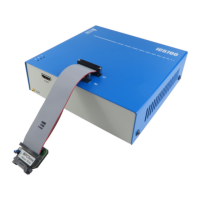
iC5000 with the grounding wire and the ground pin in the left bottom corner
The grounding wire connecting the target and iC5000


 To Next Page