Need help?
Do you have a question about the iSystem iC5700 and is the answer not in the manual?
IDE for debugging embedded applications with advanced features like breakpoints and trace visualization.
Simplifies unit test development for embedded applications using the Original Binary Code method.
SDK for automating tasks within winIDEA and testIDEA via Python, Java, and other languages.
Instructions to avoid personal injury, instrument damage, or target system damage during use.
Details on temperature, humidity, size, weight, communication interfaces, voltage, and power consumption.
Electrical characteristics including debug signal valid input voltage range and pull-up/down resistor values.
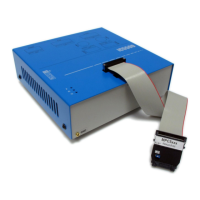
Visual overview of the iC5700 unit, detailing its top face connectors and indicator lights.
Visual overview of the iC5700 when equipped with an optional IOM6 Hub, showing additional ports.
Detailed description of DTM connectors (A) and indicator lights (B) on the top face of the iC5700.
Description of front panel ports (C, D) and rear panel connectors (E, F, G, H) of the iC5700.
Description of IOM6 Hub ports (I, J, K) and the FBridge port for synchronization.
Critical warnings regarding powering sequence, FBridge port usage, and accessory compatibility.
Importance and procedure for connecting the grounding wire to prevent voltage differences.
Details on power supply voltage range, types, and optional adapters for the BlueBox unit.
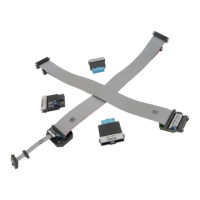
Overview of the two types of connection systems for linking the BlueBox to the target microcontroller.
Step-by-step guide for connecting the 40-pin ribbon cable to the DTM #1 socket.
Instructions for connecting the debug adapter to the ribbon cable and the target system.
Procedure for disconnecting the ribbon cable and notes on signal degradation with longer cables.
Connecting IOM6 accessories to FNet ports and warnings about HDMI incompatibility with FNet.
Extending iC5700 with IOM6 Hub for additional FNet/FBridge ports and synchronization capabilities.
Overview of Active Probes and Add-On Modules for enhanced debugging and analysis features.
Description of the IOM6 product line for extending functionality with various modules.
Statement of conformity with EU directives EMC 2014/30/EU and RoHS 2011/65/EU.
List of harmonized standards and technical specifications that have been applied to the product.
 General
| Operating Temperature | 0°C to +50°C |
|---|---|
| Target Interfaces | JTAG, SWD, ETM, PTM |
| Supported Architectures | RH850, Renesas RX |
| Debug Features | Trace, Profiling |
| Host Interface | Ethernet, USB |
| Operating System Support | Windows |

 To Next Page