The iTechworld PS2000 is a portable power station designed to provide reliable power in various situations. It features a robust LiFePo4 battery with a capacity of 1997Wh, offering over 3500 charge cycles, ensuring long-term durability and performance. The device is housed in a compact and portable design, measuring 392x279x323mm and weighing 22.0kg.
Function Description:
The PS2000 serves as a versatile power source, capable of charging and powering a wide range of electronic devices and appliances. It supports multiple input and output options, including AC, DC, USB, and solar charging, making it suitable for outdoor adventures, emergency backup, and off-grid living. The unit incorporates a built-in cooling fan to maintain optimal operating temperatures, automatically activating under high output/input loads.
Important Technical Specifications:
- Battery Type: LiFePo4
- Battery Capacity: 1997Wh
- Single Cell Rated Voltage: 3.2V
- Battery Pack Rated Voltage: 51.2V
- Battery Pack Output Voltage: 43.2-57.6V
- AC Charging: 50/60Hz, 1100W max, fully charges in 2 hours.
- MPPT Solar Input: 11.5-50V, 20A, 500W max (supports 25A Anderson to 50A Anderson conversion cable).
- AC Output: 50/60Hz (frequency switch available), rated 2000W pure sine wave, with built-in overload and short circuit protection.
- USB Outputs:
- 2x USB-A (5V/2.4A)
- 2x USB-A QC3.0 (18W)
- 2x Type-C (5-20V/5.0A, 100W max, PD3.0)
- DC Outputs:
- 2x DC 5521 (12V/3A)
- 1x XT-60 (12V/25A)
- 1x Cigar Lighter (12V/10A)
- Operating Temperature: -10°C to 40°C
- Environment Humidity: ≤90%RH
- Cycle Times: > 3500 times
- Power Off Current: <500uA
- UPS Mode: Bypass function, switches to battery within 10ms during power outage (max output 2000W).
Usage Features:
The PS2000 is designed for user-friendly operation with clearly labeled controls and an informative LCD screen.
- Power On/Off Control Button: A long press turns the unit on or off (hold until the screen activates/deactivates). It is recommended to turn off the unit when not in use.
- LED Light Control Button: A short press cycles through light modes (Solid/SOS/Flash). A long press turns the light off in any mode.
- USB Control Button: Activates/deactivates USB outputs (requires the power station to be on).
- DC Control Button: Activates/deactivates DC outputs (requires the power station to be on).
- AC 240V Output Button: Activates/deactivates AC outputs (requires the power station to be on).
- LCD Screen Display: Provides real-time information on remaining power, input/output data, and various status indicators. The display enters sleep mode after 30 seconds of inactivity and wakes up with input charge or any button press.
- Solar Charging: Connect solar panels (up to 500W, max 50V) using the included 25A Anderson to 50A Anderson conversion cable.
- AC Charging: Use the included wall socket charger for 1100W fast charging, achieving a full charge in approximately 2 hours.
- Notice: Charge directly from a wall socket; avoid extension cords or plugging multiple devices into the same power board/socket to prevent overload and fire risk.
- Car Charger Charging: Use the provided car charger for charging, though it offers a lower power output (90-120W) resulting in longer charging times compared to AC charging.
- UPS Mode: The PS2000 features a bypass function, allowing power to flow directly from the grid to connected appliances without passing through the battery. In the event of a power outage, it automatically switches to battery power within 10ms. The maximum power output in UPS mode is 2000W. An blinking AC output icon indicates overload if output exceeds 2000W.
LCD Features and Display Attention:
The LCD provides detailed status information:
- Remaining discharge time
- Fan status
- High/low temperature indicator
- Battery level indicator
- Total input power
- Total output power
- LED light status
- AC output status
- Type-C output status
- USB output status
- AC charging status
- Anderson charging status
- DC output status
- Cigarette lighter output status
- XT-60 output status
Display Attention Icons:
- Air Intake/Outlet Unobstructed Icon: Lights up to remind users to keep air intake/outlet clear.
- High/Low Temperature Icon: Lights up when the device is experiencing high or low temperatures, indicating potential temporary shutdown until the temperature returns to normal.
- AC Input Flashing Icon: Indicates an AC input fault; users should recheck the power/Hz/cable.
- Output Blinking Icon: Indicates an output fault; users should recheck the output connection.
Maintenance Features:
The PS2000 includes several features and guidelines for safe operation and longevity.
- Overload Protection: Prevents damage from excessive AC input current. If activated, the overload protector cuts off AC input. To restore, turn off the PS2000, unplug all ports, confirm standard connections, turn on the unit, and press the overload protection button to restore AC input.
- Fault Resolution: The manual provides a table for troubleshooting common issues:
- Output Exceeds Standard (Short Circuit): If the output icon flashes and buzzes, remove the output device, check if the overload protector is activated (press it if so), and press the AC output button. If the protector doesn't spring up, directly press AC output to restore.
- Temperature Warning: If the temperature warning icon flashes and buzzes, the product's temperature has exceeded the appropriate range. Remove equipment, turn off the power, and wait for the unit to reach the appropriate temperature.
- Bad Wire Connection: If charging is unavailable, confirm the connection status of the line and power supply.
- Overload Protection Activated (Charging Unavailable): If charging is unavailable, turn off the power, remove all cables, verify components are normal, turn on the power, and press the overload protection button to reconnect the AC cable.
Warnings and Storage:
- Avoid extreme temperatures, high humidity, direct sun, and fire.
- Do not disassemble or modify the PS2000.
- Avoid dropping the unit from a high place.
- Keep out of reach of children.
- Use only genuine iTechworld accessories.
- Maintain a 30cm clearance around side suction and exhaust ports for proper heat dissipation.
- When not in use, turn off the power and unplug the power cord. Avoid storing in direct sunlight with high temperature and humidity.
- For long-term storage, discharge the unit from full power to no power once every three months, then recharge to about 75%.
- Do not use the PS2000 or its accessories with defective equipment.
- Avoid storing the PS2000 for extended periods in extremely high or low temperatures.

 Need help?
 General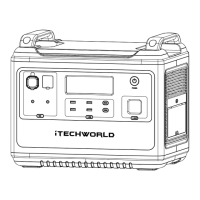

 To Next Page