Installation of mount
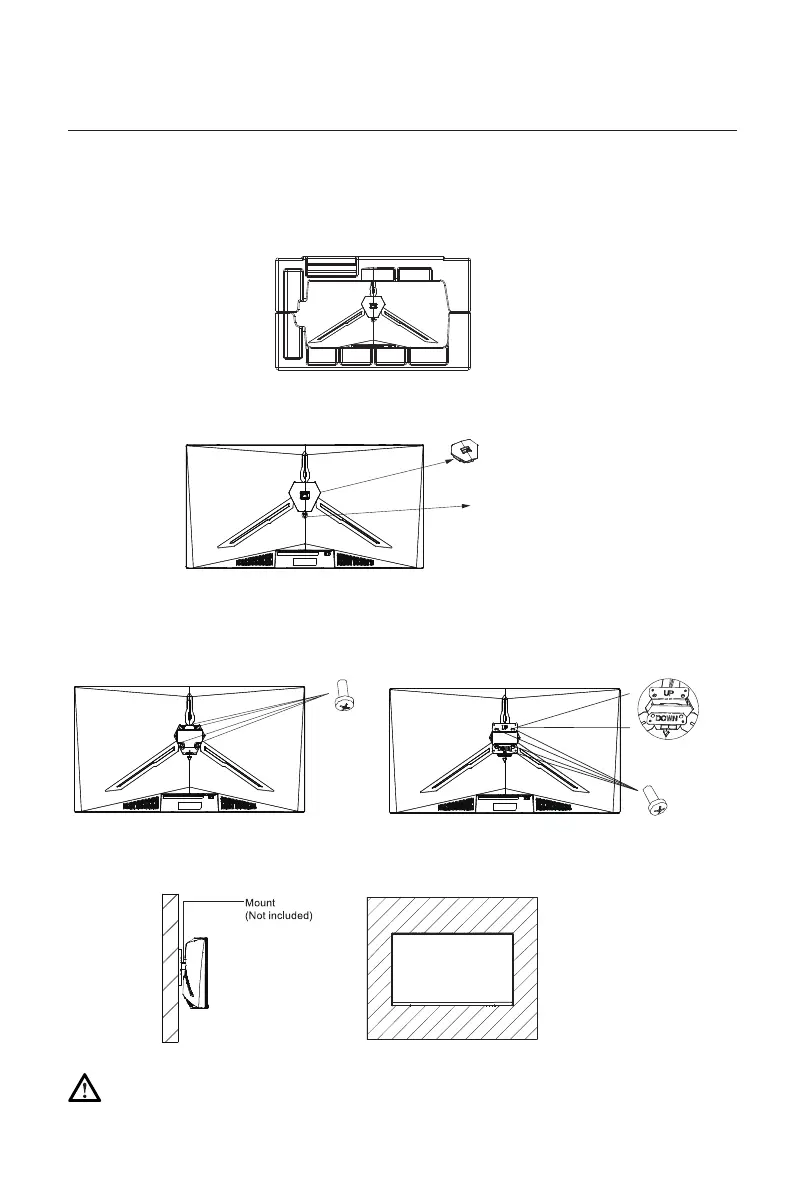
2. If the stand was not installed, press the button to remove the stand plate.
1. Open the package, take out the product with foam still attached, and gently place it on a desktop or
table. Remove the extra parts and the foam covering the back of the monitor. If the monitor is already
attached to the stand, remove the stand.
Button
Stand Plate
3. Remove the original screws x4 from the opening in the back of the monitor and put them aside. Then
use the screws provided to attach the adapters inside the opening.
4. Follow the directions received with your mount, stand, or accessory and install the monitor on the wall
or fixture as desired.
Original
Screws x 4
Screws x 4
Do not place or hang any object on the mount, and the using height of the mount should be less
than 2 meters.
Notes: To prevent the monitor on the mount from failing, please install it firmly and protect it fully.
Eng-4



 To Next Page