Cable connection:
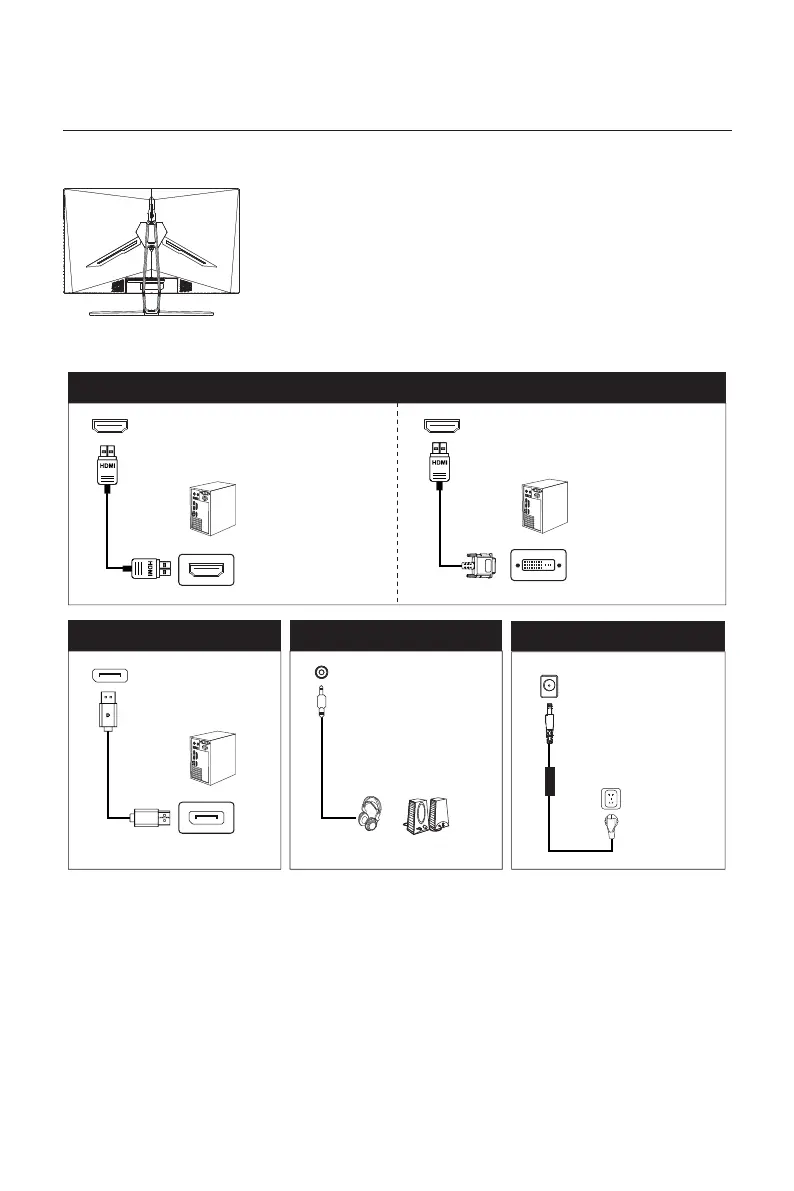
Use the HDMI cable to connect the HDMI IN
interface of the product to the HDMI OUT
interface of a PC.
* Note: If the power cable or signal cable is damaged, you must replace it
* The bottom interface configuration at the back of the monitor varie with
products.
with special soft cables or special components purchased from the
manufacture or maintenance department.
Use the HDMI-DVI cable to connect the HDMI IN
interface of the product to the DVI OUT interface
of a PC.
HDMI interface
DP interface
DC IN
AUDIO OUT
OR
Use the DP cable to
connect the DP IN interface
of the product to the DP
OUT interface of a PC.
Connect audio outputting
devices such as earphones
to the AUDIO OUT
interface.
Please connect the power
adapter to the power cable,
connect the power adapter
plug to the corresponding
power port of the monitor,
and then connect the power
cable to a properly grounded
power outlet.
Eng-7


 To Next Page