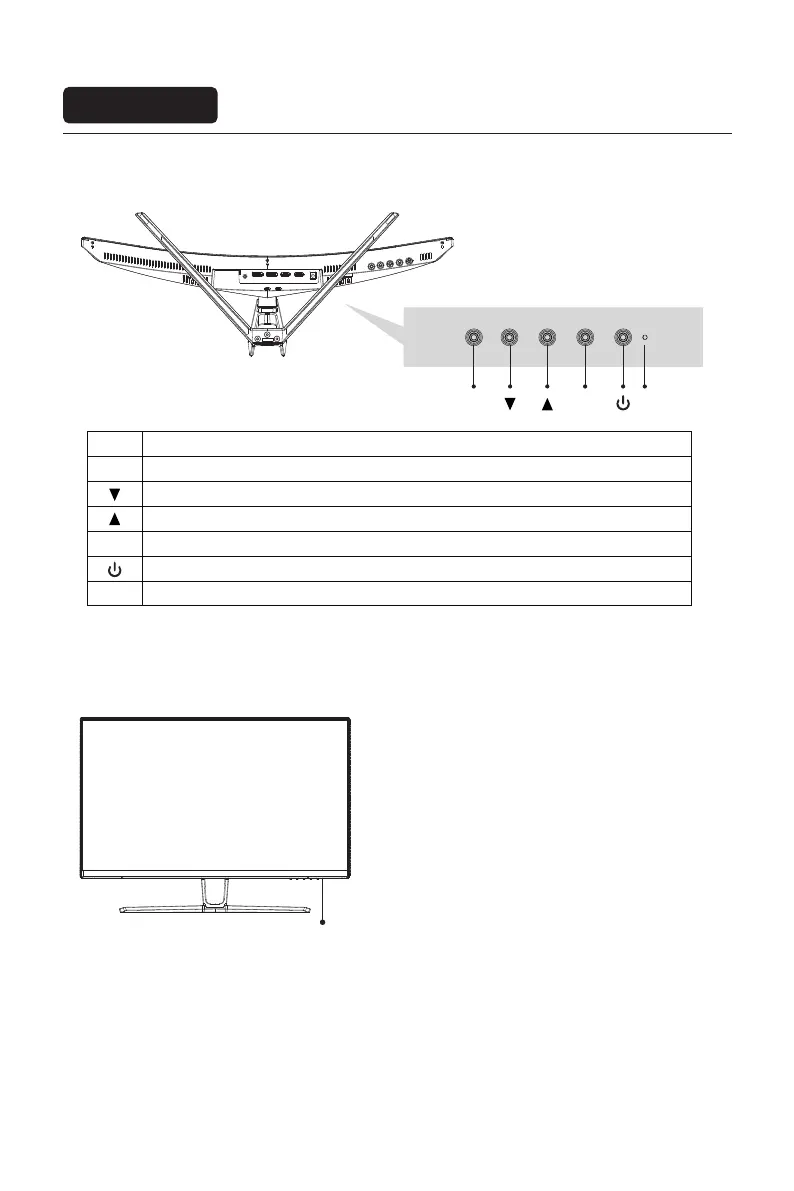
Menu button: Press to enter sub-menus/ quickly enter the main menu
Down button: Press to move down in the menu/quickly adjust the game crosshair
Up button: Press to move up in the menu/quickly adjust the contextual mode
Exit/hot key: Press to return to the previous menu/quickly switch input signals of the port
Power button: Press to turn on/off the monitor
Indicator: A steady blue light indicates that the power is on and the monitor is operating normally. Blue light
flashes to indicate There is no video source and no horizontal or vertical signal or low voltage is detected.
Make sure your computer It is turned on and all video cables are fully plugged in and/or connected.
Button Function
LED lndicator: Changes colors to indicate status.
Indicator
Description of buttons
Instructions
Explanation of indicator light
Eng-6
M
M
E
E
LED
LED


 To Next Page