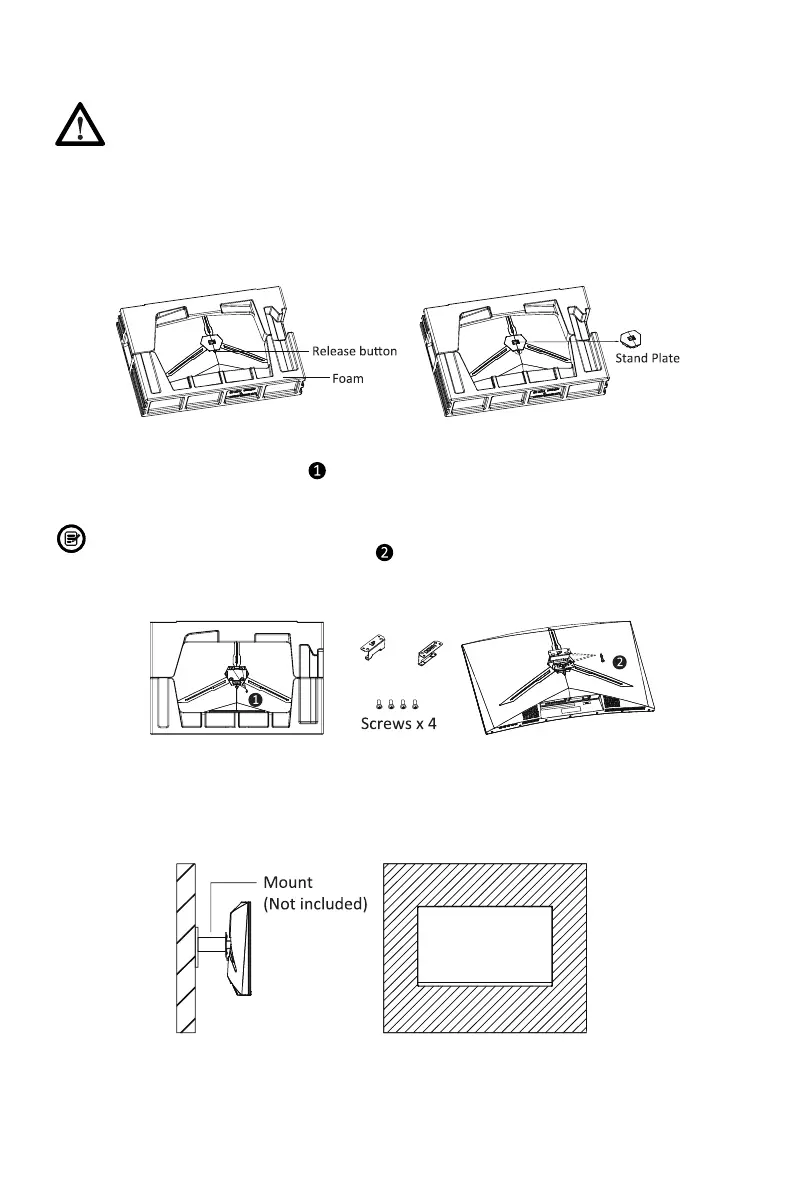
This monitor only includes screws which may be used when attaching the monitor to
a VESA 75*75mm type mount. No VESA mount or mounting accessory is included.
1. Open the package, take out the product with foam still attached, and gently place it
on a desktop or table. Remove the extra parts and the foam covering the back of the
monitor. Press the release button to remove the stand plate. lf the monitor was
already attached to the stand, remove the stand.
2. Remove the original screws ( ) from the opening in the back of the monitor. Then
use the 4pcs PM4*16 screws to attach the adapters inside the opening.
3. Your monitor is now ready to be attached to a wall-mounting bracket. To avoid
damage, please do not pinch the screen during bracket installation.
● Do not discard the original screws.
● Use only the 4pcs PM4*16 screws ( ) provided. You MUST follow the instructions
below for secure installation.
Eng-5
6.
Mount Installation



 To Next Page