9
System Access
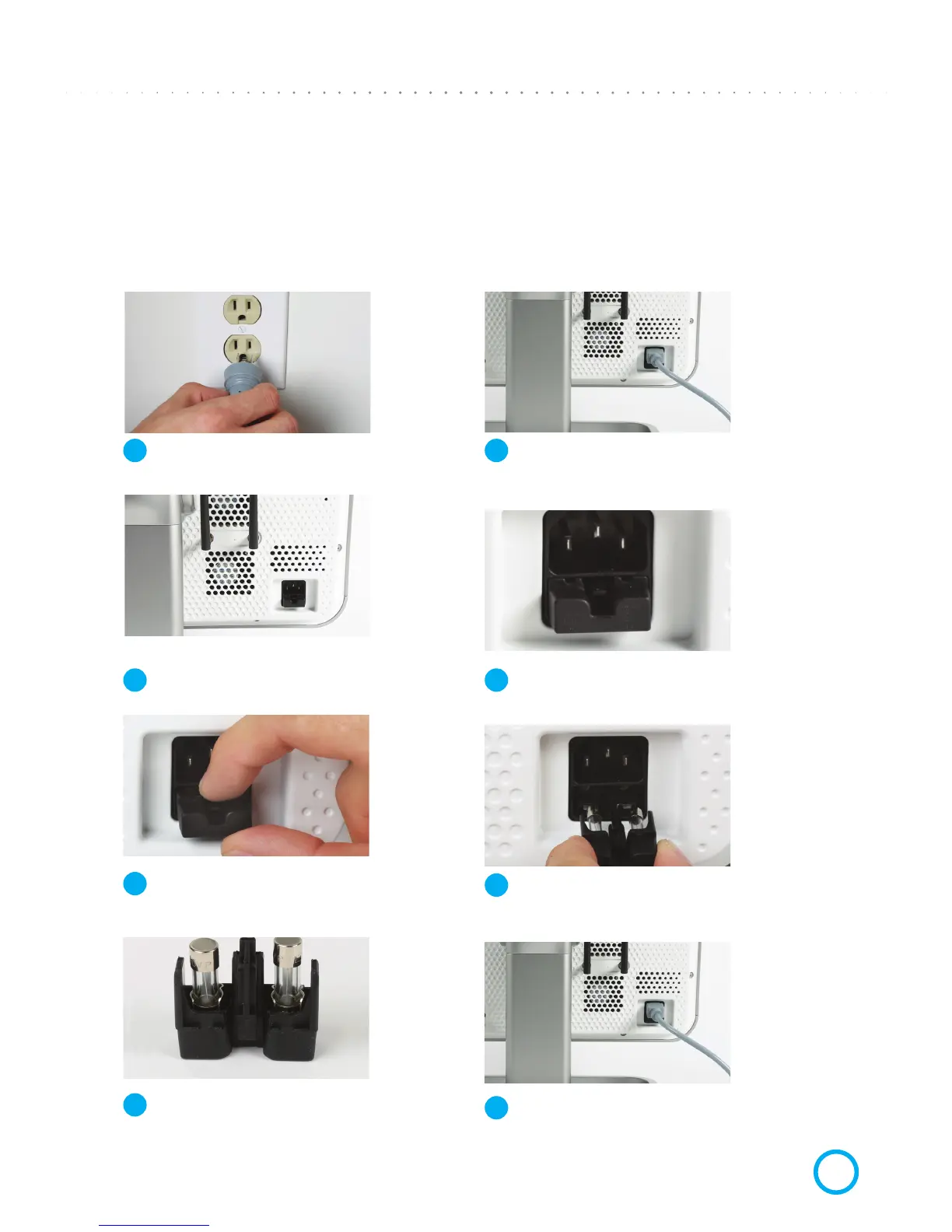
Move system away from any wall to allow easy access
to the power cord and fuse tray.
View Fuse Tray
The fuse tray is located below the power socket.
Remove & Check Fuses
Carefully remove each fuse from the tray.
Check fuses visually (and with tester if available).
Close Fuse Tray
Close the fuse tray and insert cord rmly.
CHAPTER 4:
AC Power Problems–Troubleshooting
CHECKING & REPLACING MAIN FUSES
Unplug Cord from Wall
Unplug the power cord from the wall socket.
Disconnect Cord from Base Unit
Unplug the power cord from the back of the system.
Open Fuse Tray
Push down on the small plastic part on the fuse
tray to release it, then pull the fuse tray out.
Replace Fuse
If either fuse is blown or suspect, replace both fuses
(See “Fuse Type” specs at the end of the manual.)
1
3
5
7
2
4
6
8


 To Next Page