Need help?
Do you have a question about the iTOUCH Air 3 and is the answer not in the manual?
Provides instructions and requirements for pairing the smartwatch with a smartphone.
Detailed steps for charging the iTouch Air 3 smartwatch, including tips.
How to view and manage notifications and messages received from a paired smartphone.
Explains how the smartwatch tracks steps, calories, active minutes, and sleep patterns.
Explanation of the continuous heart rate monitoring feature and how to view data.
Instructions for measuring blood oxygen saturation (SpO2) using the smartwatch.
Overview of sports and workout modes for tracking physical activities.
How to use the smartwatch's connected GPS for workout tracking and route information.
Instructions for updating the smartwatch's firmware via the iTOUCH Wearables app.
Procedure to reset the smartwatch to factory settings and clear all data.
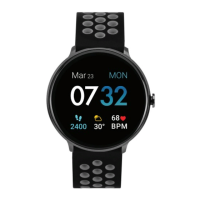
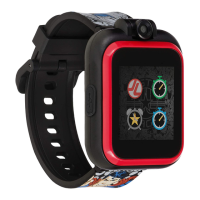
The iTouch Air 3 Smartwatch is a versatile wearable device designed to help users track their fitness, monitor health metrics, and stay connected with smartphone notifications. It offers a range of features for daily use, from timekeeping and activity tracking to remote control functionalities for music and camera.
The iTouch Air 3 serves as a comprehensive smartwatch, integrating various functionalities to enhance daily life. Its primary function is timekeeping, offering multiple customizable watch faces, including modern, analog, and custom options, allowing users to personalize their device. Beyond basic time display, the watch includes alarm and stopwatch features, accessible through the "Clock" app on the device. The alarm function allows for up to three alarms to be set via the iTOUCH Wearables app, with the ability to toggle them on/off directly from the watch. The stopwatch provides play, pause, and lap functions for timing events, with a clear stop button to end the session. Additionally, a countdown timer is available, allowing users to select predefined time frames and receive a vibration notification upon completion, even when the watch is not actively being used for the timer.
A core aspect of the iTouch Air 3 is its health and fitness tracking capabilities. It continuously monitors activity, including steps taken, calories burned, distance covered, and active minutes. This data is synced to the iTOUCH Wearables app, where users can view their complete history and progress towards daily step goals. The watch also features a 24-hour continuous heart rate monitor, providing real-time heart rate readings and recording average, highest, and lowest values throughout the day. The iTOUCH Wearables app further analyzes this data, offering insights into fitness intensity and movement states. Another significant health feature is the Blood Oxygen Monitor, which measures blood oxygen saturation (SpO2%). Users can initiate a measurement directly from the watch or through the app, with data syncing automatically to the app for historical tracking and comparison. For mental well-being, the Relaxation Mode guides users through deep breathing exercises, helping to de-stress by providing visual cues and vibrations for inhale/exhale cycles.
The iTouch Air 3 keeps users connected by displaying call, text, social media, and app notifications from a paired smartphone. Notifications cause the smartwatch to vibrate, and users can view recent messages by swiping up from the main clock face or navigating to the "Messages" screen. The watch stores up to three notifications, replacing the oldest as new ones arrive. Users have control over which notifications they receive through the iTOUCH Wearables app and can mute all notifications by enabling "Do Not Disturb" mode.
For fitness enthusiasts, the smartwatch offers Multi-Sports/Workout Mode with four sports modes (Basketball, Baseball, Football, Soccer) and four workout modes (Running, Elliptical, Cycling, Hiking). Each mode tracks specific details like steps, total time, average heart rate, and calories burned. The Connected GPS feature, which utilizes the smartphone's GPS sensors, provides detailed workout stats, route tracking, and pace information, all viewable in the iTOUCH Wearables app.
Beyond health and fitness, the iTouch Air 3 includes several remote control features. The Music Remote allows users to play/pause, skip forward, or skip to previous tracks from their smartphone's music apps (compatible with Apple Music, Spotify, Pandora, and some other third-party applications). The Camera Remote enables users to snap photos remotely from their smartphone, with iOS users needing to open their native camera app first.
Additional features include a Weather display, showing a 5-day forecast and hourly updates, with the option to change between Fahrenheit and Celsius and manually input location. The "Find Device" feature helps locate a misplaced smartwatch by making it vibrate when paired with the app. Hydration and Hygiene Reminders can be activated to prompt users to drink water or wash their hands at set intervals. Language settings allow users to choose from a variety of languages, and "Do Not Disturb" mode prevents notifications during specified times. Finally, the "Unit Format" setting allows users to switch between metric and imperial systems of measurement for all tracked data.
Navigating the iTouch Air 3 is intuitive, thanks to its full-touch screen. Users can swipe left, right, up, and down, and tap on icons to interact with the device. The main clock face serves as the central hub, from which various gestures lead to different functionalities:
The watch features a small back button, typically located in the top left corner of the screen, to exit apps or return to the previous screen.
The "Motion Gesture" feature allows users to turn on the watch screen by rotating their wrist. This can be configured in the iTOUCH Wearables app under "Additional Features," where users can set the "Activate Display After Wrist Rotation" function and define its active time. While convenient, continuous use of this feature will consume more battery.
Brightness control is available through the settings menu on the watch or via the quick toggles panel. Users can adjust the screen brightness by tapping on the screen and then saving their changes.
The iTouch Air 3 also includes a "Power Saving Mode" to extend battery life. When activated, this mode disables watch vibrations and reduces brightness to the lowest setting. It can be toggled on/off from the settings menu or the quick toggles panel. The watch will automatically prompt users to enable this mode when battery life reaches 25%.
Proper care and maintenance are essential for the longevity and optimal performance of the iTouch Air 3 Smartwatch, as well as for skin health. The device is designed for all-day and night wear, so regular cleaning is recommended.
 General
| Connectivity | Bluetooth |
|---|---|
| Compatibility | iOS and Android |
| Water Resistance | IP68 |
| Battery Life | Up to 7 days |
| Sensors | Heart rate monitor, Accelerometer |
| Display Type | LCD |
| Resolution | 240 x 240 pixels |
| Sleep Tracking | Yes |
| Notifications | Call |
| Battery Life Standby | 30 days |


 To Next Page