Need help?
Do you have a question about the iTOUCH Sport 2 and is the answer not in the manual?
Guide on how to charge the smartwatch, including cable use and base placement.
Instructions on finding and installing the companion smartphone app.
Steps to pair the smartwatch with the smartphone via the app.
Instructions for powering the device on/off and navigating its interface.
How to use wrist gestures and adjust screen brightness.
Steps to change watch faces via the app and directly on the smartwatch.
Guide to creating a personalized watch face with custom images and text.
How to set alarms and use the stopwatch function.
How to configure and check incoming notifications from your smartphone.
Information on notification storage, management, and Do Not Disturb mode.
How to access and interpret tracked steps, calories, active minutes, and sleep data.
Guide to setting step goals and enabling sedentary movement alerts.
How to use Relaxation Mode for guided deep breathing exercises.
Instructions for taking body temperature readings and notes on accuracy.
Details on continuous heart rate monitoring, recording, and data analysis.
Guide to measuring blood oxygen saturation (SpO2) on the smartwatch.
Overview of available sports modes and workout tracking features.
How to use the smartphone's GPS for detailed workout stats and route mapping.
Using the smartwatch to control music playback and the phone's camera.
Features like weather display, device finding, and hydration/hygiene reminders.
Settings for language, notification silencing, and measurement units.
Procedures for updating software, restarting, and factory resetting the smartwatch.
Recommendations for cleaning, wearing, and maintaining the smartwatch and skin health.
Information on FCC compliance, radio frequency, and radiation exposure limits.
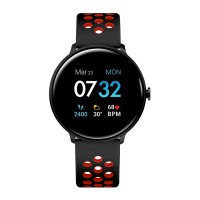
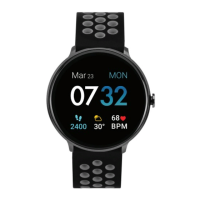
The iTouch Sport Smartwatch is a versatile wearable device designed to help users track their fitness, monitor health metrics, and stay connected. It offers a range of features for daily use, exercise, and personal well-being, all managed through the iTOUCH Wearables app.
The iTouch Sport Smartwatch serves as a comprehensive personal assistant on your wrist. Its primary functions include timekeeping, activity tracking, sleep monitoring, and health metric measurement. It also provides smart notifications and remote controls for your smartphone.
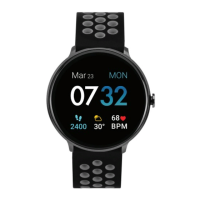
For timekeeping, the smartwatch displays the current time and date, with customizable watch faces to suit individual preferences. Users can choose from Modern, Digital, and Custom watch faces, or explore additional styles through the iTOUCH Wearables app. The device also includes a Clock app with alarm and stopwatch functions, allowing users to set up to three alarms and time events with precision. A countdown timer is also available, which operates in the background, notifying the user with a vibration once complete.
Activity tracking is a core feature, continuously monitoring steps taken, calories burned, distance covered, and active minutes throughout the day. The smartwatch helps users track their progress towards a daily step goal, providing a celebratory animation upon achievement. Active time is calculated based on activities that record steps and utilize the pedometer. This data is synced to the iTOUCH Wearables app, where users can view their complete activity history and detailed insights.
Health monitoring capabilities include a 24-hour continuous heart rate detection, which automatically measures heart rate when worn. Users can view their current heart rate, recent records, and average heart rate trends in the app. The device also features an Elevated Heart Rate alert, notifying users if their heart rate exceeds a predefined limit. A Body Temperature monitor allows users to measure their body temperature in real-time, with historical data and fluctuations viewable on the watch and in the app. Additionally, a Blood Oxygen Monitor (SpO2 %) provides on-demand measurements of blood oxygen saturation, which can be tracked and compared in the app.
Sleep monitoring is automatic, tracking time asleep, sleep stages (restful, light, and awake), and providing an overall sleep score. This helps users understand their sleep habits, including wake time, light sleep, and deep sleep.
For staying connected, the iTouch Sport Smartwatch displays call, text, social media, and app notifications from a paired smartphone. Notifications cause the smartwatch to vibrate, and users can view unopened messages and recent notifications by swiping up from the main clock face or navigating to the Messages screen.
The smartwatch also includes several remote features. A Music Remote allows users to play/pause, skip forward, or skip to previous tracks on compatible music apps like Apple Music, Spotify, and Pandora. A Camera Remote enables users to snap photos on their smartphone by tapping the watch screen or rotating their wrist.
Additional features enhance the user experience. The Weather feature displays a 5-day forecast with hourly updates, customizable for specific cities. A Sedentary Reminder encourages users to move during predefined hours. The Hydration Reminder prompts users to drink water at set intervals, and the Hygiene Assistant reminds them to wash their hands. The Find Device feature helps locate a misplaced smartwatch by making it vibrate. Users can also change the device's language and unit format (metric or imperial). A Do Not Disturb mode mutes all notifications (except alarms) for a specified period.
The iTouch Sport Smartwatch is designed for intuitive interaction through its full-touch screen. Users can swipe left and right to navigate menus and tap icons to interact with features. Swiping down from the main clock face reveals a quick toggle/notification panel, providing quick access to settings like Bluetooth, sleep data, brightness, and watch faces, as well as power options. Swiping up from the main clock face quickly accesses messages and notifications. Swiping right on the main clock face reveals activity screens, while swiping left leads to the main menu area where all apps and functions are listed. A back button, typically located in the top left corner, allows users to exit apps and return to previous screens.
The device supports a Motion Gesture feature, which turns on the watch screen when the wrist is rotated. Users can customize the active time for this feature through the iTOUCH Wearables app. Brightness can be adjusted directly on the smartwatch via the Settings menu or the quick toggles panel.
For fitness and exercise, the smartwatch offers 4 sports modes and 4 workout modes, including Basketball, Baseball, Football, Soccer, Running, Elliptical, Cycling, and Hiking. Each mode tracks specific details like steps, total time, average heart rate, and calories. To save data, activities must be performed actively for at least 3 minutes. During a workout, the watch displays two pages of data, accessible by swiping left and right. The Connected GPS feature, when used with a smartphone, provides complete workout stats, route tracking, and pace information, with a live map of the route available during the activity.
The Power Saving Mode helps extend battery life by disabling vibrations and reducing screen brightness to the lowest setting. This mode can be toggled on/off in the settings or via the quick toggles panel. The watch will automatically prompt users to activate this mode when battery life reaches 25%.
The Relaxation Mode guides users through deep breathing exercises to help reduce stress. It displays the current heart rate and provides prompts to inhale and exhale, with vibrations to guide the process.
Proper wear and care are essential for maintaining the iTouch Sport Smartwatch and ensuring skin comfort. The device is designed for all-day and all-night wear.
Regular cleaning of the band and wrist is recommended, especially after intense workouts or sweating. The band can be rinsed with water or wiped with a small amount of rubbing alcohol. It is crucial to avoid using hand soap, dish soap, hand sanitizer, cleaning wipes, or household cleaners, as these can get trapped beneath the band and irritate the skin. After cleaning, the band should always be patted dry before being worn again.
While the iTouch Sport is waterproof, it is not advisable to wear a wet band for extended periods, as this can lead to skin irritation.
The smartwatch should be worn loosely enough to allow it to move back and forth on the wrist. Prolonged rubbing and pressure can irritate the skin, so users are advised to give their wrists a break by removing the band for an hour or two after extended wear.
For users with allergies, asthma, or eczema, there is a higher likelihood of experiencing skin irritation or allergies from wearable devices. If skin irritation or redness occurs, the device should be removed. Consulting a dermatologist is recommended if symptoms persist for more than 2-3 days after discontinuing use.
Firmware updates are delivered through the iTOUCH Wearables app. Users will receive a pop-up notification when a new update is available. The update process requires the smartwatch to remain within Bluetooth range of the phone. After a successful update, the watch will automatically reset.
If the smartwatch experiences syncing issues, connectivity problems with Connected GPS, or tracking inaccuracies, a restart can be performed from the device itself. Navigating to the Power icon in the smartwatch menu and selecting 'Restart' will automatically reboot the device. If restarting does not resolve the issue, a factory reset option is available in the power menu, which clears all data from the smartwatch.
 General
| Display Type | LCD |
|---|---|
| Resolution | 240 x 240 pixels |
| Water Resistance | IP67 |
| Compatibility | iOS and Android |
| Connectivity | Bluetooth 4.0 |
| Strap Material | Silicone |
| Fitness Tracking | steps, distance, calories burned |
| Sensors | Accelerometer |
| Colors | Black, Blue, Pink, Green |
| Battery Life | Up to 7 days (normal use), Up to 15 days (standby) |

 To Next Page