6
PRODUCT OVERVIEW
PRODUCT OVERVIEW
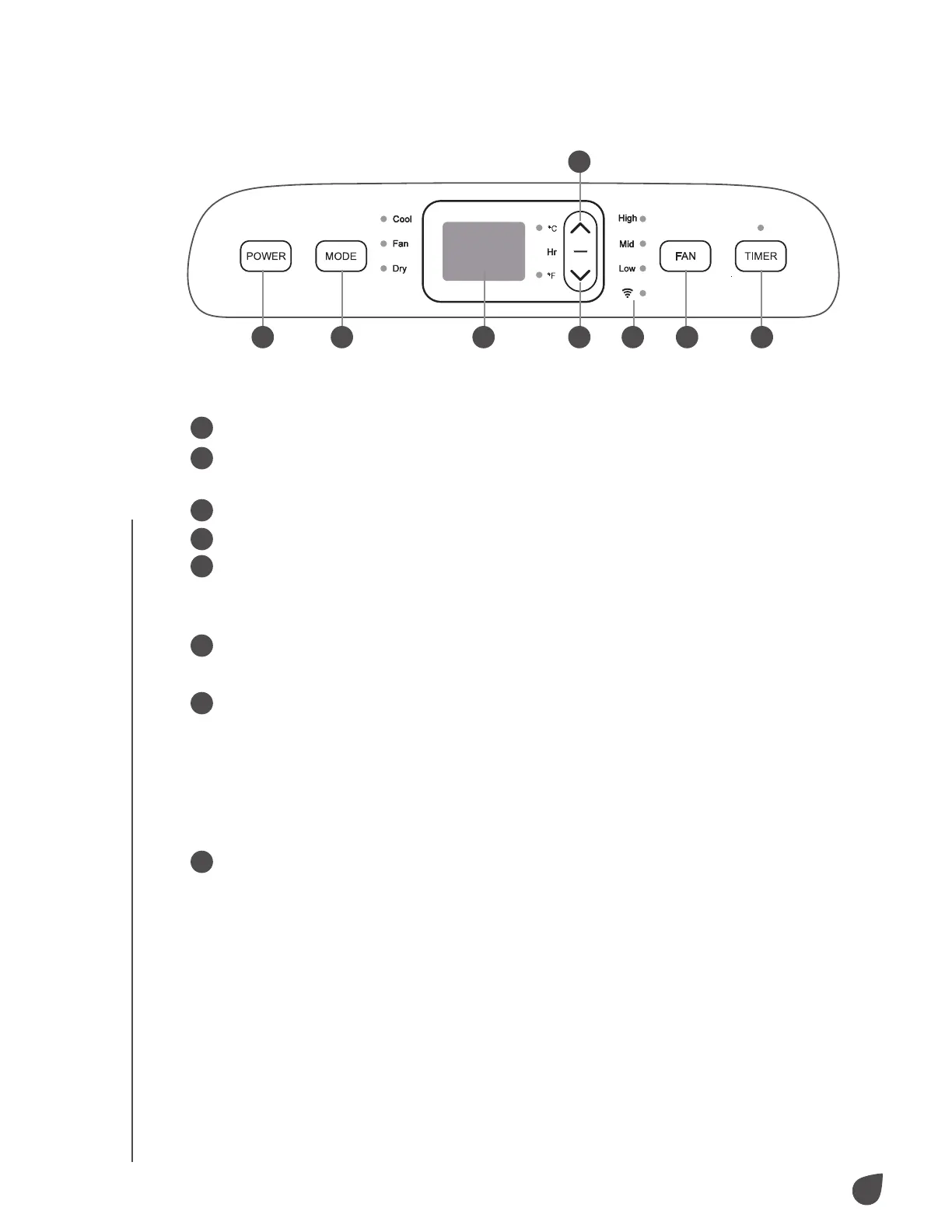
CONTROL PANEL
1
Power button: Power your air conditioner on and o.
2
Mode selection button: When powered on, select between cooling, ventilation,
and dehumidification mode.
3
LCD display: View selected temperature and operating conditions.
4
Down button: Lower your selected temperature or timing value.
5
Up button: Raise your selected temperature or timing value.
a. To switch between Fahrenheit (°F) and Celsius (°C), simultaneously press
both the up and down button.
6
Fan speed button: Toggle between high, medium, and low fan speeds.
NOTE: Fan speed is not selectable in dehumidifying mode.
7
Timer button: Select automated power on and o.
a. When powered o, press the timer button to open the timer menu and use
the up and down buttons to choose when to power on the air conditioner.
b. When powered on, press the timer button to open the timer menu and use
the up and down buttons to choose when to power o the air conditioner.
c. Timing values can be set between 1-24 hour(s) in one-hour increments.
8
Wi-Fi indicator light: Indicates whether or not the air conditioner is connected
to Wi-Fi.
1 2 3 4 8 6 7
5


 To Next Page
 Loading...