6. Installation Procedures
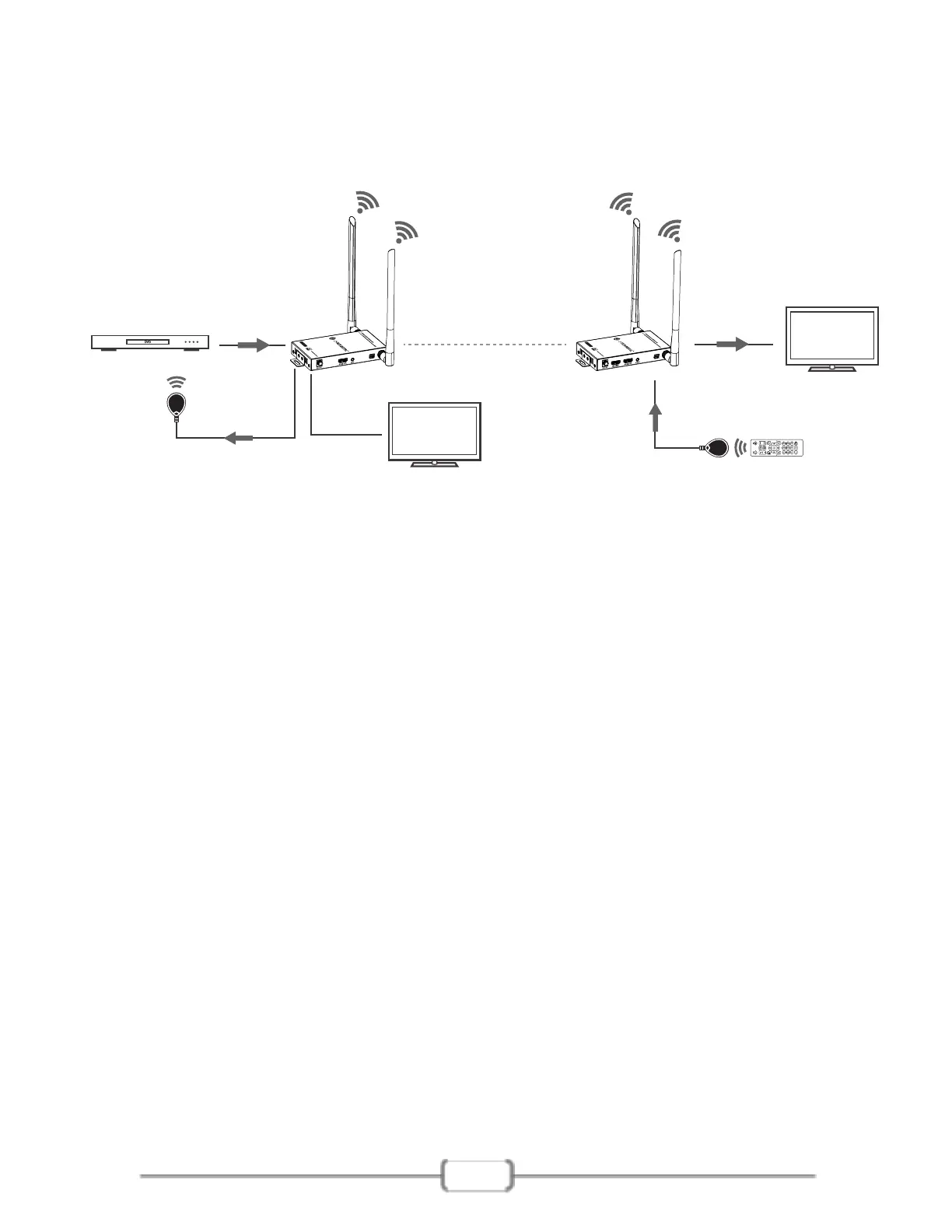
6.1 Connection Diagrams
6.2 Connection Instructions
One to one connection
1) Connect the source device to the HDMI IN port of the transmitter with an HDMI cable, and connect
the HDMI OUT port of the receiver to the display device with another HDMI cable.
2) If using the IR passback function, connect the IR blaster extension cable into the IR OUT port of the
transmitter, and connect the IR receiver extension cable into the IR IN port of the receiver.
a: The emitter of the IR blaster extension cable should be as close as possible to the IR receiving
window of the source device.
b: Point the remote control at the receiving head of the IR receiver extension cable to operate.
3) Plug the power supply into the devices to get started.
4) In the case of multiple sets being used at the same time in the same area. In order to prevent mutual
interference, switch each set of transmitters and receivers to a different channel after they have been
manually paired with the SSID.
6.3 SSID Pairing
1) Enter the SSID pairing mode by holding the transmitter and receiver's channel switch buttons for five
seconds. Both WiFi connection indicators will flash quickly in yellow.
2) When the SSID pairing is successful, the WiFi indicators on the transmitter and receiver will change
from quick flashing to slow flashing or steady on.
9
HDMI IN
HDMI OUT
TX
RX
HDMI Display
HDMI Display
Video Source


 To Next Page