EasyManua.ls Logo

jablotron JA-103K - User Manual

jablotron JA-103K
30 pages
Print Icon
To Next Page IconTo Next Page
Loading...
User manual
JABLOTRON 100+_COVER_EN_MMD55500.indd 1 25.9.2018 14:42:29

Table of Contents

Other manuals for jablotron JA-103K

Question and Answer IconNeed help?

Do you have a question about the jablotron JA-103K and is the answer not in the manual?

Summary

Introduction to JABLOTRON 100+ System

Operating the JABLOTRON 100+ System

User Access Rights and Codes

Defines different user roles and their system control permissions, including authorization types and codes.

On-Site Operation with Keypads

Details using system keypads, including indicators, segments, and code authorization methods.

JA-110 E and JA-150 E Keypad Operation

Describes the functions, indicators, and operation of specific JABLOTRON keypad models.

System Operation via Keyfob

Explains how to use keyfobs for system control, covering bi-directional and one-way types.

System Operation via Computer (J-LINK)

Using the J-LINK software for local system management, configuration, and control.

Remote System Operation Methods

Covers remote system control via MyJABLOTRON app, web interface, and voice menu.

Controlling Programmable Outputs (PG)

Methods for controlling PG outputs via keypad, remote, app, web, dial-in, and SMS.

PG Control via Keypad Segment

Using keypad segments to activate or deactivate programmable outputs.

PG Control via User Keypad Authorization

Authorizing PG output control with user codes or RFID tags.

PG Control via LCD Keypad Menu

Managing PG outputs through the LCD keypad menu options.

PG Control via Remote Control

Operating PG outputs using assigned buttons on a remote control.

PG Control via MyJABLOTRON App

Controlling PG outputs using the MyJABLOTRON smartphone application.

PG Control via MyJABLOTRON Web Interface

Managing PG outputs through the MyJABLOTRON web interface.

PG Control via Dialling-In

Activating PG outputs by dialling the system's phone number.

PG Control via SMS Commands

Using SMS messages to switch programmable outputs on or off.

Blocking and Disabling in the System

Blocking Users

Procedures for temporarily blocking user access to the system.

Blocking Detectors

Methods for temporarily disabling specific detectors within the system.

Disabling Timers

How to temporarily disable automated scheduled events or timers.

Customizing the System

Changing User Access Codes

How users or administrators can change access codes.

Managing RFID Cards and Tags

Adding, changing, or deleting RFID cards and tags for user authorization.

Managing Usernames and Phone Numbers

Modifying user names and associated phone numbers in the system.

Adding and Deleting Users

Process for administrators to add or remove users from the system.

Calendar Events Setup

Configuring scheduled events and actions using the calendar function.

Event History

Accessing Event History via LCD Keypad

How to view system events using the keypad interface.

Event History via J-LINK Software

Browsing and downloading system events using the J-LINK computer software.

Logging into MyJABLOTRON for Event History

Viewing system event history through the MyJABLOTRON web or smartphone interface.

Periodical Maintenance

Technical Specifications

Glossary of Terms

Summary

Introduction to JABLOTRON 100+ System

Operating the JABLOTRON 100+ System

User Access Rights and Codes

Defines different user roles and their system control permissions, including authorization types and codes.

On-Site Operation with Keypads

Details using system keypads, including indicators, segments, and code authorization methods.

JA-110 E and JA-150 E Keypad Operation

Describes the functions, indicators, and operation of specific JABLOTRON keypad models.

System Operation via Keyfob

Explains how to use keyfobs for system control, covering bi-directional and one-way types.

System Operation via Computer (J-LINK)

Using the J-LINK software for local system management, configuration, and control.

Remote System Operation Methods

Covers remote system control via MyJABLOTRON app, web interface, and voice menu.

Controlling Programmable Outputs (PG)

Methods for controlling PG outputs via keypad, remote, app, web, dial-in, and SMS.

PG Control via Keypad Segment

Using keypad segments to activate or deactivate programmable outputs.

PG Control via User Keypad Authorization

Authorizing PG output control with user codes or RFID tags.

PG Control via LCD Keypad Menu

Managing PG outputs through the LCD keypad menu options.

PG Control via Remote Control

Operating PG outputs using assigned buttons on a remote control.

PG Control via MyJABLOTRON App

Controlling PG outputs using the MyJABLOTRON smartphone application.

PG Control via MyJABLOTRON Web Interface

Managing PG outputs through the MyJABLOTRON web interface.

PG Control via Dialling-In

Activating PG outputs by dialling the system's phone number.

PG Control via SMS Commands

Using SMS messages to switch programmable outputs on or off.

Blocking and Disabling in the System

Blocking Users

Procedures for temporarily blocking user access to the system.

Blocking Detectors

Methods for temporarily disabling specific detectors within the system.

Disabling Timers

How to temporarily disable automated scheduled events or timers.

Customizing the System

Changing User Access Codes

How users or administrators can change access codes.

Managing RFID Cards and Tags

Adding, changing, or deleting RFID cards and tags for user authorization.

Managing Usernames and Phone Numbers

Modifying user names and associated phone numbers in the system.

Adding and Deleting Users

Process for administrators to add or remove users from the system.

Calendar Events Setup

Configuring scheduled events and actions using the calendar function.

Event History

Accessing Event History via LCD Keypad

How to view system events using the keypad interface.

Event History via J-LINK Software

Browsing and downloading system events using the J-LINK computer software.

Logging into MyJABLOTRON for Event History

Viewing system event history through the MyJABLOTRON web or smartphone interface.

Periodical Maintenance

Technical Specifications

Glossary of Terms

Overview

The JABLOTRON 100+ security system is a versatile solution for both commercial and home security, designed for ease of use and comprehensive control. It integrates both wired and wireless devices, offering a flexible and adaptable security infrastructure. The system's operation is intuitive, typically involving a two-step process: user authorization (via code or RFID tag) followed by pressing a function-assigned segment button on a keypad. A reversed method is also possible if the "Default" system profile is enabled, where a segment button is pressed first, then authorization occurs. The control segments utilize a simple traffic light logic for clear status indication, and the number of segments can be customized to fit specific premises.

Function Description

The JABLOTRON 100+ system supports up to 600 users and can be divided into 15 individual sections, allowing for granular control over different areas of a property. It can connect up to 230 devices and offers up to 128 multi-purpose programmable outputs (PG outputs) for home automation functions.

User Authorization and Access Rights:

The system requires user identification for most operations, ensuring that only authorized individuals can control specific parts of the system. Different levels of authorization are available:

  • ARC code: Highest level, for system configuration and unblocking after an alarm.
  • Service code: For entering Service mode and configuring system behavior, with access to various options.
  • Administrator code (Main): Full access to all sections and PG outputs, can create other users and manage access rights.
  • Administrator code (Other): Access to sections and PG outputs as defined by the main Administrator, can add users with lower authorization levels.
  • User code: Access to assigned sections and PG control rights, can manage their own RFID tags and phone numbers.
  • Set code: Only allowed to set a designated section and control specific PG outputs, cannot change codes or erase alarm memory.
  • PG only code: Controls programmable outputs with authorization only, cannot change codes or erase alarm memory.
  • Panic code: Triggers a panic alarm only, cannot change codes or erase alarm memory.
  • Guard code: Sets the entire system, but can only unset during or after an alarm, cannot change codes or erase alarm memory.
  • Unblocking code: Unblocks the system after a system blocking by alarm, cannot change codes or erase alarm memory.

Access codes can be 4, 6, or 8 digits, and the system supports prefix codes for a higher number of users. RFID cards/tags can also be used for contactless authorization, either alone or in combination with codes for enhanced security.

System Operation:

The system can be operated in multiple ways:

  • On-site:
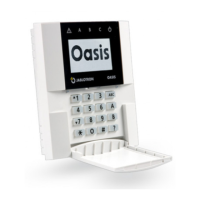
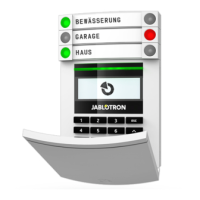
    • System Keypad: Various access modules are available, including RFID card readers, keypads with card readers, and keypads with LCD displays. These allow users to set/unset the system, control automation functions, and view system statuses. Segment buttons use traffic light logic (green for unset/off, red for set/on, yellow for partially set, flashing for delays or faults).
    • Keyfob: Keyfobs can be one-way or bi-directional, providing control over sections and PG outputs. Bi-directional keyfobs confirm commands with LED lights.
    • Computer (J-Link): Local operation via a computer connected via USB, using J-Link software for user management and calendar events.
  • Remotely:
    • MyJABLOTRON Smartphone App: Allows remote monitoring and control of the system, including setting/unsetting, controlling PG outputs, viewing event history, and receiving notifications.
    • MyJABLOTRON Web Interface: Provides online access to JABLOTRON devices via a web browser for monitoring and control.
    • Voice Menu: Control the system by dialing its phone number and navigating through a preconfigured voice menu.
    • SMS Commands: Control individual sections and programmable outputs by sending predefined SMS commands.
    • Dialling-in: Control one PG output by simply dialing the system's SIM card number and hanging up before it answers.
    • Computer (J-Link) remotely: Connect to the control panel via the internet using J-Link software.

Alarm Setting and Unsetting:

  • Setting: Authorization (code/RFID) followed by pressing the right segment button for the desired section. The system indicates exit delay acoustically, and the segment button turns red. The system can react to triggered detectors during setting in various ways, including automatic guarding, optical indication, or preventing setting.
  • Partial Setting: Allows guarding only by certain detectors in a section (e.g., door/window detectors at night).
  • Unsetting: Entering the building triggers an entrance delay. Authorization (code/RFID) followed by pressing the left segment button for the desired section. Segment buttons turn green to indicate unset sections.
  • Duress Access Control: Unsets the system while silently triggering a panic alarm, reported to selected users. This is done by adding 1 to the last digit of a valid code.
  • Terminating a Triggered Alarm: Authorization followed by pressing the left segment button of the alarmed section. Sirens are silenced, and the segment button flashes red to indicate alarm memory. The alarm memory can be canceled from the keypad menu or by unsetting the system again.

Programmable Outputs (PG):

PG outputs can be controlled via keypad segments, user authorization, the keypad's LCD menu, remote controls, the MyJABLOTRON app/web interface, dialling-in, or SMS messages. They can be configured for various functions, such as switching lights, garage doors, or other electrical devices.

Blocking/Disabling in the System:

  • Blocking Users: Temporarily blocks a user's access (code/RFID) and prevents them from receiving alerts. Only administrators or service technicians can block users.
  • Blocking Detectors: Temporarily deactivates a detector's alarm function while still performing tamper diagnostics. Only administrators or service technicians can block detectors.
  • Disabling Timers: Temporarily prevents scheduled automated events from executing.

Customizing the System:

Users can change their access codes, add/delete RFID cards/tags, and change usernames or phone numbers, depending on system configuration and their access rights. Administrators and service technicians have broader customization capabilities, including adding/deleting users and setting calendar events.

Event History:

The system stores all operations and events (settings, alarms, faults, messages) in a micro SD card. This history can be viewed via the LCD keypad, J-Link software, or the MyJABLOTRON web/smartphone interface.

Home Automation:

Beyond security, the JABLOTRON 100+ offers features like electrical door locks, automated lighting, and remote control of appliances, enhancing convenience and smart home integration.

Maintenance Features

Periodical Maintenance:

Regular maintenance checks are crucial for reliable system functioning, typically carried out by an installation company at least once a year. User maintenance primarily involves keeping devices clean.

Maintenance Mode:

The system administrator can switch the system to a "Maintenance mode" to safely open detectors (e.g., for battery changes) or remove them without triggering alarms. This mode can be activated via J-Link software or the LCD keypad menu. In Maintenance mode, selected sections will not trigger alarms, even if detectors are opened or removed. The mode is indicated by a flashing green activation button and unlit segment buttons.

Device Handling:

When handling devices, care should be taken to avoid damage. Detector covers are usually secured with a tab or a small locking screw.

Battery Replacement:

When changing batteries in a detector, all batteries in that specific detector should be replaced simultaneously with batteries of the same type and from the same manufacturer.

Device Testing:

Some devices, such as fire detectors, may require testing. For specific instructions, users should consult their service technician.

jablotron JA-103K Specifications

General IconGeneral
CommunicationWireless
Users100
Partitions4
Programmable weekly schedulesYes
SMS reports from the control panelYes
Voice reports from the control panelYes
Remote controlYes
Memory cardYes
Security gradeGrade 2
Power Supply (Keypad)12 V DC
Operating Temperature (Keypad)-10 to +40 °C
Power Supply230 V AC
Backup Battery12 V, 7 Ah
Operating frequency868 MHz
Operating environmentIndoor
ClassificationEN 50131-1
CompatibilityJA-100
Operating Rangeup to 300 m
EncryptionAES

Related product manuals