
 Need help?
Do you have a question about the jablotron 100+ and is the answer not in the manual?
Details different user code types and their access levels for system control and data management.
Explains how code length and RFID combinations impact system security and possible combinations.
Outlines methods for operating the system locally via keypad, remotely via computer, and via telephone.
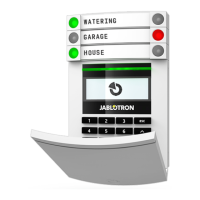
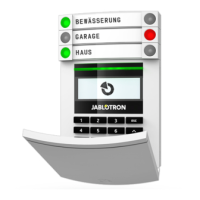
Describes the meaning of LED indicators and function buttons on the keypad for system status.
Explains authorization using RFID tags, cards, and remote controls for system access.
Details how to authorize access using 4, 6, or 8-digit codes, including prefix options.
Presents a flowchart of the internal LCD keypad menu options and their functionalities.
Allows cancelling alarms or unsuccessful setting indications for sections the user has access to.
Enables control of system sections based on user access rights and internal settings.
Allows controlling programmable outputs based on user permissions and system settings.
Displays a detailed list of recorded system events.
Shows triggered detectors preventing system setting, if activated in configuration.
Lists detectors indicating system faults from accessible sections.
Displays a list of blocked detectors in sections accessible to the user.
Shows system status including triggered detectors, tampers, low batteries, and bypassing.
Allows editing users and devices, primarily when a USB is disconnected.
Enables adjustment of keypad backlight intensity and display contrast.
Allows the Administrator to switch sections into Maintenance mode.
Details the process of setting the alarm using the keypad, including exit delays and detector reactions.
Explains how to unset the alarm using the keypad, including entrance delays and authorization.
Describes a silent alarm trigger mode for unsetting the system under duress.
Covers setting the system to guard only specific detectors or sections.
Explains how to end an active alarm, including dealing with alarm memory indication.
Details controlling sections via the keypad's LCD menu after user authorization.
Explains the operation and features of specific Jablotron keypad models.
Provides a step-by-step guide for setting the alarm, including detector reactions and warnings.
Describes indications and causes for unsuccessful alarm setting attempts.
Explains the unsetting process, including authorization and entrance delay behavior.
Covers setting specific sections or detectors, including authorization requirements.
Explains the process of unsetting the system under duress, triggering a silent alarm.
Details how to terminate an active alarm and manage alarm memory indications.
Explains how section control is configured and managed via authorization.
Describes controlling sections using the keypad's LCD menu after authorization.
Details how to operate the system using keyfobs, including bi-directional keyfobs.
Explains the functionality of one-way keyfobs for system control and status indication.
Covers remote system operation via a computer using J-LINK software.
Details remote monitoring and control of the system via the MyJABLOTRON smartphone app.
Explains remote system operation through the Jablotron web interface.
Describes controlling the system via a voice menu over the phone.
Details controlling the system and programmable outputs via SMS commands.
Details controlling PG outputs via keypad segments, user authorization, and keypad menu.
Explains controlling PG outputs by pressing specific keypad buttons.
Details activating PG outputs through user authorization (code/RFID).
Describes controlling PG outputs through the keypad's LCD menu.
Details controlling the system using remote controls and their LED indicators.
Covers controlling PG outputs via the MyJABLOTRON smartphone app.
Covers controlling PG outputs via the MyJABLOTRON web interface.
Explains controlling PG outputs by dialing into the system.
Details controlling PG outputs via SMS messages.
Describes how to block users from accessing the system by losing their code or RFID.
Explains how to block specific detectors, temporarily or permanently, to prevent false alarms.
Details how users can change their access codes and manage system security.
Explains how to add, delete, or change RFID cards and tags for system access.
Covers modifying user names and associated telephone numbers in the system.
Describes the process of adding new users and deleting existing ones from the system.
Explains how to configure scheduled events for sections, PG outputs, and system control.
Details how to view the system's event history using the LCD keypad.
Explains how to download and browse event history using J-LINK software.
Describes viewing event history through the MyJablotron web or smartphone interface.
The JABLOTRON 100+ security system is a versatile solution for both commercial and home security, designed for ease of use and comprehensive control. It integrates both wired and wireless devices, offering a flexible and adaptable security infrastructure. The system's operation is intuitive, typically involving a two-step process: user authorization (via code or RFID tag) followed by pressing a function-assigned segment button on a keypad. A reversed method is also possible if the "Default" system profile is enabled, where a segment button is pressed first, then authorization occurs. The control segments utilize a simple traffic light logic for clear status indication, and the number of segments can be customized to fit specific premises.
The JABLOTRON 100+ system supports up to 600 users and can be divided into 15 individual sections, allowing for granular control over different areas of a property. It can connect up to 230 devices and offers up to 128 multi-purpose programmable outputs (PG outputs) for home automation functions.
The system requires user identification for most operations, ensuring that only authorized individuals can control specific parts of the system. Different levels of authorization are available:
Access codes can be 4, 6, or 8 digits, and the system supports prefix codes for a higher number of users. RFID cards/tags can also be used for contactless authorization, either alone or in combination with codes for enhanced security.
The system can be operated in multiple ways:
PG outputs can be controlled via keypad segments, user authorization, the keypad's LCD menu, remote controls, the MyJABLOTRON app/web interface, dialling-in, or SMS messages. They can be configured for various functions, such as switching lights, garage doors, or other electrical devices.
Users can change their access codes, add/delete RFID cards/tags, and change usernames or phone numbers, depending on system configuration and their access rights. Administrators and service technicians have broader customization capabilities, including adding/deleting users and setting calendar events.
The system stores all operations and events (settings, alarms, faults, messages) in a micro SD card. This history can be viewed via the LCD keypad, J-Link software, or the MyJABLOTRON web/smartphone interface.
Beyond security, the JABLOTRON 100+ offers features like electrical door locks, automated lighting, and remote control of appliances, enhancing convenience and smart home integration.
Regular maintenance checks are crucial for reliable system functioning, typically carried out by an installation company at least once a year. User maintenance primarily involves keeping devices clean.
The system administrator can switch the system to a "Maintenance mode" to safely open detectors (e.g., for battery changes) or remove them without triggering alarms. This mode can be activated via J-Link software or the LCD keypad menu. In Maintenance mode, selected sections will not trigger alarms, even if detectors are opened or removed. The mode is indicated by a flashing green activation button and unlit segment buttons.
When handling devices, care should be taken to avoid damage. Detector covers are usually secured with a tab or a small locking screw.
When changing batteries in a detector, all batteries in that specific detector should be replaced simultaneously with batteries of the same type and from the same manufacturer.
Some devices, such as fire detectors, may require testing. For specific instructions, users should consult their service technician.
 General
| SMS reports from the control panel | Yes |
|---|---|
| Voice reports from the control panel | Yes |
| System Type | Wireless/Hybrid |
| Control Panel | JA-101K |
| Communication | GSM |
| Backup Battery | Yes |
| Mobile App | Yes |
| Certification | EN 50131 Grade 2 |
| Remote access | Yes, via mobile app or web interface |
| Power Supply | 230V AC |
| Remote Control | Yes |
| Installation | Professional installation recommended |








 To Next Page
