The Jabra Enhance Plus is a personal sound amplification product designed for adults aged 18 and older who experience perceived mild to moderate hearing impairment. This device aims to amplify sound for clearer conversations and music, offering an optimized listening experience across various environments. It is not intended for individuals with severe to profound hearing impairment or acute conditions such as dizziness, ear infections, ear pain, or tinnitus, who should consult a healthcare provider. The earbuds are designed for occasional wear, and prolonged use may lead to discomfort or ear pain.
Function Description
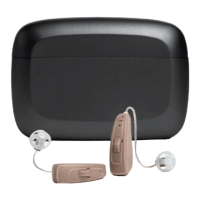
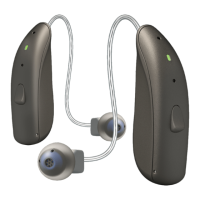
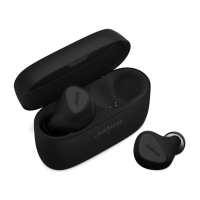
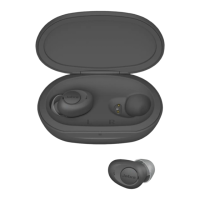
The Jabra Enhance Plus consists of two earbuds and a charging case. The earbuds feature multi-function buttons and status LEDs, while the charging case includes earbud charging bays, a battery status LED, a cable status LED, and a USB-C charging port. The device operates via Bluetooth and requires an iPhone with iOS 14 or later for full functionality, managed through the Jabra Enhance app.
The primary function of the Jabra Enhance Plus is to enhance hearing. It offers three Listen Modes: Adaptive, Focus, and Surround.
- Adaptive Mode intelligently adjusts speech and sounds based on your surroundings and conversations. When speech is easily discernible, the environment sounds natural. If speech is difficult to hear, this mode lowers the volume of ambient sounds to prioritize the speaker.
- Focus Mode amplifies speech and sounds specifically from a narrow zone directly in front of you, ideal for one-on-one conversations in noisy settings.
- Surround Mode enhances sounds coming from all directions, providing a broader awareness of your environment. This mode is automatically activated and locked when listening to music or on a call via your iPhone.
The Listen Mode volume can be adjusted through the Jabra Enhance app or directly using the earbud buttons. The default volume setting for a personalized profile is 7. Music or call volume can be controlled using the iPhone's volume buttons.
The device also supports phone calls, allowing users to answer calls with a single press of an earbud button and end or reject calls with a double press. A mute microphone function is also available via a double press.
Usage Features
First-Time Setup:
- Download the Jabra Enhance app: Available on the App Store for iPhone.
- Open the app and pair: Follow in-app instructions to pair the earbuds with your iPhone. iOS 14 or later is required.
- Access iPhone settings: When prompted, navigate to 'Settings > Accessibility > Hearing Devices' on your iPhone.
- Connect to 'Your Hearing Devices': Tap to connect to the earbuds.
- Accept pairing requests: Tap 'Pair' for both left and right earbuds when prompted by Bluetooth Pairing Requests.
- Return to the Jabra Enhance app: Complete the setup process.
- Product registration: Register your product within the app for updates and support.
- EarGel fit guidance: Learn how to wear the earbuds and change EarGel sizes for optimal fit and audio quality.
- Personalization: The app guides you through a personalization process to create a unique hearing profile. This involves finding a quiet place, entering gender and age, and reacting to a series of tones. This step is crucial for tailoring the earbuds to your specific hearing needs.
- Speech filter selection: Choose a preferred speech filter (Normal, Clear, or Full) after listening to a pre-recorded conversation to find the most natural sound.
Wearing the Earbuds:
Insert the earbuds gently and rotate them until a snug, comfortable fit is achieved. The correct EarGel size is vital for optimal audio and hearing experience. Medium EarGels are pre-mounted, but users may need to try different sizes for a proper fit. EarGels that are too small can lead to listening fatigue, missed sound awareness, or the earbuds falling out. EarGels that are too large can cause discomfort or ear pain. Improperly mounted EarGels may come loose. Only use the supplied Jabra Enhance Plus EarGels.
Manual Pairing:
If pairing to a second iPhone or re-pairing:
- Power on: Remove earbuds from the charging case; LEDs will light green.
- Enter pairing mode: Press and hold both earbud buttons simultaneously for 3 seconds (not longer than 6 seconds). LEDs will flash blue.
- iPhone settings: On your iPhone, go to 'Settings > Accessibility > Hearing Devices'.
- Connect: Find 'Your Hearing Devices' and tap to connect.
- Accept pairing: Tap 'Pair' for both left and right earbuds.
Charging:
- Earbuds: Place earbuds in the charging case and close the lid. Full recharge takes up to 2 hours. Do not insert earbuds into the wrong charging bays.
- Charging Case: Plug the supplied USB-C charging cable into a USB power outlet or adapter (not included) and connect to the charging case. Full recharge takes up to 3 hours. Only use the supplied charging case and cable. Do not charge with power outlets exceeding 5V+- 0.25V.
LED Indicators:
- Earbuds (in case): Solid green for fully charged; flashing red, yellow, or green for low, medium, or high battery while charging.
- Earbud Status: Solid green for powering on; flashing red for powering off; flashing blue for pairing; solid blue for paired/connected; flashing blue for resetting/firmware updating.
- Charging Case: Solid green for fully charged; solid red, yellow, or green for low, medium, or high battery (when lid opened or earbuds inserted/removed); flashing red, yellow, or green for low, medium, or high battery while charging. A white LED indicates the charging case is connected to power.
Firmware Updates:
Firmware can be updated via the Jabra Enhance app, taking approximately 5 minutes. It is recommended to enable notifications in the app (Settings > Earbud settings > Notifications) to receive automatic alerts for available updates.
Maintenance Features
Cleaning:
- Earbuds: After removal or if dirty, clean with a soft, dry, lint-free cloth.
- Charging Case: Use a clean, dry cloth.
- Earbud Charging Bays: Clean with a clean cotton swab.
- Avoid Liquids: Do not use liquid to clean the charging case or earbuds.
- Cosmetics/Chemicals: Apply cosmetics, perfume, after-shave, hairspray, lotions, etc., before wearing earbuds, as these can damage or discolor them.
- Ear Wax: Ear wax or other residues can cause infection; clean earbuds as instructed to prevent this.
Storage and Protection:
- Immersion: Never immerse earbuds in liquid.
- Heat/Sunlight: Keep earbuds away from excessive heat and direct sunlight.
- Water/Dust Resistance: Earbuds have IP52 limited protection against dust and water ingress. Avoid extensive exposure to dust or water. Do not swim, shower, or use in a sauna while wearing them.
- Storage: Always store earbuds in the charging case for safety and protection.
- Temperature: Avoid storing in hot or cold environments (e.g., a closed car in summer or winter) to prevent battery deterioration. For extended storage, keep temperatures between -4°F to +86°F (-20°C to +30°C).
- Long-Term Storage: Do not store earbuds for extended periods (max. three months) without recharging.
- Drying: Do not attempt to dry earbuds or charging case in an oven, microwave, or other heating equipment, as this can cause melting or burns.
General Safety:
- Damaged Devices: Do not use earbuds or charging case if broken, as rechargeable batteries may leak. Contact a hearing care professional if leakage occurs.
- Battery Leakage: If exposed to battery leakage material, rinse immediately with warm water and seek medical attention for chemical burns, redness, or skin irritation.
- Disassembly: Do not attempt to disassemble the charging case, as this can expose you to electric shock and void the warranty.
- Disposal: Do not dispose of earbuds or charging case with ordinary household waste. Dispose of at sites intended for electronic waste.
- Children/Pets: Keep earbuds and EarGels away from pets, children, and individuals with cognitive, intellectual, or mental health challenges, as swallowing can cause choking or be harmful.
- Li-Ion Batteries: Earbuds and charging case contain Li-Ion batteries. Exposure or ingestion can be seriously harmful. Never put earbuds in your mouth. Consult airlines for transportation details.
- Medical Conditions: Discontinue use and contact a physician if you experience discomfort or ringing in the ears.
- Wireless Interference: While unlikely, nearby electronic devices may be affected when the wireless function is active. Move earbuds away from affected devices if this occurs.
- Earbud Placement: Do not wear left and right earbuds in the wrong ears, as this could damage your hearing.
- EarGel Modification: Never attempt to modify the shape of earbuds or EarGels, as this can cause skin reactions or injuries.
- iOS Updates: Always keep your iPhone updated to the latest iOS version.
- Jabra Enhance App: Only use the Jabra Enhance app with Jabra earbuds.
Replacement Accessories:
Replacement accessories can be purchased from Jabra.com. Only use official Jabra parts. When using replacement earbuds, unpair the old earbuds from your iPhone, then pair the new ones following the manual pairing steps.

 Need help?
 General

 To Next Page