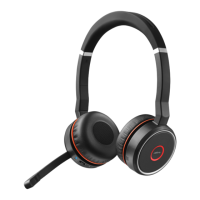
The Jabra Evolve 75 SE - UC Stereo with Charging Stand is a sophisticated wireless headset designed for professional use, offering seamless connectivity and superior audio quality for calls and multimedia. This device is engineered to enhance productivity in various work environments, from bustling open offices to remote work setups, by providing clear communication and effective noise management. Its primary function is to facilitate crystal-clear conversations and immersive audio experiences, making it an indispensable tool for professionals who rely on reliable communication throughout their workday.
Function Description
The core function of the Jabra Evolve 75 SE is to provide a high-quality, wireless audio solution for unified communications (UC) platforms. It connects to mobile devices such as smartphones and tablets via Bluetooth, enabling users to manage calls, listen to music, and interact with voice assistants without being tethered by cables. The headset is equipped with advanced noise-cancellation technology, which actively reduces background distractions, ensuring that both the user and the caller can hear each other clearly. This is particularly beneficial in noisy environments, where maintaining focus and clarity is crucial.
The headset supports dual connectivity, meaning it can be simultaneously connected to two Bluetooth devices. This feature allows users to seamlessly switch between, for example, a mobile phone and a computer, without needing to re-pair the device. This flexibility is ideal for professionals who frequently use multiple devices for their work, ensuring they never miss an important call or notification.
A key aspect of its functionality is its integration with UC platforms. The "UC Stereo" designation indicates that it is optimized for leading unified communications solutions, providing plug-and-play compatibility and enhanced call control features. This optimization ensures a smooth user experience with applications like Microsoft Teams, Zoom, and other similar platforms, allowing for intuitive call answering, ending, and volume adjustments directly from the headset.
The included charging stand serves as both a convenient storage solution and a charging station. When not in use, the headset can be placed on the stand, ensuring it is always charged and ready for the next call or meeting. This eliminates the hassle of constantly searching for charging cables and helps maintain an organized workspace. The stand also provides a visual indicator of the headset's charging status, adding to its user-friendly design.
Usage Features
The Jabra Evolve 75 SE is designed with user convenience and comfort in mind, offering a range of features that enhance its usability in daily professional life.
- Wireless Freedom: Operating via Bluetooth, the headset provides the freedom to move around the office or home without being restricted by cables. This allows users to grab a coffee, walk to a colleague's desk, or simply stretch their legs during long calls, maintaining connectivity throughout.
- Intuitive Controls: The headset features easily accessible controls on the earcups for managing calls and audio playback. These controls typically include buttons for answering/ending calls, adjusting volume, muting the microphone, and activating voice assistants. The placement and tactile feedback of these buttons are designed for quick and effortless operation, minimizing interruptions during important tasks.
- Active Noise Cancellation (ANC): A standout feature for productivity, ANC actively blocks out ambient noise, creating a personal quiet zone for the user. This is invaluable in open-plan offices, public spaces, or busy home environments, allowing users to concentrate on their conversations or work without distractions.
- Busylight: The integrated busylight on both earcups automatically illuminates when the user is on a call or in a meeting, signaling to colleagues that they should not be disturbed. This visual cue helps to reduce interruptions and foster a more focused work environment.
- Superior Microphone Performance: The headset incorporates a high-quality microphone with noise-canceling capabilities, ensuring that the user's voice is transmitted clearly, free from background noise. This is crucial for professional communication, where clarity can significantly impact the effectiveness of a conversation.
- Comfortable Design: Ergonomically designed for extended wear, the Jabra Evolve 75 SE features soft ear cushions and an adjustable headband. The lightweight construction ensures comfort throughout the workday, reducing fatigue even during prolonged use.
- Long Battery Life: The headset offers a substantial battery life, providing many hours of talk time and music playback on a single charge. This ensures that the device can keep up with demanding work schedules without requiring frequent recharging.
- Pairing Simplicity: The pairing process is straightforward, as detailed in the manual. Users simply need to activate Bluetooth on their mobile device, put the headset into pairing mode by holding the On/off/Bluetooth switch in the Bluetooth position until the LED flashes blue, and then select "Jabra Evolve 75" from the list of available devices. A PIN code of "0000" may be required. The headset also provides audible pairing instructions when worn, guiding the user through the process.
- Multi-Device Connectivity: The ability to connect to two Bluetooth devices simultaneously enhances flexibility, allowing users to seamlessly switch between a mobile phone and a computer for calls or media.
- Charging Stand Integration: The dedicated charging stand not only keeps the headset charged but also serves as a neat and organized storage solution, ensuring the device is always ready for use.
Maintenance Features
Maintaining the Jabra Evolve 75 SE is relatively simple, focusing on ensuring optimal performance and longevity of the device.
- Regular Charging: The most fundamental maintenance involves regularly charging the headset, ideally using the provided charging stand. This ensures the battery remains in good condition and the headset is always ready for use. The charging stand simplifies this by providing a dedicated spot for the headset, making it easy to remember to charge it.
- Software Updates: Jabra frequently releases firmware updates for its devices to improve performance, add new features, and fix bugs. Users can typically update the headset's firmware through a companion application on their computer or mobile device. Keeping the firmware updated ensures the headset operates with the latest enhancements and compatibility.
- Cleaning: Periodically cleaning the ear cushions and the headband with a soft, dry cloth can help maintain hygiene and prevent the buildup of dirt or oils. For more stubborn grime, a slightly damp cloth can be used, ensuring no liquid enters the internal components. The microphone boom should also be gently wiped clean.
- Safe Storage: When not in use, especially for extended periods, storing the headset on its charging stand or in a protective case (if available) helps protect it from dust, accidental damage, and extreme temperatures. This is particularly important for preserving the integrity of the ear cushions and the overall structure of the headset.
- Troubleshooting Pairing Issues: In case of unsuccessful pairing, the manual suggests re-attempting the pairing steps or trying to pair with a different Bluetooth device. Jabra also provides a "Bluetooth Pairing Guide" for more detailed troubleshooting tips, ensuring users can resolve common connectivity problems efficiently. This self-help approach minimizes downtime and ensures continuous usability.
- Battery Care: While the headset has a robust battery, avoiding complete discharge frequently and storing it with some charge (not fully depleted or fully charged for very long periods) can contribute to the battery's overall lifespan.
- Physical Inspection: Occasionally inspecting the headset for any signs of wear and tear, such as frayed cables (if any are used for charging directly) or damaged ear cushions, can help identify potential issues early. Replacing worn-out parts, if possible, can extend the life of the headset.
By adhering to these simple usage and maintenance practices, users can ensure their Jabra Evolve 75 SE - UC Stereo with Charging Stand continues to deliver high-quality performance and reliable communication for years to come.

 Need help?
 General












 To Next Page