Need help?
Do you have a question about the Jackson Systems Comfort System T-21-P and is the answer not in the manual?
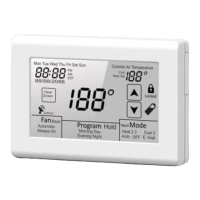
Touch to set day and time.
Touch to select Automatic or Always On fan operation.
Touch to override programmable mode to allow manual operation.
Touch to select Heat, Cool, Auto, Off or E. Heat.
Optional filter reminder alternates with the current time.
Touch to lock out functions for 30 seconds to permit cleaning.
Used to set temperature, time, day of week and other values.
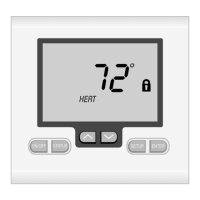
Padlock symbol indicates function is prohibited or setpoint limit reached.
Shown when battery needs to be replaced.
Step-by-step guide to setting the clock on the thermostat display.
Program four schedules per day for Mon-Fri with heating/cooling setpoints.
Controls heating and cooling modes: Off, Heat, Cool, Auto, E. Heat.
Selects fan operation: Automatic or Always On.
Step-by-step guide to setting the clock for 7-day programming.
Program four schedules per day for each of the 7 days with setpoints.
Copy programmed schedule to other days of the week.
Step-by-step guide to setting the clock for commercial mode.
Program two schedules per day (Day/Night) for 7-Day or 5-2 programming.
Steps to resolve a blank display, checking power and batteries.
Troubleshooting issues with heating or cooling response and time delays.
 General
| Brand | Jackson Systems |
|---|---|
| Model | Comfort System T-21-P |
| Category | Thermostat |
| Language | English |

 To Next Page