25 juni 2018, 8:45 - Jaga N.V.
Jaga Room Thermostat JRT-200 setup / user
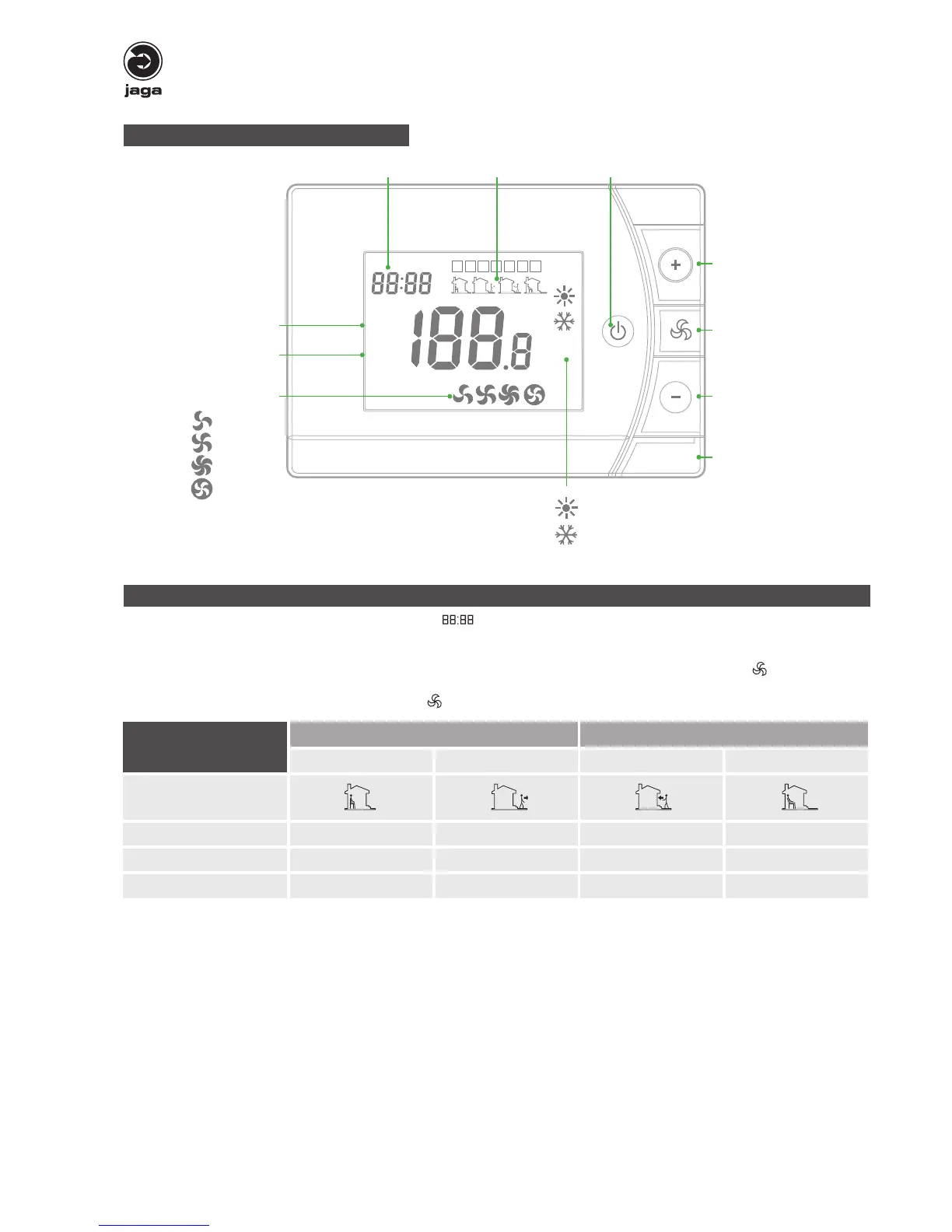
Control panel
Clock
Programming & week / day On / Off
Room temperature
Set temperature
M
1 2 3 4 5 6 7
h
ROOM
SET
°C
1 2 3 4
Temperature /
parameter setting
Fan Speed setting
Fan speed:
Temperature /
parameter setting
Heating / cooling
• Low
• Mid
• High
• Auto fan
Heating
Cooling
Programmable Time setting
• press the “M” button for 5 seconds to enter clock setting ( ) and day setting
• enter 5+1+1 programmable mode
• press “+” and “-“ to set the thermostat on/off time
• next mode setting: toggle trough the menu with the “M” button. Activate the programmed time: press and hold the “ “ button for 5
seconds.
To deactivate the programmed time: press and hold the “ “ button for 5 seconds
Week
1st time zone 2nd time zone
Turn on Turn Off Turn on Turn Off
Icons
1
4
12345 (Monday~Friday) 8:30 12:00 14:00 18:00
6(Sat.) 9:00 12:00 15:00 18:00
7(Sun.) 9:00 12:00 15:00 18:00



 To Next Page