Alarm clock setting
The wake-up light is designed to help you wake up easily by simulating a sunrise. Once enabled,
the alarm clock will gradually become brighter before the alarm sounds, waking you up with a
soft, natural sound. You can easily set two alarms: Alarm 1 and Alarm 2, and each alarm can be
set to ring on weekdays or weekends separately using the buttons on the device.
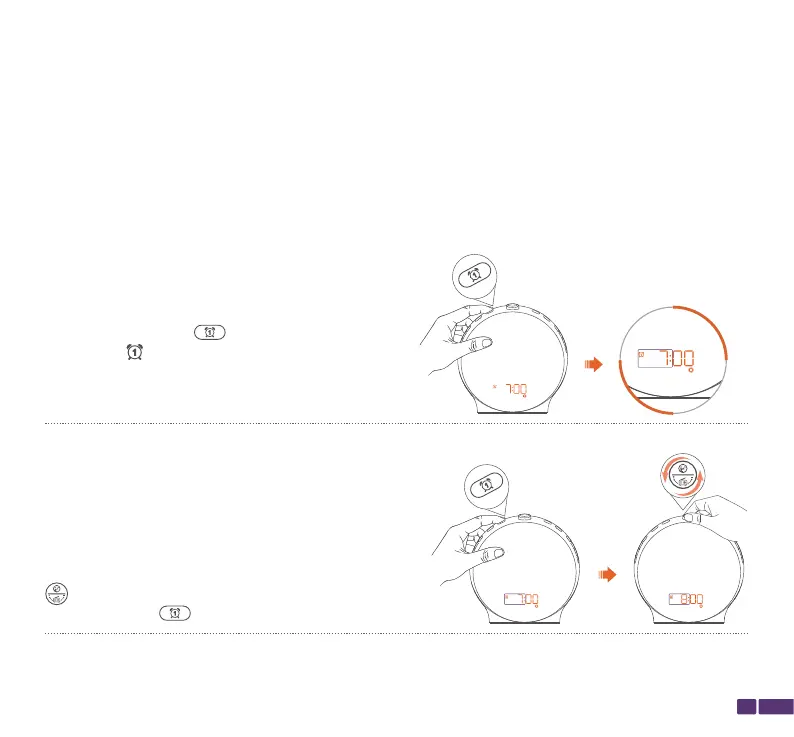
Step 2:
While the HH on the alarm is flashing, rotate the top
button to adjust the hour for the alarm, then
press the Alarm 1 button to confirm the hour.
Step 1:
Hold down the Alarm 1 button for 3 seconds.
The Alarm 1 icon on the screen will start
flashing, and the screen will display the alarm
time for Alarm 1.
09
Taking Alarm 1 as an example, follow these steps to set it up:


 To Next Page