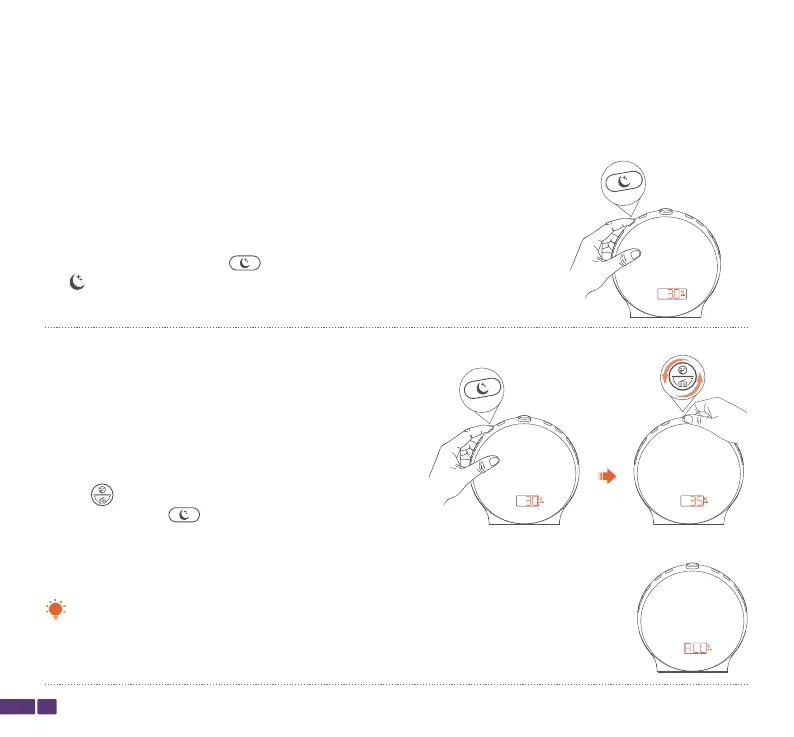
Steps for Setting up and Using the Sleep Aid:
Step 1:
Press and hold the Sleep Aid button for 2 seconds until the Sleep
Aid icon show, and the screen displays the sleep aid time length,
which will take you to the Sleep Aid setup.
You can set the sleep aid time duration to 5-120 minutes, or select "ALL" to
keep it continuously running until you turn it off.
Note:
18
Sleep Aid
The Sleep Aid gradually lowers the brightness of the light and volume of music over a set time
period, and automatically shuts off, helping you fall asleep more easily.
Step 2:
During the blinking of Sleep Aid time (xx), turn the top
button to adjust the sleep aid time length, and then
press the Sleep Aid button to confirm the setting.



 To Next Page