Black Cat II Radar Recorder User’s Manual
3-8
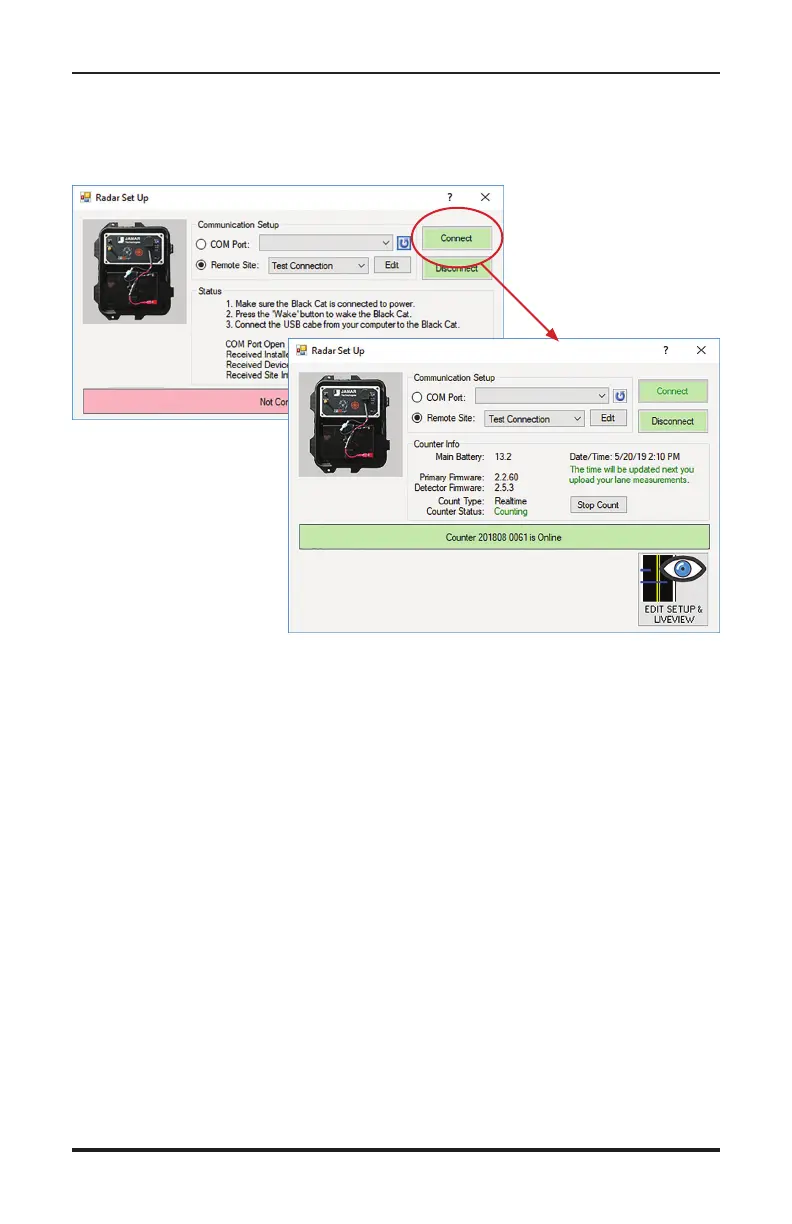
Once back on the connection screen, select the site you just created and
click Connect. STARnext will attempt to connect to the Black Cat II Ra-
dar Recorder and, if successful, show the current status of the unit.
Once connected, the middle of the screen will show the Counter Info,
which includes:
• Battery voltage – the current voltage of the battery. A fully charged
battery should be around 13V or higher. The Radar will not be able to
start if the voltage is below 12V.
• Primary firmware & Detector firmware number – updates for these
are posted periodically at www.jamartech.com.
• Count Type – typically either Per Vehicle or Realtime
• Counter Status – this will be either Not Counting if no count is in
progress or Counting... if a count is in progress.
• Date/Time – this is the date & time current programmed in the unit.
You will be shown a warning that the date and time are not correct if they
are not within a minute of the computer’s date and time. This will be
automatically corrected the next time you upload settings to the unit.


 To Next Page