3-7
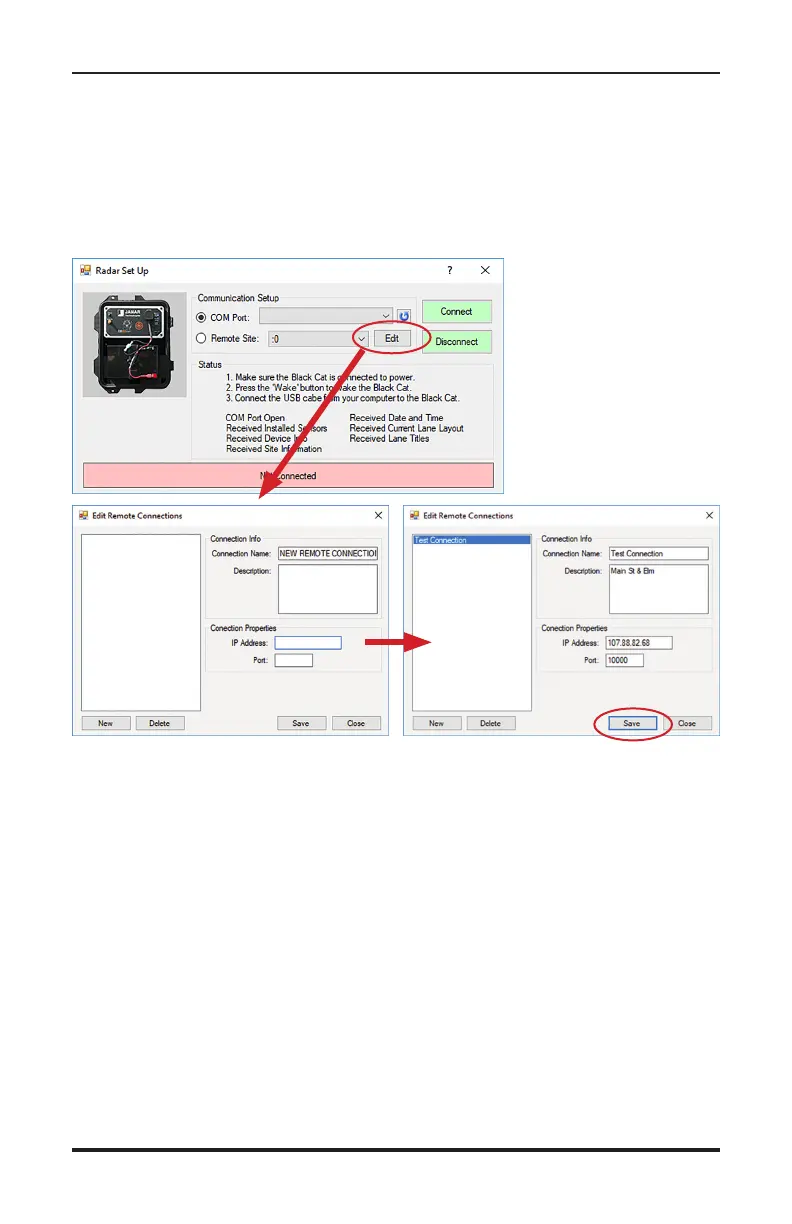
Once the Black Cat II Radar Recorder Setup screen appears, you'll see op-
tions for COM Port or Remote Site connection.
To connect to a Black Cat II remotely, you need to create a Site Listing for
the Black Cat II in question. To do this, click the Edit button and the Radar
Lane Setup form will appear.
To create a new site, fill in the following information:
• Connection Name - The name that will appear on the initial connection
screen.
• Description - (Optional) for site identification
• IP Address – (Required) the connection address usually found on a
sticker on the front of the Radar head.
• Port – (Required) the connection port used by the computer, this is
typically 10000.
Once you have entered the information, click the Save button to save the
site listing, then close the screen and return to the initial radar connection
screen. There will then be a new listing under Remote Site with the con-
nection name you assigned.
Chapter 3 — Programming the Radar Head


 To Next Page