English
15
FILLING THE WATER TANK
1. Insert the plug into a suitable outlet.
2. Press the to turn on the deep fryer. Hold the to turn o the deep fryer.
3. Touch and the deep fryer is set to the mode.
4. Choose a program by pressing , ,
, or
.
is for emptying
the water tank.
CAUTION:
• Every program has preprogrammed settings. The settings can be changed as preferred,
but will be reset when the deep fryer is turned o.
• Only the temperature for
can be adjusted.
CAUTION:
• When “E11” is shown on the display and
is on, this means that there is no water in the reservoir.
• If there is a water shortage during a program, “E12” will be shown.
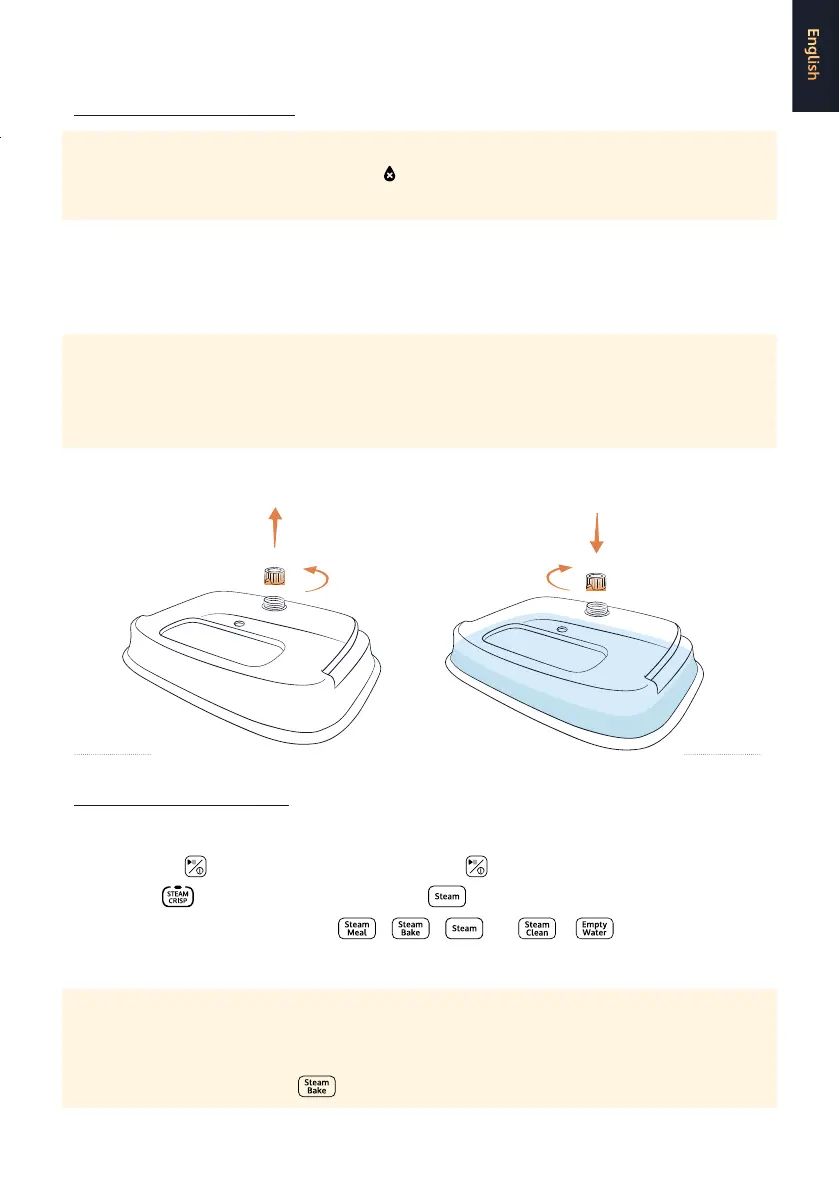
1. Carefully take the water tank out of the deep fryer.
2. Remove the knob from the water tank. [FIG.7]
3. Add suicient pure water to the tank.
CAUTION:
• Only use distilled water. Pure water does not have a negative inuence on the taste of the food.
• Do not ll the tank with water higher than 50 degrees or lower than 10 degrees, otherwise it
increases risk of leakage.
4. Place the knob back [FIG. 8] and place the water tank back in the deep fryer.
USING THE STEAM OVEN
FIG. 8FIG. 7


 To Next Page