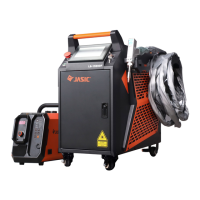
3.2 Description of welder front panel components
Figure 3 -7 Front panel schematic diagram
Power switch: The power control switch of the welder. Rotating it clockwise can turn on the welder.
Laser enablement: Controls the laser output. The indicator light comes on when this feature is on. The
light can be emitted only when it is turned on at the same time as the operation interface "Laser
Enablement".
Emergency stop switch: When an emergency occurs, press it to stop the welder and rotate it clockwise to
reset.
3.3 Description of welder rear panel components
Figure 3 -8 Rear panel schematic diagram
Current leakage protection switch: controls the power input of the machine and has a
short-circuit protection function.
Power cord: Means the machine power cord, which is connected to the single-phase AC
220V power. The earth wire must be reliably grounded.
Shield gas: The shield gas is supplied via a gas pipe during welding.
Torch cable: The outlet of the welding torch cable, through which the optical fiber, water pipe,
gas pipe, and welding torch control wires are put.


 To Next Page