REAL PANEL
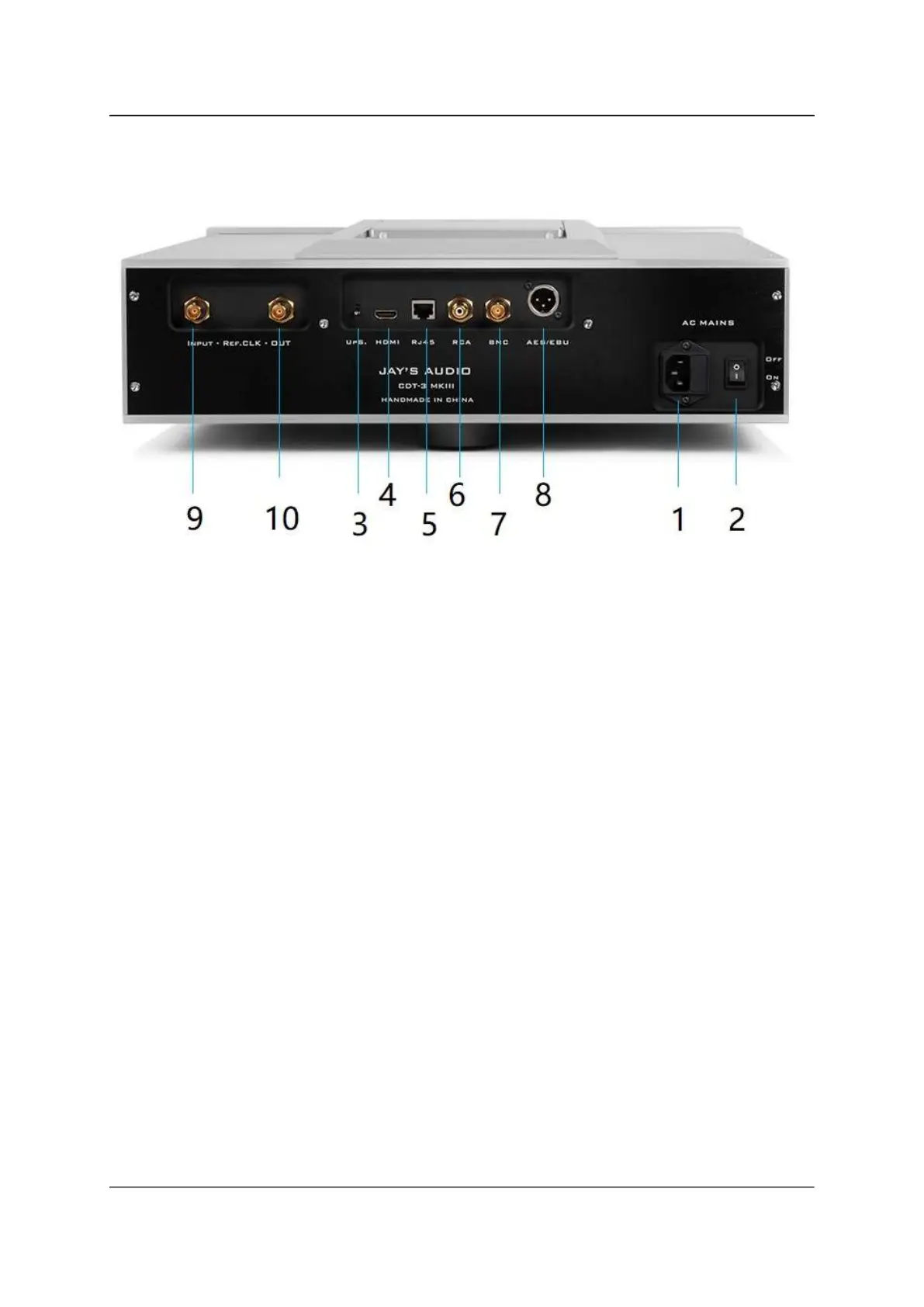
Figure 2. CDT3-MK3 Rear Panel
(1) POWER SWITCH ---- Power On/Off the CDT unit by using the power switch. There is
no standby function.
(2) AC MAINS IEC ---- Connect the power cord to the AC Mains IEC inlet firmly. The AC
Mains is fitted with a mains fuse, rated at 1.6A, 5x20mm, Slow Blow. Replace the fuse
should the fuse blown with the spare fuse provided, or with the identical fuse rating.
Frequent fuse blown is considered a fault. Please contact us to investigate the issue
further.
(3) UP-SAMPLE ---- when in UP position, the FS output is up-sampled to 24bit / 176K. In
DOWN position, the FS is originally in 16bit / 44.1KHz
(4) ~(8)DIGITAL OUTPUT ( from the Left to the Right)
HDMI-I2S (LVDS)
RJ45-I2S (TTL)
SPDIF – RCA
SPDIF – BNC
ASE/EBU
(9) ~(10)REF-CLK Input - Output ---- 10Mhz reference clock signal input and output
port at 50 or 75 ohms.


 To Next Page